Support Forum

Ads Plug in

DD Dave Downie
Dave Downie
Member

Apologies for asking a lot of questions but it is a steep learning curve.

I have the Ads plugin, can create ad sets but knowhere can I see where to create an ad.

The documentation shows a text panel to create ads but I do not appear to have it.

Thank you

15 Answers

New Answer

SS SP Community Support
SP Community Support
Admin

Hi:

If you HOVER over the ad-set row, you’ll see a link show up called ADS LIST.  Click on that link and you’ll see another screen where you’ll be able to add one or more ads.

Thanks.

DD Dave Downie
Dave Downie
Member

Thank you for the prompt reply.

Sorry but just not happening here or I’m missing something.

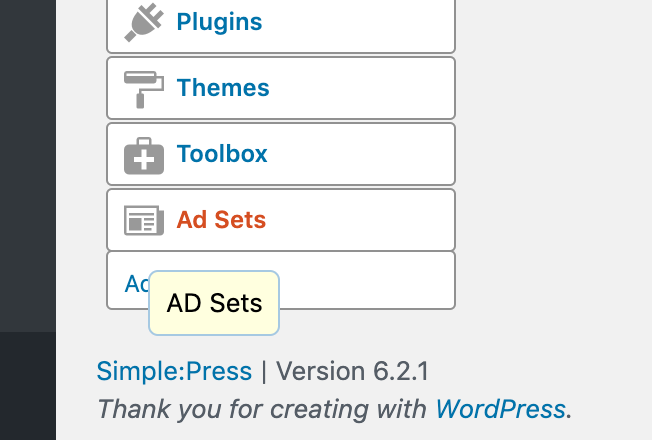
See attachment – is this what you mean?

No link comes up that I can see.

Screen-Shot-2019-09-11-at-3.11.17-pm.png
SS SP Community Support
SP Community Support
Admin

No, that’s not it.  First you need to add an AD SET.

So, if you click on the AD SET menu, on the right pane of the screen you should see a button that allows you to add one. 

Then, once you’ve done that you can hover over the AD SET you’ve added and see the link I mentioned above.

DD Dave Downie
Dave Downie
Member
Screen-Shot-2019-09-11-at-3.24.33-pm.png

Thank you.

I had created an ad-set.

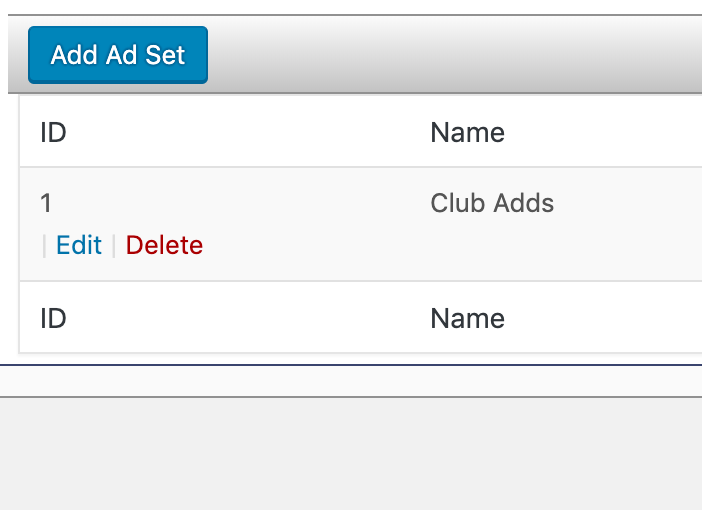
When I hover over the ad-set I created the only links that come up are edit and delete.

Edit only edits the ad-set. There doesn’t appear to be a link to create an ad.

SS SP Community Support
SP Community Support
Admin

hmmm…when you hover over the ad-set you created, you should see this:

https://www.screencast.com/t/7FjRCMU5CM

DD Dave Downie
Dave Downie
Member

Thank you, as you can see by my last post, that option is not available.

Any idea why?

Thank you again.

SS SP Community Support
SP Community Support
Admin

No idea.

Can you try creating a new ad-set and see if that gives you the option?

If not, then just temporarily switch your wp theme to 2019 – lets make sure that some JS or CSS isn’t getting in the way from it. 

Also, check your browser console to see if you have any javascript errors showing there.

Finally, use the CTRL-F5 key combination on your admin page to make sure that the latest CSS and JS files.

Thanks.

PS: What version of the ADS plugin shows up in our FORUMS->PLUGINS list?

SS SP Community Support
SP Community Support
Admin

One other thing to try – Add a new ad-set but just add it with the default options and save it.  Maybe there’s an option there that’s messing with whether or not that link appears (though I cannot fathom why that would be).

DD Dave Downie
Dave Downie
Member

Thanks again.

I have switch WP themes to 2019 but no change.

The Plugin version is 1.0.0

I did a forced refresh etc (on a Mac)

I opened the java console in Chrome, This is a bit beyond my experience but there is an error showing:

Unchecked runtime.lastError: The message port closed before a response was received.


Thanks

DD Dave Downie
Dave Downie
Member

As a test I just opened the page in Safari and the link is there!!

Is this a Chrome or cache error?


Thanks again

SS SP Community Support
SP Community Support
Admin

Oh. That is weird. I don’t have enough information to even hazard a guess as to why you’d see it on one browser and not the other.  One thing to try is to disable all other WP plugins (just leave simple:press activated) to see if the JS error goes away in Chrome and/or if the link shows up.

SS SP Community Support
SP Community Support
Admin

It could also be a CHROME add-on that is causing the error – so maybe try disabling those too.  Might be easier to do this step first before trying the disabling plugins step.

DD Dave Downie
Dave Downie
Member

Thanks for your help.

I’ll try both your suggestions, I’m sure I’ll sort it out.

Appreciate your assistance.

DD Dave Downie
Dave Downie
Member

After some testing, I found turning off the Chrome extension “AdBlock 3.54.0″ fixed the issue.

Thanks again.