Support Forum

Adding hyperlinks to Profanity Filter replacement words

JI jim
jim
Member

Just tested the Profanity Filter plugin and it works like a charm, thanks! Just have a special request…

It would be just dandy if we could replace specific keywords or phrases with hyperlinked text. I tried doing this and the filter stripped out the href tag I added to the replacement word. I understand this may be difficult, or perhaps impossible, but consider this scenario, in our canine amputation support forums:

Member A posts about a helpful “ruffware harness” they found on our site.

Member B wants more info about product, but member A provided no link, and spelled the item name wrong making searching difficult.

We create Profanity filter to replace “ruffware harness” with Ruff Wear harness, link and all.

Any thoughts? Thank you for your consideration.

18 Answers

New Answer

MP Mr Papa
Mr Papa
Member

hmmm… sounds like a different plugin to me… though I can understand why you are trying to use the existing one… ;)

but still think an auto hyperlinking plugin might not be a bad idea… can open a ticket to make note of this…

JI jim
jim
Member

Thumb’s up for auto-hyperlinking plugin! Just thought I’d give the filter a try to see if it passed tags since correcting spelling at the same time would be a big plus.

Thanks!

MP Mr Papa
Mr Papa
Member

If you want, you could try editing the plugin…  sp-profantiy-filter-admin-options-save.php… around line 12 change

    $filter[‘replacementwords’] = sp_esc_regex(sp_filter_title_save(trim($_POST[‘replacementwords’]), false));

to

    $filter[‘replacementwords’] = sp_esc_regex(sp_filter_save_kses(trim($_POST[‘replacementwords’]), false));

and then in sp-profanity-filter-components.php around line 36 change

    $content = sp_filter_display_stripslashes($content);

to

    $content = esc_html($content);

that is completely untested and possible the html will throw off the regex, but worth a try…

JI jim
jim
Member

Thanks for the valiant attempt!

Filter content settings on admin pane saved without issue when including hyperlink tag, but interesting behavior when loading topic or adding new post…

Loading topic with existing keywords replaced by filter resulted in “Invalid Database Query”, and testing filter resulted in various issues:

  • odd slash-stripping behavior for URLs.
  • <p> tags being added to all posts in topic
  • and Polls conflict with shortcodes rendering as “Poll ID invalid”

FYI Only, happy to wait for and help test any new plugin development.

MP Mr Papa
Mr Papa
Member

yeah was afraid the regex might not like that…  okay, yeah, will need to wait until I can dig into… will be post 5.2 which is couple weeks away…

MP Mr Papa
Mr Papa
Member

Hey, Jim…  why not give this early, pre-release plugin in a shot and see if it does what you want… ;)


JI jim
jim
Member

Sweet! Thought you were busy with 5.2?

Anyway… seems to work like a charm so far. Still trying to find fault.

Been testing it in conjunction with the Profanity Filter to correct spellings and add links at same time. Only identified one issue so far:

The Profanity Filter is replacing words on the Auto-Link admin pane. But while the keyword on the left does get replaced, the link still gets added to the original word in posts. So, for example, by adding links to various spellings of the same keywords, the words get replaced but the link gets added. In this case, words in a post get replaced (is also added to PF) and a link added, so it’s mainly a visual thing.

Thanks for working on this! Will report back with any other issues I might find.

MP Mr Papa
Mr Papa
Member

not sure I understand the interaction with profanity filter you are referring to…  can you explain further?  are you replacing the same word with both plugins?

MP Mr Papa
Mr Papa
Member

which do you want to run first?

find this line in the auto link plugin main file:

add_filter(‘sph_display_post_content_filter’,     ‘sp_autolink_filter’);

and change it to

add_filter(‘sph_display_post_content_filter’,     ‘sp_autolink_filter’, xx);

replace xx with 20 if you want profanity to run first… or replace xx with 7 if you want autolink to run first…

JI jim
jim
Member

Had a tough time explaining that myself!

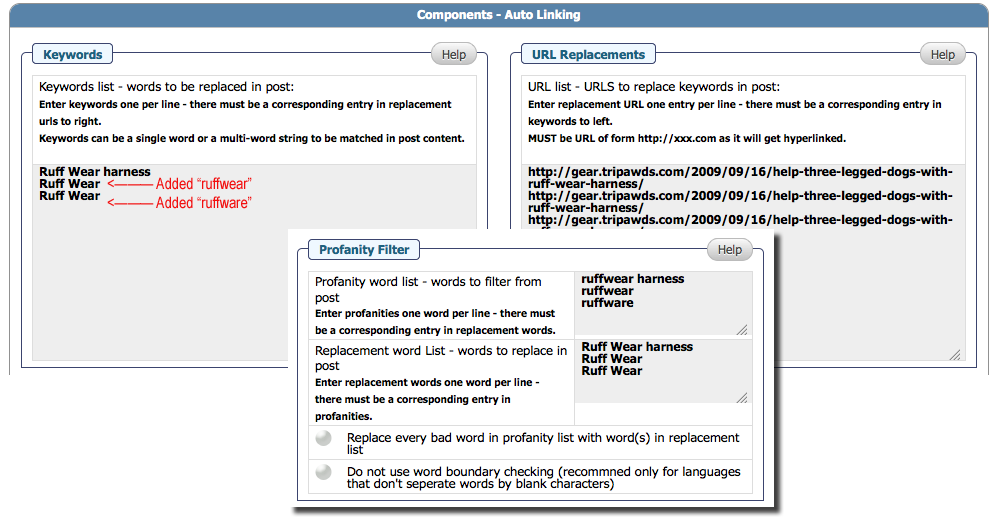
PF is replacing keywords on the Autolink admin pane. Page will refresh with keyword replaced on admin pane, but link will still auto-add to original word in forum posts. Visual aide attached…

Profanity Filter does not fire and replace keywords entered into its own admin pane like it does on the Autolink pane.

FYI: I am seeing no obvious adverse effects of autolinking or replacing keywords that are subsets of keyphrases.

Hope this helps! But seriously, feel free to shelf this since 5.2 is the priority.

autolink1.png
MP Mr Papa
Mr Papa
Member

did you see my previous post about priority?  ended up last one on first page so might have missed it…

JI jim
jim
Member

Mr Papa said
did you see my previous post about priority?

I did now, thanks! Forcing PF to fire first eliminated the need to add misspelled words to be auto-linked. The two plugins are playing nice together now.

Keywords from PF list do still get converted upon refresh if added  the Autolink admin pane. Perhaps this could be addressed on that screen’s Help tab, as could the firing order if no Admin option is added.

Thanks again for all that you do!

Just one last point of clarification please… activating these plugins will filter and/or link existing keywords, not just new posts, right? It appears they work on page load, not publishing of the post. Just want to confirm. And if so, is there any harm in auto-linking keyphrases that already have hyperlinks?

MP Mr Papa
Mr Papa
Member

I have changed the plugin in work so that the auto linking plugin will run after the profile…. no admin option required…

as to the admin panel…  profanity filter checks all titles too… and they keywords are filtered as a title…  I can see if another filter can be used…

both of these plugins filter the content on display only…  they are stored in the db unaltered…  if a keyword is found in a hyperlink, that might cause problems… can try to research..