I know we can edit theme files to insert ads into the forum, but a plugin that you can just paste code and choose where you want it to be seen would be awesome, it’s the only thing I miss from mingle, just a idea
Support Forum
problem with such a plugin is that it potentially would be very limiting on where to display an ad… remember that by modifying your template files you can completely change the look of your forum… perhaps elements are removed or reordered or new ones added… would be quite difficult, short of ‘before forum’ and ‘after forum’ to guarantee any particular location would be the same from site to site…
putting in the template file yourself is much more powerful and allows complete control…
understood, but honestly there are usually only a couple areas where people want ads, top of forum, bottom of forum, in posts, ect. I will see if I still have a copy of mingle, if so, I will upload it on my staging site and see what all the options were, they pretty much covered all the needs, also, from a user perspective, it would be much simpler to paste a code and click a button where it should be shown, for you, it is much easier to edit a file, but for people without the knowledge, it is a struggle
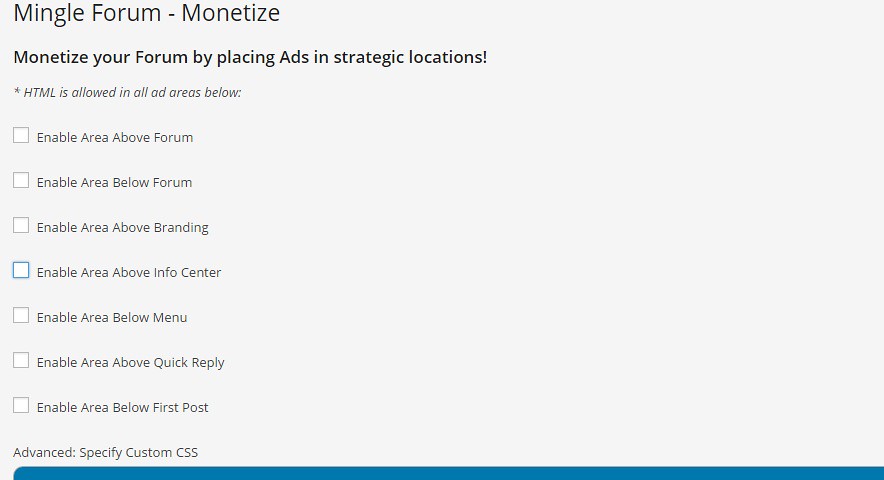
found a copy, this was the options they had for mingle, you click a box and it gives you an option to paste the code
Mingle is more fixed format… with simple press and themes, you can organize it just about any way…. except for before forum and after forum, the ‘locations’ can vary from theme to theme…
personally, I would rather be able to locate it wherever or exactly where I want it…
but as I said, can understand how it might aid less technical savvy folks… just hard to do one size fits all…
is this something that could be a custom plug in then? I have read through all the adsense posts I can find, and I still screw it up
well let’s take a step backwards. Where do you want the adsense block to appear? If you send us the code you have been given from Google we can advise on where and how to use it.
I’ve tried adding to the header like the one above, I’ve tried adding after first post by following the directions here
https://simple-press.com/documentation/codex/faq/problem-with-post-edit-buttonow-to/faq-how-to-display-ads-in-the-forum/
and this one
https://simple-press.com/support-forum/sp5-general-topics/where-do-i-add-the-echo-call-for-adsense/
and it breaks the forum
Andy asked you for the code you are trying to output… and we can help give the syntax to make it right…
paste it here, then highlight it and select the code button so it shows up properly… and pick a spot to display – those two examples are not in the same location…
<script async src=”//pagead2.googlesyndication.com/pagead/js/adsbygoogle.js”></script>
<!– Responsive –>
<ins class=”adsbygoogle”
style=”display:block”
data-ad-client=”ca-pub-xxxxxxxxxxxxxxxx”
data-ad-slot=”xxxxxxxxx”
data-ad-format=”auto”></ins>
<script>
(adsbygoogle = window.adsbygoogle || []).push({});
</script>
so, using your second link/example, replace:
# ad code here
with
echo '
<script async src="//pagead2.googlesyndication.com/pagead/js/adsbygoogle.js"></script>
<!– Responsive –>
<ins class="adsbygoogle"
style="display:block"
data-ad-client="ca-pub-xxxxxxxxxxxxxxxx"
data-ad-slot="xxxxxxxxx"
data-ad-format="auto"></ins>
<script>
(adsbygoogle = window.adsbygoogle || []).push({});
</script>
';
and you should be good to go… remember, use the raw code button to copy so your dont get dorked up quote characters… and of course, replace your adsense publisher info back in there…
finally got it to work, thanks for your help gents, I still think a plug-in is still ideal though, KISS imo, if someone wants to add outside of the plug in, they can make the mods needed, a large majority of simple press users don’t feel comfortable modifying files
glad you got it working… we are constantly considering user ideas and yours (have had couple other requests for same) has been noted…