Support Forum

Editor TinyMCE Rich Text doesnt work

SK Stephan Kuny
Stephan Kuny
Member

Hi,


I have installed the TinyMCE Rich Text plugin. When I’m activating this I see only a white screen and I can do nothing. The Editor is not loading…switching back to the standard editor and all works fine.

But I will use the Tiny Editor….


Please help


thx

11 Answers

New Answer

IK Ike
Ike
Member

Hey Stephan,

Is it possible you are running anything else that adds to the TinyMCE editor for WordPress? If so is it completely up to date? A lot changed when WordPress moved to TinyMCE v4 recently and a lot of plugins have caused issues with others.

So to start it would be worth disabling all WP plugins, reverting to a stock WP theme then trying to enable TinyMCE again to see if it then works. If this works then you’ll want to re-enable things one by one until you find what plugin is in conflict.

WG Wolfgang Groher
Wolfgang Groher
Member

Hello,
Unfortunately, I can not speak English.
But I have the same problem.
I istalliert also the TinyMCE Advanced.
I have all plugins disabled.
Page reloads and the forum I no editor is displayed.

Please help!
Thank you!

IK Ike
Ike
Member

Hey Wolfgang Groher,

It doesn’t look like the same problem, the original poster was hitting some kind of error when activating the plugin, it looks to me like your forum loads just fine just without the editor.

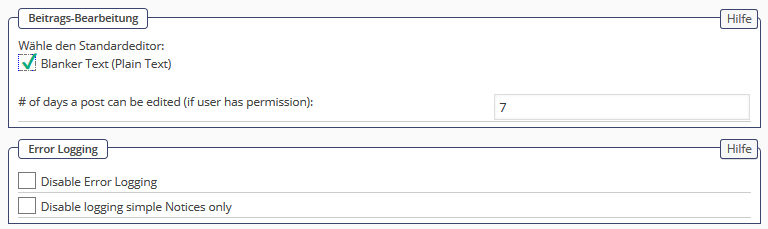
Have you set up your editor preferences in Forum > Options > Global Settings > ‘Post Editing’ pane?

If so, and the TinyMCE plugin is activated, please see my post above and report back when you’ve tried everything.

WG Wolfgang Groher
Wolfgang Groher
Member

Hey Ike!

Thank you for your immediately answer. In the picture i’ve sent is ‘Post Editing’ activated. I can’t change it.

Can i give you an admin in my forum, so that you can take a look on this problem?

Link to the forum: http://demo.flotter-feger.at/forum/test-1/


YS Yellow Swordfish
Yellow Swordfish
Member

it looks like the SP tinyMCE plugin is not active. Did you install it in the right place? /wp-content/sp-resources/forum-plugins ? And then activate it on the SP Admin > Plugins list page?

WG Wolfgang Groher
Wolfgang Groher
Member

Hi Andy!
Yes I‘ve uninstalled the TinyMCE editor.
Thus, I would have the standard editor of WordPress can use the forum.
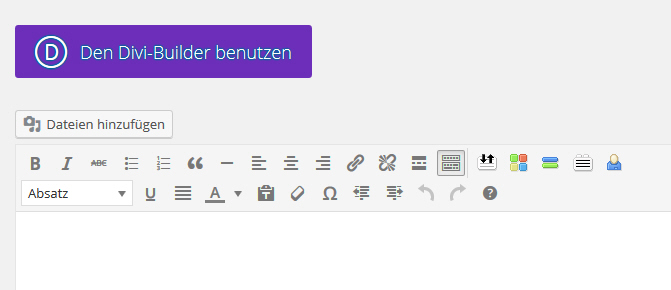
When I create a new page in WordPress, I also have the standard editor.
See image:

MP Mr Papa
Mr Papa
Member

this is why its best to keep topics separate… think the two are getting confused.. no way to tell if same or not at this point..

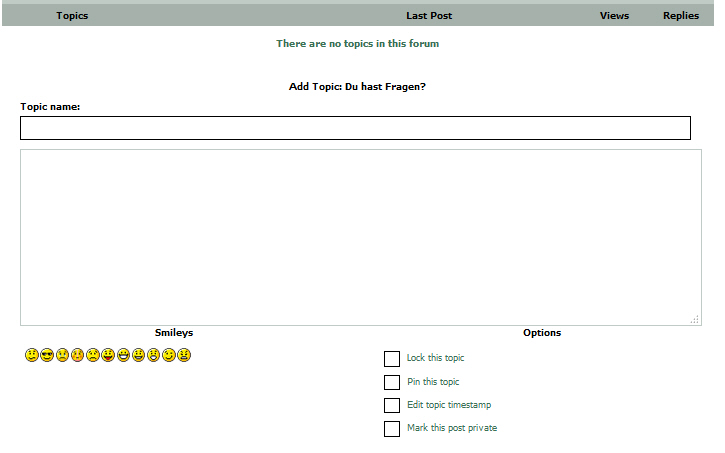
so Wofgang, what is different between images in post 3 and 7??  one seems working but not other… what is different?

is post 7 in wp admin?  if so, what are the other buttons? especially the color ones… looks like a wp theme or plugin is adding buttons… so guessing it is doing it wrong…  which might be why it doesnt work in forum (if I am interpreting things right here)…

the wp editor is designed and built to be used on admin or front end.. unfortunately, too many themes and plugins dont realize that and add stuff incorrectly…  best thing here is to test and see…  try switching to wp default theme and see if any better… if not, disable other plugins and see if working…  if so, can reenable one by one until it breaks… then we know conflict and can proceed…

WG Wolfgang Groher
Wolfgang Groher
Member

Hey Mr. Papa,

the difference between images in post 3 and 7 is, 3 is when i will write a post in forum and 7 is when i will open a new page as admin.

The color button in post 7 in the Divi Theme and i need it for the layout of the forum page. I don’t think that the Theme is doing something wrong, because this Theme is not used at the forum page.

I’ve deactivated all plugins but it doesn’t work yet. With bbPress the editor works with the forum.

Is it possible that the problem is with a permission, because the image in post 5 “Forum > Options > Global Settings > ‘Post Editing’” i can’t remove the check. In profile i can’t change this check neither “Profil > Options > Edit Posting Options.

Thans for your answers, i’ll respond your answers tomorrow.

MP Mr Papa
Mr Papa
Member

No permissions needed to use it… Of course this assumes you have it enabled….

Andy asked if it was enabled. I am out and can’t look at site… But have you set as default on forum –  options – global settings? Or chosen as your editor in profile? (not sure if that is what you a re talking about at end)

WG Wolfgang Groher
Wolfgang Groher
Member

Hey!

Guilt is the themes to the display problems . I’ll use an independent forum system .

Thank you for your help.
wolfgang

IK Ike
Ike
Member

So the theme is causing the additional buttons / problems with the TinyMCE? Not sure I follow the next part but hopefully that means you now know what the problem is and can proceed accordingly.