Support Forum

5.0 Up and running. Minor Issues.

53 Answers

New Answer

MY MyGarageShop
MyGarageShop
Member

Like below? I made that change and I also removed it completely and no change with either modification.


 <script type=”text/javascript”>
  jQuery(document).ready(function(){
    jQuery(“.mg-FacebookContainer”).mouseleave(function(){
   jQuery(“.mg-FacebookContainer”).scrollTop(0);
    });
  });
 </script>

MY MyGarageShop
MyGarageShop
Member

I found the answer to not being able to post it is another plug-in called


No Right Click Images Plugin
Uses Javascript to prevent right clicking of images to help keep leaches from copying images


I deactivated it and I can post so I will contact the author…


So now just the highslide replacement. THIS IS AN IMPORTANT ISSUE FOR ME


Andy,

If you could point me to the directory, file, and approximate line where you open the image I can add my highslide call like I did last time and fix a major portion of missing functionality from my site.

YS Yellow Swordfish
Yellow Swordfish
Member

So you made the change from $ to jQuery. I no longer see the error on your page plus the editor AND the captcha seem to working fine so it was a good change.

The tabs from your blogpost will not show up in the forum and they never should have. Allowing javascript in a forum post would be like opening the doors to every hacker and his best mate! A very bad idea indeed.

The routine is now in the folder sp-api and the file is sp-api-filters. The function is called sp_format_display_image() and you will see near the bottom where it calls spjPopupImage().

It is obviously not a great idea to change core code as it will prevent you updating the forum. A far better idea would be to let me put a filter in there so that you can use the filter and keep your code outside of the forum code. I justcanlt do that instantly as it will need a little thought. But I am happy to provide one.

MY MyGarageShop
MyGarageShop
Member

The Captcha issue was the “No Right Click” plug in… I have contacted the author with the details…


I agree I would like it if you gave me (and everyone else) a way of hooking in their own image display.


I just launched my site in January and I have gotten a lot of grumbling because of my choice to upgrade the forum at this time… The site has been broken for more than a week.


With your help its is almost back together…


I will hook in my stuff for now and when you have the new feature, let me know and I will replace my hack with your more elegant solution.


Thanks for the help.

YS Yellow Swordfish
Yellow Swordfish
Member

You may as well do it properly now – save hassle later.

Find the line of code and add the second line as so:

$out = '<a href="javascript:void(null)" onclick="spjPopupImage(''.$src[1].'');" >';
$out = apply_filters('sph_display_image_popup', $out, $src[1]);

This will create a standard Wp filter of the name ‘sph_display_image_popup’. It will pass two parameters – the current source and the image tag source.

Then in your own code somewhere you can define

add_filter('sph_display_image_popup', 'your_function', 1, 2);
 function your_function($out, $src) {
    $out = your highslide code;
    return $out;
}

And I will make sure that the filter is in the next update to SP.

MY MyGarageShop
MyGarageShop
Member

I can not tell you how much I appreciate you doing this for me as quickly as you did. The modification works perfectly.


Take a look…

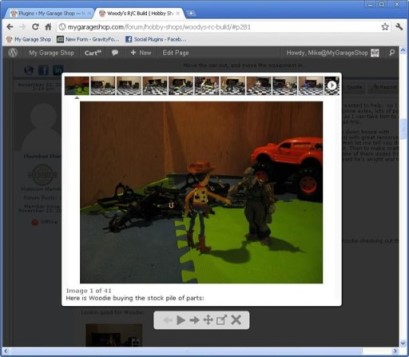
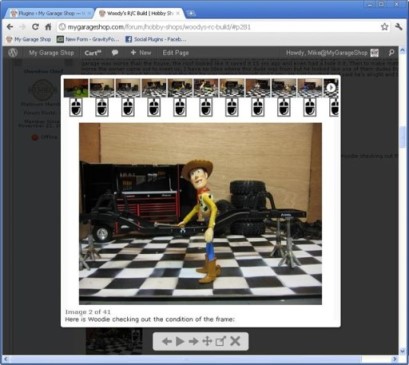
http://mygarageshop.com/forum/problem-with-post-edit-buttonobby-shops/woodys-rc-build/#p281


I had to make one more modification to your code to filter out the mouse icon images…

At the end of the function I had to add this… otherwise I wind up with a ton of mouse icons in the thumbnail viewer…


This little modification filters them out and everything still works as you designed. no matter if you use the filter, use the expander, or not…

Can you include that so my implementation won’t break in the next release?


    if ($anchor) $out.= ‘</a><a>’;

    if ($mclass) $out.= ‘<img src=”‘.SPTHEMEICONS.’sp_Mouse.png” class=”.$iclass.’ ‘.$mclass.” alt=”” />’;

    if ($anchor) $out.= ‘</a>’;

    return $out;


with this I can use the thumbnail viewer and not have any mouse icons in the thumnails

YS Yellow Swordfish
Yellow Swordfish
Member

Anything needed would be better done using a second filter. all you need to do is determine where and what needs passing and I am sure we can accommodate the request

MY MyGarageShop
MyGarageShop
Member

screen-shot-with-the-modification.jpgscreen-shot-without-the-modification.jpg


Well at the bootom of that function I added that one line to close the </a> tag for the image and reopen a new <a> tag for th mouse image. this way highslide (and I think most other expanders) will ignore the mouse icon for the thubnail view.

Otherwise you wind up with a mouse icon for every image in the thumnail viewer…

It looks really bad and just looks like a something is wrong.


you are a much better developer than I so I cannot tell you the “best” way to do it… just how I did it.

If you add the line I showed in red to the existing code, even without the filter addtion  your existing code both with and with out the default expander works perfectly.


So I am not sure if a filter is needed or that just goes into the code by default.


As I said I only know how I got it to work… You are know better than I but it would be nice for me and anyone else who is going to use a highside like expander with a thumbnail view.

YS Yellow Swordfish
Yellow Swordfish
Member

I don’t really see how that works. But I am ill at the moment confused

MY MyGarageShop
MyGarageShop
Member

I thought I replied? but it did not take… I probably did not save it… So anyway if you look at the images above…


The one on the left is ok because it does not have a mouse icon for every image in the thumbnail view. The one on the right does. I corrected that problem by adding the line in red in the sp-api-filters… Can you include something so upgrades dont break my fix?

    if ($anchor) $out.= ‘</a><a>’;
    if ($mclass) $out.= ‘<img src=”‘.SPTHEMEICONS.’sp_Mouse.png” class=”.$iclass.’ ‘.$mclass.” alt=”” />’;
    if ($anchor) $out.= ‘</a>’;
    return $out;


Just one one and one question. first the note… Everything is working well in 5.x I have had only one user report an issues with the profanity filter. I disabled it in my implementation for now. I have enclosed the screen shot they sent me

MyGarageShop-Profanity-filter-error.png


The question is I need to disable the drag and drop catcha and use another spam option? is that possible?

The reason I ask is that another plug in which I use and need is conflicting with that one piece of the forum. for now I have disabled the other plugin but I do not want to do that because I need it.


Let me know if I have some other option.

YS Yellow Swordfish
Yellow Swordfish
Member

Look at the code you changed before. I put in an extra filter for the ‘mouse’ icon. Just return a true or a false.

The only ‘spam’ type tool available in the core is the old spam math which is a permission you turn off (Bypass Spam control) so you an turn that back on

MY MyGarageShop
MyGarageShop
Member

Thanks for the change…

To clarify I need to turn the drag and drop off and turn the math on…

 I know how to turn the math on and off, but how do I turn the drag and drop control off?

BR Brandon
Brandon
Member

Do you have the SP Captcha plugin installed & activated? If so, try deactivating it.

MP Mr Papa
Mr Papa
Member

it is possible to have the captcha on registrations, but not the posting…

MY MyGarageShop
MyGarageShop
Member

I am aware that I can turn the math on for registrations and postings.

I need specifically to turn the drag and drop off.

Another plugin is conflicting with it and stopping me from posting

I need the other plug in and I need to post.


So how do I turn off the drag and drop for posting and or all together?

I know how to turn on the math already (in permissions)