Support Forum

500 server error after installing buddy press plugin

26 Answers

New Answer

YS Yellow Swordfish
Yellow Swordfish
Member

Just to make things easier for you if either a WordPress plugin or a Simple:Press plugin causes problems then rather than go through hoops deactivating and reactivating, as an ’emergency’ measure, the quickest course is to simply remove the plugin’s folder. Not rename it it but remove it. So – in this case remove wp-content/sp-resources/forum-plugins/buddypress – which should then allow things to continue as they should.

Back to the error log if we may. A 500 server error would normally put an specific entry in the error log. Are you seeing no actual item marked as a 500? Or – I will have to check with someone who knows – maybe the error only gets written out to the server log as opposed to the php log. Can you check that? (Usually from the hosting control panel).

JV jvcasill
jvcasill
Member

Yellow Swordfish said
Just to make things easier for you if either a WordPress plugin or a Simple:Press plugin causes problems then rather than go through hoops deactivating and reactivating, as an ’emergency’ measure, the quickest course is to simply remove the plugin’s folder. Not rename it it but remove it. So – in this case remove wp-content/sp-resources/forum-plugins/buddypress – which should then allow things to continue as they should.

Back to the error log if we may. A 500 server error would normally put an specific entry in the error log. Are you seeing no actual item marked as a 500? Or – I will have to check with someone who knows – maybe the error only gets written out to the server log as opposed to the php log. Can you check that? (Usually from the hosting control panel).
There is a lot going on in the error report. I tried to take screenshots but they are too large to upload. Here is a gist.

https://gist.github.com/jvcasill/536ac3fb6cee4024a478

YS Yellow Swordfish
Yellow Swordfish
Member

Hmmmm. Well there is one (at least) there that is somewhat odd. Whether that is the cause of your problem or not though I don’t know… This one:

include_once(…/wp-content/sp-resources/forum-plugins/buddypress/library/sp-buddypress-component.php):
failed to open stream: No such file or directory in …/wp-content/sp-resources/forum-plugins/Buddypress/sp-buddypress-plugin.php on line 154

That is saying that the main SP buddypress plugin code is there but the folder/file at ‘buddypress/library/sp-buddypress-component.php’ is not. At least it is not being found or able to be read. Which does make a lot of sense.Can youy check that? And of there can you cjeck the permissions on the folder and file in question are correctly set – i.e., same aa the parent folder and files.

JV jvcasill
jvcasill
Member

Yellow Swordfish said
Hmmmm. Well there is one (at least) there that is somewhat odd. Whether that is the cause of your problem or not though I don’t know… This one:

include_once(…/wp-content/sp-resources/forum-plugins/buddypress/library/sp-buddypress-component.php):
failed to open stream: No such file or directory in …/wp-content/sp-resources/forum-plugins/Buddypress/sp-buddypress-plugin.php on line 154

That is saying that the main SP buddypress plugin code is there but the folder/file at ‘buddypress/library/sp-buddypress-component.php’ is not. At least it is not being found or able to be read. Which does make a lot of sense.Can youy check that? And of there can you cjeck the permissions on the folder and file in question are correctly set – i.e., same aa the parent folder and files.

The permissions of the ‘library’ folder are “drwxr-xr-x@” and those of the sp-buddypress-componen.php file are “-rwxr-xr-x@”. Do I need to change them?

YS Yellow Swordfish
Yellow Swordfish
Member

Well the file is an odd one. I would normally expect that to be -rw-r–r– which is 644. I have encountered some server set-ups that will not load php files if the permissions are too open to prevent a hack attack. That might be it but I am perhaps a little dubious.

I would seriously suggest you ask your host support if those permissions are as they want them to be. We would normally expect 755 on folders and 644 on files. If they are wrong then they may be wrong on several of the files not just that one. And I would perhaps just ask them to check your GUID and UID as well on the files and folders. They should know what that means!

MP Mr Papa
Mr Papa
Member

include_once(…/wp-content/sp-resources/forum-plugins/buddypress/library/sp-buddypress-component.php):
failed to open stream: No such file or directory in …/wp-content/sp-resources/forum-plugins/Buddypress/sp-buddypress-plugin.php on line 154

going to jump back to what I said at the beginning… assuming above is really the error message…

The directory name MUST be buddypress…  according to the error message its Buddypress…

buddypress is not the same as Buddypress…  unix directories are case sensitive…

JV jvcasill
jvcasill
Member

bbpress.jpgMr Papa said

include_once(…/wp-content/sp-resources/forum-plugins/buddypress/library/sp-buddypress-component.php):
failed to open stream: No such file or directory in …/wp-content/sp-resources/forum-plugins/Buddypress/sp-buddypress-plugin.php on line 154

going to jump back to what I said at the beginning… assuming above is really the error message…

The directory name MUST be buddypress…  according to the error message its Buddypress…

buddypress is not the same as Buddypress…  unix directories are case sensitive…

Well, Mr Papa, if that is the case, and I’ve repeatedly stated that it is not, then it is because that is how the file is named in the infrastructure of YOUR plugin… I don’t know what more you want me to do…

YS Yellow Swordfish
Yellow Swordfish
Member

First off – well spotted Steve. I didn’t notice that errant capital ‘B’. Still not sure that this would cause a 500 error but it sure would stop the plugin from working.

It is NOT how it is delivered. If it were then we would be hearing loudly from all the users who have this plugin active.  So – having said that – have you tried changing it?

JV jvcasill
jvcasill
Member

Yellow Swordfish said
First off – well spotted Steve. I didn’t notice that errant capital ‘B’. Still not sure that this would cause a 500 error but it sure would stop the plugin from working.

It is NOT how it is delivered. If it were then we would be hearing loudly from all the users who have this plugin active.  So – having said that – have you tried changing it?

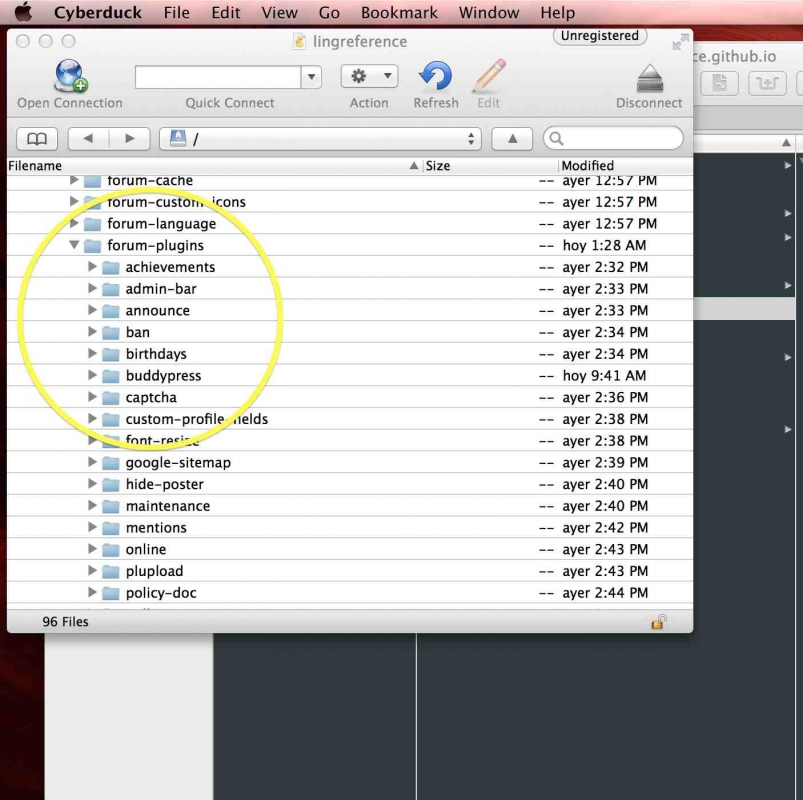
I agree, that is not how it is delivered (see .png above), but I can assure I didn’t change anything. Here is another screenshot of what is actually in the directory…


bbpress2.jpg


So, to answer your question, I haven’t tried changing it because there isn’t anything I can change. 

YS Yellow Swordfish
Yellow Swordfish
Member

So has that error gone away? Did the permissions check out and are you still getting a 500 server error?

And if you are still seeing that error in the error log with the capital ‘B’ then perhaps that is also a question for your host support.

JV jvcasill
jvcasill
Member

Yellow Swordfish said
So has that error gone away? Did the permissions check out and are you still getting a 500 server error?

And if you are still seeing that error in the error log with the capital ‘B’ then perhaps that is also a question for your host support.

I decided to completely uninstall simple:press and start over. I have successfully installed buddypress. Being that I never touched the names of the files, I’m inclined to suggest that the buddypress plugin didn’t play nice with something else I had installed beforehand. Given that there are no other users with similar problems, this may not be anything you are interested in looking into. I will now begin reinstalling the other plugins and I will post back if the error returns (and let you know which plugin triggered it). Otherwise, thank you both for your time and attention. 

MP Mr Papa
Mr Papa
Member

glad we could help.  would be interesting to see what you find out…