Support Forum

a few issues when upgrading from 4.4.5 to 5.0

OV ovizii
ovizii
Member

I had a couple of issues, i.e. the upgrade stopped with errors but I figured out it was an apache2 module meant to protect my site called mod-evasive that was detecting too many page calls to my site and stopped me cold when the limits I had set up were reached. Added my own IP and the server IP to the white list and the upgrade ran smooth.


Then I found that some storage locations had not been created and did so manually.

Uploaded a couple of themes and plugins, all works fine so far.


The current problem I have is that I was using this tag: sf_new_post_announce in my sidebar and now with this new version it doesn’t work anymore. Is it still included? DO I need to activate a certain plugin for this functionality? I have found the recent posts widget but that isn’t self-refreshing I guess.

17 Answers

New Answer

OV ovizii
ovizii
Member

here is my error log from within simple:press, please have a look and let me know if there is anything you can tell me about these entries:


Date Type Description
20.02.12
14:21
php file: /clients/client1/web6/web/wp-content/sp-resources/forum-plugins/subscriptions/library/sp-subscriptions-components.php
line: 322
function: Unavailable
Notice | Trying to get property of non-object
20.02.12
14:21
php file: /clients/client1/web6/web/wp-content/sp-resources/forum-plugins/subscriptions/library/sp-subscriptions-components.php
line: 322
function: sp_subscriptions_render_user_subscriptions
Notice | Trying to get property of non-object
20.02.12
14:21
php file: /clients/client1/web6/web/wp-content/sp-resources/forum-plugins/subscriptions/library/sp-subscriptions-components.php
line: 322
function: sp_subscriptions_render_user_subscriptions
Notice | Trying to get property of non-object
20.02.12
14:21
php file: /clients/client1/web6/web/wp-content/sp-resources/forum-plugins/subscriptions/library/sp-subscriptions-components.php
line: 321
function: sp_subscriptions_render_user_subscriptions
Notice | Trying to get property of non-object
20.02.12
14:21
php file: /clients/client1/web6/web/wp-content/sp-resources/forum-plugins/subscriptions/library/sp-subscriptions-components.php
line: 321
function: sp_subscriptions_render_user_subscriptions
Notice | Trying to get property of non-object
20.02.12
14:21
database file: /var/www/clients/client1/web6/web/wp-content/sp-resources/forum-plugins/subscriptions/admin/sp-subscriptions-admin-users.php
line: 18
function: sp_subscriptions_render_user_subscriptions
error: You have an error in your SQL syntax; check the manual that corresponds to your MySQL server version for the right syntax to use near ‘:1:{i:0;s:56:”a:1:{i:0;s:38:”a:1:{i:0;s:20:”a:1:{i:0;s:3:”101″;}”;}”;}”;}’ at line 4

SELECT topic_id, topic_slug, topic_name, forum_slug FROM wpwp_sftopics JOIN wpwp_sfforums ON wpwp_sftopics.forum_id = wpwp_sfforums.forum_id WHERE topic_id = a:1:{i:0;s:56:”a:1:{i:0;s:38:”a:1:{i:0;s:20:”a:1:{i:0;s:3:”101″;}”;}”;}”;}

20.02.12
14:21
php file: /clients/client1/web6/web/wp-content/sp-resources/forum-plugins/subscriptions/library/sp-subscriptions-components.php
line: 322
function: sp_subscriptions_render_user_subscriptions
Notice | Trying to get property of non-object
20.02.12
14:21
php file: /clients/client1/web6/web/wp-content/sp-resources/forum-plugins/subscriptions/library/sp-subscriptions-components.php
line: 322
function: sp_subscriptions_render_user_subscriptions
Notice | Trying to get property of non-object
20.02.12
14:21
php file: /clients/client1/web6/web/wp-content/sp-resources/forum-plugins/subscriptions/library/sp-subscriptions-components.php
line: 321
function: sp_subscriptions_render_user_subscriptions
Notice | Trying to get property of non-object
20.02.12
14:21
php file: /clients/client1/web6/web/wp-content/sp-resources/forum-plugins/subscriptions/library/sp-subscriptions-components.php
line: 321
function: sp_subscriptions_render_user_subscriptions
Notice | Trying to get property of non-object
20.02.12
14:21
database file: /var/www/clients/client1/web6/web/wp-content/sp-resources/forum-plugins/subscriptions/admin/sp-subscriptions-admin-users.php
line: 18
function: sp_subscriptions_render_user_subscriptions
error: You have an error in your SQL syntax; check the manual that corresponds to your MySQL server version for the right syntax to use near ‘:1:{i:0;s:66:”a:1:{i:0;s:48:”a:1:{i:0;s:30:”a:2:{i:0;s:1:”7″;i:1;s:1:”6″;}”;}”;}’ at line 4

SELECT topic_id, topic_slug, topic_name, forum_slug FROM wpwp_sftopics JOIN wpwp_sfforums ON wpwp_sftopics.forum_id = wpwp_sfforums.forum_id WHERE topic_id = a:1:{i:0;s:66:”a:1:{i:0;s:48:”a:1:{i:0;s:30:”a:2:{i:0;s:1:”7″;i:1;s:1:”6″;}”;}”;}”;}

20.02.12
13:47
database file: /var/www/clients/client1/web6/web/wp-content/sp-resources/forum-plugins/watches/sp-watches-plugin.php
line: 108
function: sp_watches_do_install
error: Duplicate column name ‘watches’

ALTER TABLE wpwp_sfmembers ADD (watches longtext)

20.02.12
13:47
database file: /var/www/clients/client1/web6/web/wp-content/sp-resources/forum-plugins/watches/sp-watches-plugin.php
line: 108
function: sp_watches_do_install
error: Duplicate column name ‘topic_watches’

ALTER TABLE wpwp_sftopics ADD (topic_watches longtext)

20.02.12
13:47
database file: /var/www/clients/client1/web6/web/wp-content/sp-resources/forum-plugins/subscriptions/sp-subscriptions-plugin.php
line: 125
function: sp_subscriptions_do_install
error: Duplicate column name ‘subscribe’

ALTER TABLE wpwp_sfmembers ADD (subscribe longtext)

20.02.12
13:47
database file: /var/www/clients/client1/web6/web/wp-content/sp-resources/forum-plugins/subscriptions/sp-subscriptions-plugin.php
line: 125
function: sp_subscriptions_do_install
error: Duplicate column name ‘topic_subs’

ALTER TABLE wpwp_sftopics ADD (topic_subs longtext)

20.02.12
13:05
php file: /simple-press/admin/panel-themes/support/spa-themes-prepare.php
line: 101
function: Unavailable
Warning | opendir(/var/www/clients/client1/web6/web/wp-content/sp-resources/forum-themes): failed to open dir: No such file or directory
20.02.12
13:05
php file: /simple-press/admin/panel-themes/support/spa-themes-prepare.php
line: 101
function: opendir
Warning | opendir(/var/www/clients/client1/web6/web/wp-content/sp-resources/forum-themes): failed to open dir: No such file or directory
20.02.12
13:05
php file: /simple-press/sp-api/sp-api-plugins.php
line: 57
function: Unavailable
Warning | opendir(/var/www/clients/client1/web6/web/wp-content/sp-resources/forum-plugins): failed to open dir: No such file or directory
20.02.12
13:05
php file: /simple-press/sp-api/sp-api-plugins.php
line: 57
function: opendir
Warning | opendir(/var/www/clients/client1/web6/web/wp-content/sp-resources/forum-plugins): failed to open dir: No such file or directory
20.02.12
13:03
php file: /simple-press/admin/panel-themes/support/spa-themes-prepare.php
line: 101
function: Unavailable
Warning | opendir(/var/www/clients/client1/web6/web/wp-content/sp-resources/forum-themes): failed to open dir: No such file or directory
20.02.12
13:03
php file: /simple-press/admin/panel-themes/support/spa-themes-prepare.php
line: 101
function: opendir
Warning | opendir(/var/www/clients/client1/web6/web/wp-content/sp-resources/forum-themes): failed to open dir: No such file or directory
OV ovizii
ovizii
Member

Another issue:


go to: Integration => Page and Permalink:


I would really like to be able to manually set the current permalink to http://www.die-kellerkinder.eu/ as the forum page that contains the forum is set as the front page so I would have duplicate content as http://www.die-kellerkinder.eu/ would have the same content as http://www.die-kellerkinder.eu/forum/

see screen shot please: http://screencast.com/t/RrIh3ODnW

see screen shot pelase: http://screencast.com/t/prCYCk2rg1


I could work around it by redirecting http://www.die-kellerkinder.eu/forum/ to http://www.die-kellerkinder.eu/ but wouldn’t it be nicer to have this option built into simple:press?

OV ovizii
ovizii
Member

And here comes the last and most important issue:


none of my users who isn’t a moderator can access any parts of the forum.

here are screens of a sample user: 

http://screencast.com/t/qKbl3vaTcA

http://screencast.com/t/a1bcZ21oVIXj

http://screencast.com/t/uOwz8YR5t

http://screencast.com/t/7cyTG9AkRW


The user is in the proper user group. the user group has the proper rights upon several forums and still he doesn’t see anything 🙁


P.S. Just realized that my permissions are all empty. During the update they must have been lost. is there a way to restore the default permissions? I had not changed them, see here: http://screencast.com/t/jCD8qalTl 

ÁM Álvaro Degives-Más
Álvaro Degives-Más
Member

Hm… I see you have the exact same issue I have with the blank permissions… Also lost in a 4.x > 5 migration. I wish there were a “reset to defaults” button for the permissions. Either that, or a template file (even a picture would do) to copy the settings over manually.

Good luck on ironing out your other issues!

(PS: quite the cheeky title for the forum you have…)

OV ovizii
ovizii
Member

thanks for confirming the issue.

can someone post screen shots of the default permissions? that would at least get me started again aside from the other probs.


what forum title? “Die Kellerkinder” ? We’re a group of friends who started playing role playing and computer games in a friends cellar about 15 years ago, hence the name of “The cellar-kids” 🙂

AL alvaro
alvaro
Member

Haha! Clearly a case of “honi soit qui mal y pense” (I thought it was a variant of Rammstein’s Wiener Blut – I think you know what I’m referring to, right?) Oh well. That should remind me that a cigar sometimes really is a cigar!

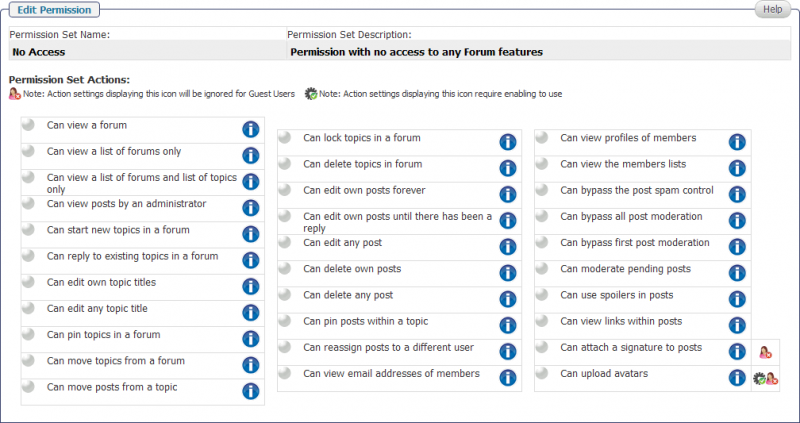
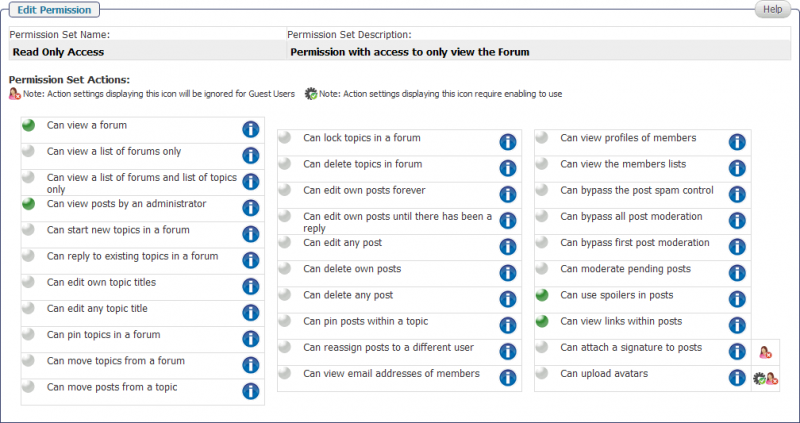
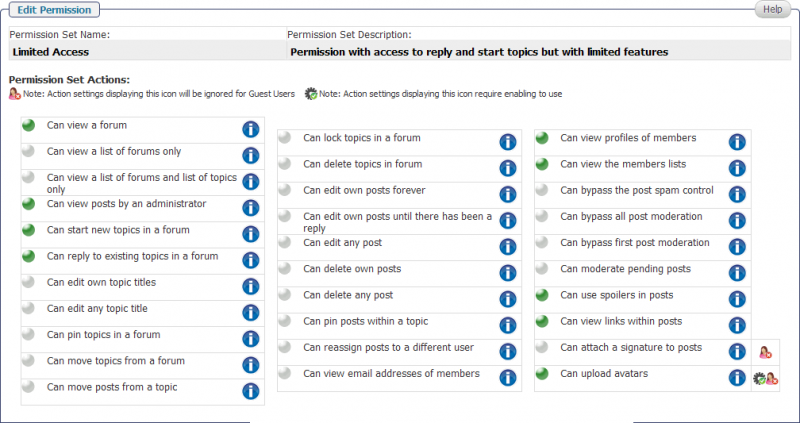
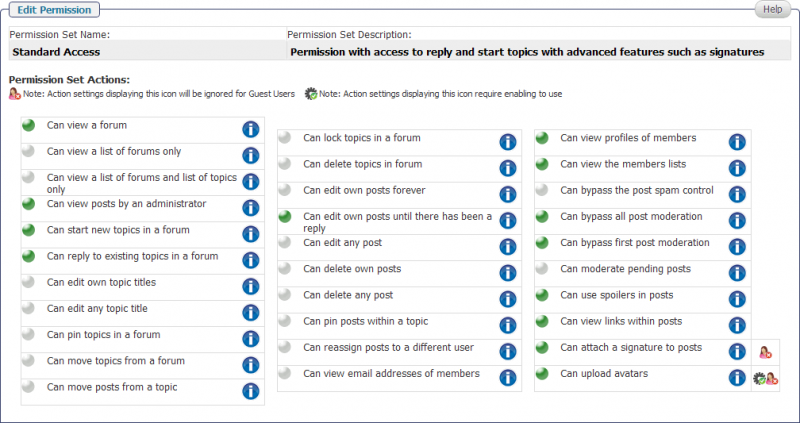
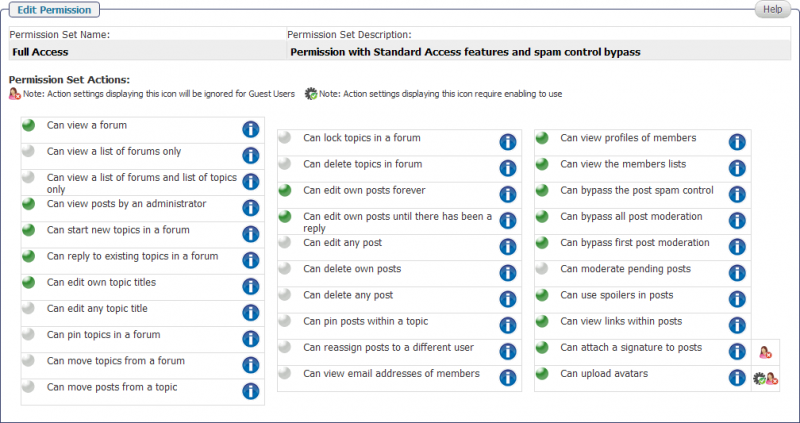
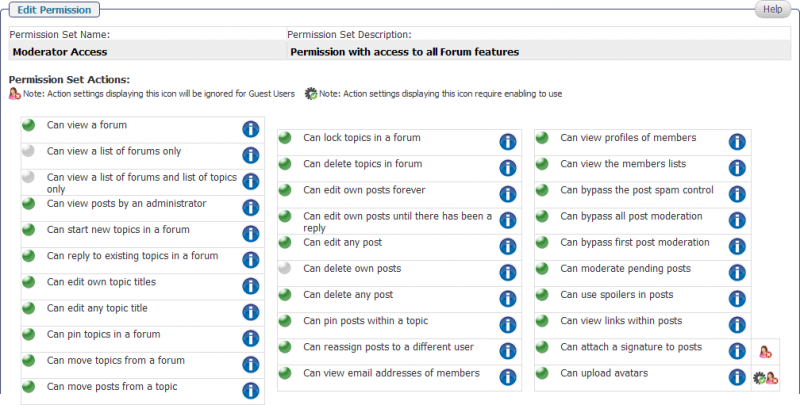
Now, onto the screenshots:

1-perms-no-access.png2-perms-read-only-access.png3-perms-limited-access.png4-perms-standard-access.png5-perms-full-access.png6-perms-moderator-access.png


That’s it. I have a localhost server copy of the site, and I just reinstalled a fresh copy of SPF and took the snapshots from there.

Bottom line: thank you for pointing me to the cause of a baffling problem!

AL alvaro
alvaro
Member

Just remember that SP plugins you use (if you have them installed & active) may add additional permission capabilities not shown above.

OV ovizii
ovizii
Member

LOL, in this case a cigar is indeed a cigar 🙂 

I am not into hard rock so I wasn’t aware of Rammstein’s lyrics. 


Thx for the screens, that fixed it temporarily for me but I need to check the permissions again since v. 5.0 adds a lot more…

AL alvaro
alvaro
Member

Those are v5 permissions. They don’t show the permissions of ALL plugins though (not everybody has them installed & active)

OV ovizii
ovizii
Member

oh and here is another issue:

I’d like to get rid of the part marked with red or at least de-clutter it as much as possible but I can’t find any options to do so. I am sure there are some, can someone point me in the right direction? http://screencast.com/t/9nID4pg4LtVM

OV ovizii
ovizii
Member

Álvaro Degives­-Más said

Those are v5 permissions. They don’t show the permissions of ALL plugins though (not everybody has them installed & active)

gotcha! thanks 🙂

YS Yellow Swordfish
Yellow Swordfish
Member

I wonder of the permissions got screwed when the update faltered. Possible.

The bit in red is basically all of the spHeader.php template in the forum theme you are using. So just comment it out. As always we do recommend making your own theme to avoid losing changes in a future update.

OV ovizii
ovizii
Member

Yellow Swordfish said

I wonder of the permissions got screwed when the update faltered. Possible.

The bit in red is basically all of the spHeader.php template in the forum theme you are using. So just comment it out. As always we do recommend making your own theme to avoid losing changes in a future update.

Thanks, will make a copy of the theme and customize it.

would you mind checking my other posts in this thread? 

I know the problems aren’t related but they happened all during my upgrade so I thought I’d keep them in this one thread 🙁


and here is another one:

if I chose the plain text mode for writing it all works. 

if I chose rich text tinymce it looks like this: http://screencast.com/t/YQic9yV9 but you simply can’t click into the field where you are supposed to write.

if I chose plain the bbtext version clicking on reply brings this up: http://screencast.com/t/odLlcXr7 


do you think these problems are related to an error I had when uploading those two plugins warning me about some probs with open_basedir restrictions, could it be possible the upload failed partially?

OV ovizii
ovizii
Member

here is another related error from my logs: 


[Mon Feb 20 14:21:01 2012] [warn] [client 196.210.184.173] mod_fcgid: stderr: PHP Notice:  Trying to get property of non-object, referer: http://www.die-kellerkinder.eu/wp-admin/admin.php?page=simple-press/admin/panel-usergroups/spa-usergroups.php