Support Forum

Access Denied pop up

RP Robert Provencher
Robert Provencher
Member

I have a member, who’s also a moderator, telling me some posts he gets the access denied showing up. I checked around, permissions, usergroups etc and can’t seem to figure out what’s going on.

I also logged in as him and sure enough, some posts (not all) give me that notice.

I created a 3 min video showing this…..:

https://vimeo.com/143872259


??

Rob

9 Answers

New Answer

IK Ike
Ike
Member

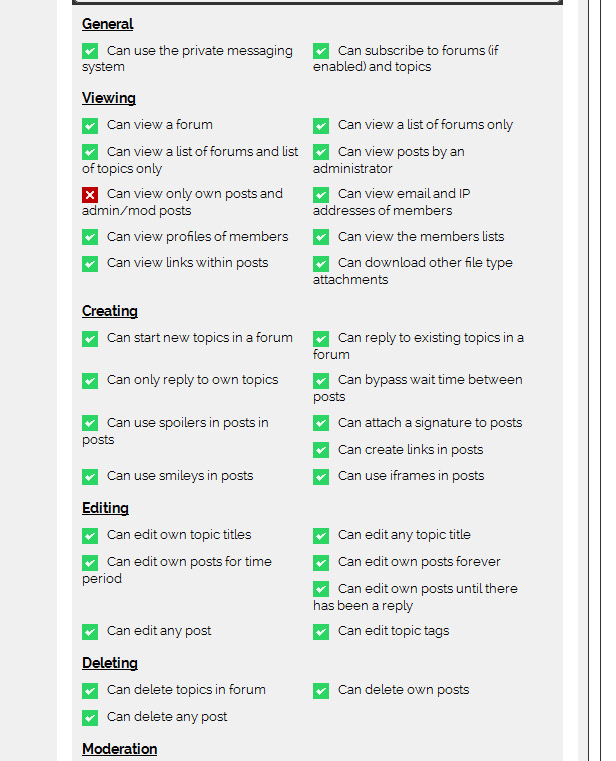
OK so it seems as though the moderator can add a topic and reply to his own topic, but not others from the same forum..

So, I know you’ve said you checked permissions and couldn’t see anything wrong, but could you just check his permissions for the ‘Shop Talk’ forum?

The easiest way is to log in as him, and within the forum click Profile from the header, go to the permissions tab, find the ‘Shop Talk’ forum and click ‘View’..

Check to see if there is a green tick for both ‘Can start new topics in a forum’ and also ‘Can reply to existing topics in a forum’..

First thing to check!

On a side note, I notice that the forum is running UTC timezone – This should really be updated to a genuine timezone as UTC isn’t supported by WordPress. Not sure it’s responsible for this issue but it has been known to cause strange problems.

RP Robert Provencher
Robert Provencher
Member

BTW,…. it appears other members have the same issue, not just this one guy. I don’t seem to. I’m admin, maybe that makes a dif?

IK Ike
Ike
Member

So these other members aren’t moderators?

Is it then an intermittent issue or can nobody reply to any topics but ones they’ve started?

YS Yellow Swordfish
Yellow Swordfish
Member

There is always the rare possibility that permissions have become mangled for some reason. Try the fiorum admin > Toolbox > Housekeeping – the task to ‘Reset the Auths Cache’. See if that helps.

YS Yellow Swordfish
Yellow Swordfish
Member

Additionally try turning OFF the permission ‘Can only reply to own topics’

IK Ike
Ike
Member

Yellow Swordfish said
Additionally try turning OFF the permission ‘Can only reply to own topics’

Good spot.. I had completely missed that one!

RP Robert Provencher
Robert Provencher
Member

this started happening to the members who I had just added as moderators, so, im thinking it was the  “…turning OFF the permission ‘Can only reply to own topics’…”

I made that change and testing now. fingers crossed.


Hate to ask ( Ilooked, no luck) where do I change the UTC timezone thingie?


Should I click this on as well?:

Block user access to WP admin pages


thanks


Rob

YS Yellow Swordfish
Yellow Swordfish
Member

…where do I change the UTC timezone thingie?

The base server is in the WP Admin > Settings > General.  Your own individual timezone can be set in the forum profile.

Block user access to WP admin pages

This has to be up to you of course. We were always being told that many users did not like the WP standard which allows all their users to see the admin dashboard and their own WP profile page. So this allows SP admins to stop that from happening.