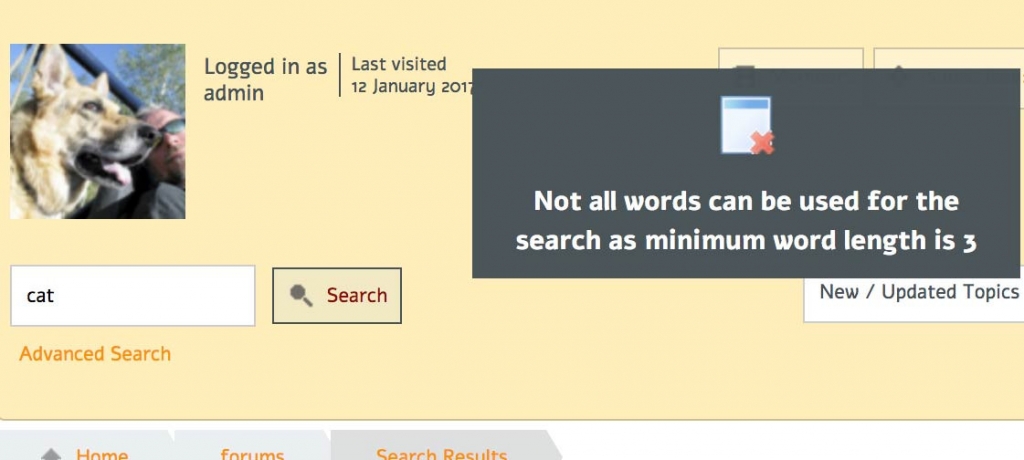
We use a lot of acronyms in our industry so the four character minimum on search terms makes many of our key topics impossible to search for – can this limit be adjusted? I understand there may be a performance hit but I’m prepared to make that compromise for a useful search function.
Support Forum
I am sorry to say that this is not something that is under either Simple:Press or WordPress control. It is a setting on your mySQL database and to change it will need the help of your hosting support.
To be perfectly honest I have no idea whether they will be willing to change it or not. I would have thought they would be with the right argument but I would be interested to know how they respond to the request.
if you have access to your mysql ini file on your server you could change it as well… more info: http://dev.mysql.com/doc/refman/5.1/en/fulltext-fine-tuning.html
Thanks, I understand we can’t leverage a FULLTEXT index with strings shorter than the mySQL minimum, but that doesn’t make searching for shorter strings impossible, just slow. WordPress has no problem searching for three letter words – can Simple:Press do something similar, as fallback maybe?
== UPDATE ==
After research I can see that by editing the query directly…
/forum/?search=1&value=ABC
…the search works fine with strings of any length, including words shorter than the mySQL minimum. So the only thing preventing a search for short words is restrictive js validation. Unfortunately the script that does that (sp-forum.js) is obfuscated – is there a hook to tweak the validation? Or a way to remove it altogether? We really don’t need min-length validated at all.
You know i had completely forgotten that we had removed our fulltext index on post content. So you are quite right.
It’s going to need a little coding to get it up and working as it should but it will be done ASAP
It will be in the next update to Simple:Press which is due for release at the same time as WordPress 4.5 which is currently at Beta 4 and seems to be progressing nicely.
We are imposing a limit of 3 characters by default as really all recommendations are never to search on less. But this can be overridden by a user if they really feel they need to.
Yellow Swordfish said
We are imposing a limit of 3 characters…But this can be overridden by a user…
Exactly how?
I’m excited to hear this is possible and would like to explain, since we’re getting a lot of new members with three legged cats. I just confirmed that I can search for “cat” but presume the results also return words containing cat like catapult, catacomb or truncate.
FYI: The warning notice only appeared when I searched for ” cat ” (including the spaces), but the search still returned 7,750+ results—hence my presumption above.
I thought I saw a note somewhere about wildcard characters that could be used in the search query, but can’t find that now.
Thanks in advance for any feedback!
you have to adjust your mysql settings… something like this (dont worry about 5.7 ref): http://dev.mysql.com/doc/refman/5.7/en/fulltext-fine-tuning.html
oh wait… lol… was doing the full text search thing like Andy…oops…
in your theme spFunctions.php file, just add this with desired value:
define('SPSEARCHMIN', 3);
of course, be sure you have a child theme or a custom theme and not editing one of ours…
Mr Papa said
in your theme spFunctions.php file, just add this with desired value:
OK… but I’m still curious about wildcard characters, are there any and is there an explanation somewhere? I could have sworn I saw something about characters like % matching “exactly one character” etc.
I’m guessing the spFunctions hack you’re recommending will affect all searches, which could impact performance…just wondering if there is a way to allow members to search for a specific three letter word.
Thanks!
those old wildcards were for the mysql full text search… which is not done anymore… so, afraid there are not any wildcards… yes, the define will affect all forum searches…
Mr Papa said
in your theme spFunctions.php file, just add this…
Thanks! This is going to affect all searches though, which I understand may impact performance on forums our size. I’ll give it a try, but still curious…
Is there no way for a user to enter a search query using wildcard characters to search for the word cat surrounded by a space on each side?
Like: “(space)cat(space)” Something like: “_cat_” or “%cat%”
I can search for cat in our forums, but it returns all results of words containing cat…just wondering if there’s any way to include blank spaces in the search query.
I see your problem. I thought we allowed for this so I will need to check back and see if anything got changed mistakenly at some point. Or – how to implement it if not.
the default search is %cat%… afraid, that is about all that can be done currently… you can of course use the ‘sph_search_term’ filter and change it up like you like (ie replace the % with other wildcard chars..