Support Forum

Administrator Needs Moderator Rights

BA Bart
Bart
Member

Greetings,

I searched Google and this help forum and could not find a relevant topic.

I service a rather famous author who comments on 50 plus posts a day via his Magic Members membership blog, and has recently had me add this forum. I have tried every possible way to find a way to add the ADMIN of WordPress and who is the same user who installed the forum, the rights as moderator, much the same as vBulletin works.

Unfortunately, I can find no such means. It would not be sensible that the administrator should have to log out as admin, then login as a new administrator to gain these rights.

The forum has launched, yet he is unable to moderate, therefore any assistance greatly appreciated.

Thanks

16 Answers

New Answer

YS Yellow Swordfish
Yellow Swordfish
Member

I am not sure what I am supposed to be answering really. Let’s ignore users who are WordPress ‘Administrators’ as to Simple:Press they are just another user. IF a WordPress ‘Administrator’ installed the forum then they should automatically be made the forum ‘Admin’ – an independent and separate entity. 

A forum ‘Admin’ can not be made a member of a Simple:Press User Group. There is no point in doing so as they can do and see everything. As such – they are automatically a moderator with global rights and permissions. I am an ‘Admin’ on this forum and I answer posts.

If your famous author does not want to be a forum admin, create another Admin user (there needs to be one to run things properly); log in as that user and go to the Admins > Manage Admins panel and remove the author. Then add the author to a user group that has moderator status. But he has that status now if he is an Admin.

So – am I missing something?

BA Bart
Bart
Member
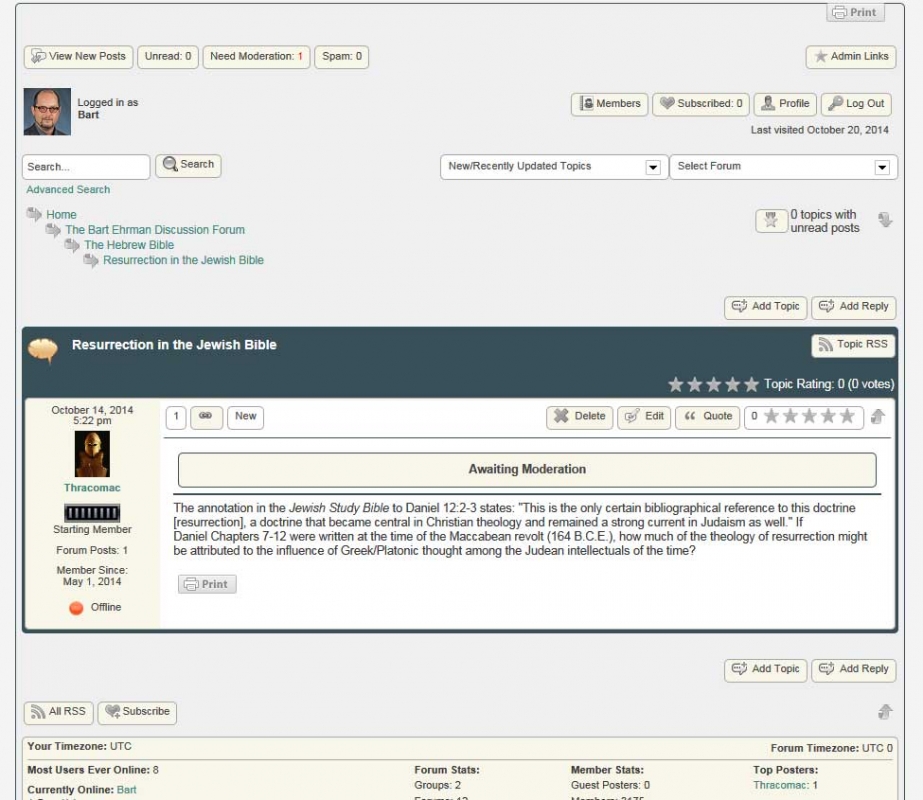
no-moderation-for-admin.jpg


You are not missing anything I don’t think.

The problem is that he is not given moderator rights, as the administrator who installed the forum. I can login as him, find a new post “awaiting moderation” and the moderation buttons below do not appear below the post as they should.

I thought maybe I could add him via Manage Member Permissions > Moderator. When selecting from list, ADMIN nor his profile name is an option… because they are already assigned as administrator, thus automatically assigned super administrator functions, however he has no moderator tools.

The author wants to be both forum administrator and moderator. One login, all functions. Should be viable request with system, but it is not working.

This is one of those bugs that I probably need to email the login credentials to a Simple:Press developers email address, to access the blog for hands-on resolution. I don’t think chatting about it is going to achieve anything… this is an off-the-grid issue.

Simple:Press is working in correlation with the Magic Members member plugin, therefore there may be an unknown anomaly.

YS Yellow Swordfish
Yellow Swordfish
Member

He can see the post content thus proving he has moderation permissions as expected. He has basically three ways of approving the post:

  1. The simplest is just to answer it. When a user with moderation permissions responds to a post awaiting moderation the assumption is that the post is approved. Simple as that.
  2. Use the forum tools from the popup tools menu (clicking on the little tools button that shows on hover).
  3. Use the Simple:Press Admjn Bar plugin which will allow the admin (or moderators) to view ALL new posts in one place AND answer then using the Quick Reply feature – which includes approval or posts, delete of posts etc. Also supports spam post checking via Akismet.
BA Bart
Bart
Member

Thanks Yellow,

My comments to your numbers…

1) Admins – Global Admin Options >  “Approve all posts in topic in moderation when an admin posts to the topic” is not active on purpose, because some post may not be acceptable. He doesn’t want a ‘one post’ global approach, but wants incremental comment control.

2) That’s a seriously obscure icon, but I see it now. Why is it created to be utterly stealth for the users who need it often? It is especially tedious to click where it is evasive with its Ajax animation. It would be more beneficial to allow the tool box access to be configuration selectable as “always visible” for the moderator and administrator, like other functions are subject to select visible or not visible.

3) That was the nature of the initial post as well, the Simple:Press Admin Bar plugin, that provides three buttons below the post, does not appear, as I saw in the demo. Reason I provided the screen capture, to show them missing. Post bag display is shown on top, that is it.

At least number 2 provides the author something to work with. Appreciate it!

IK Ike
Ike
Member

You can set the tool button to be always visible.

If you take a look at the template which has the tool button you are looking to modify, just copy the function name (in this case sp_TopicForumToolButton) and paste it into the SP Codex search on the right hand side here.

Take a look at the Codex page regarding the function and you will find arguments you can use to modify the way the function works. Here – we can use hide=0 to make the button always visible.

I’m not sure about number 3 there, you say the admin bar ‘does not appear’, but the ‘post bag’ is the admin bar.. Although the information labels at the top are not clickable, the ‘view new posts’ button on the left opens the postbag and would not be visible to anyone other than admin / mod. What ‘three buttons below the post’ are you referring to?

Hope this helps!

BA Bart
Bart
Member

Getting closer…

We are using the default theme, and edited the file spForumView.php located in /public_html/wp-content/sp-resources/forum-themes/default/templates/  I changed the line 155 as described (hide=0) and the button still remains hidden?  Double checked, and even included the semicolon missing from the end of the string on the example page.

Number 3, well, I remember early on, seeing an example screen capture of three moderator buttons that appear below the post, to easily click… something like “Approve Post” “Delete Post” “Edit Post”.  Can’t find the page now.

IK Ike
Ike
Member

My fault, apologies – had not been awake that long!

If you are looking at modifying the tools button which appears on each post you would need to change ‘sp_PostForumToolButton’ from the spTopicView.php template located in the same folder.

It should then look something like:

sp_PostForumToolButton('hide=0', '', __sp('Open the forum toolset'));

You might also consider moving it to  the ‘spPostActionSection’ further down in the template (will be listed under ‘# Column 2 of the post row’) as I think if you leave it in the same place and just change it to hide=0, it will place it slightly off from where it was appearing. Also putting it inside the post action section aligns it with other post tool buttons – and will still only be visible to admins / mods who have permission to see it.

Again – sorry about the confusion there!

BA Bart
Bart
Member

Thanks Ike,

I inserted the line under Column 2 in spTopicView.php after line 153:

sp_PostIndexPrint(‘tagClass=spButton spLeft’, ”, __sp(‘Print this post’));

Which inserted the tool button to the right of the print button. Works great!

Please, if you can, add this “always on” option as a user configuration in the next update, so that users can retained the setting regardless of updates. Currently, I will have to manually edit the files with each update.

Also, it would be great if there were ‘always on’ easy access buttons available to the admin and moderator, for  “Approve Post” “Delete Post” “Edit Post”. Plenty of room next to the Post Tool buttons.

Thanks again.

MP Mr Papa
Mr Papa
Member

If you make the changes in your own theme or a child theme, you wont lose any changes on updates….  this is what we strongly recommend  you do…

Also, you already have edit and delete buttons on the post button row above post content…

BA Bart
Bart
Member

Thanks, well yes we could create a secondary theme, but then miss out on all the default theme updates thereafter. It would be more viable to make the toolbox visibility a user configured option. It is not at all a complicated addition, having helped develop plugins myself. It was merely a paying users suggestion.

Yes, we know the edit and delete buttons are on the post button row, but are suggesting an instant click moderation button next to the delete and edit, which would prove extremely valuable for forums with immense activity. Whether located on top or bottom of the frame. Moderation access is not exactly user friendly with the two level click.

Here is a question from my super busy author, lecturer, professor client:

Is there any way to configure the forum moderation so that all I have to do is click on the tab that says: “Need Moderation” and be given access on one page, to see all the posts that need approval?  Much like the WordPress Dashboard provides for comments. Otherwise I have to search through every topic one by one in order to find the new posts indicated, and that will be extraordinarily time consuming.

Above, I have already addressed what I guess would be the response: Admins – Global Admin Options >  “Approve all posts in topic in moderation when an admin posts to the topic” is not active on purpose, because some post may not be acceptable. He doesn’t want a ‘one post’ global approach, but wants incremental comment control.

Would be nice to make moderation more user friendly, where the rest of the forum is nicely developed.

Thanks!

IK Ike
Ike
Member

Just F.Y.I, if you make a child theme rather than a complete custom theme and only change one thing (in this case the tools button) your one change will be loaded over the top of whichever stock theme is the parent. The stock theme will continue to be updated and load your tools button change over the top.

YS Yellow Swordfish
Yellow Swordfish
Member

Additionally – the whole design of Simple:Press version 5+ has been to remove all those irritating options and settings. There are still far too many of them. The much stated and repeated goal has been to use templates and arguments within the template display functions as opposed to page after page of user settings. 

Is there any way to configure the forum moderation so that all I have to do is click on the tab that says: “Need Moderation” and be given access on one page, to see all the posts that need approval?  Much like the WordPress Dashboard provides for comments. Otherwise I have to search through every topic one by one in order to find the new posts indicated, and that will be extraordinarily time consuming.

This has been addressed in the thread above already but I will repeat it here. The ‘need moderation’ label of the admin bar is not and never will be a button. You click on the ‘View New Posts’ button to the left of it to get what you are asking for. One place to review, approve, delete and even answer every post that is made. Those needing approval show the ‘View’ button in red by default.

This seems to me to fit the requirement exactly. Has your author actually tried this?

BA Bart
Bart
Member

Thanks, yes… well aware of how Child themes work. Will cope instead with keeping notes and edit the files after updates to assure the latest and greatest.

Yes, I can understand how too many switches and options might annoy users to some extent (novice), while others like to fine tune everything from a detailed admin console (tech).

Yes, we know about “View New Posts” and finding the posts waiting moderation… nested. A moderator has to click, then click and click again to get to their destination. Then back and repeat. Not very user friendly, versus having all the posts listed on one page, easily accessible for moderation, as WordPress does comments from the dashboard. It is possible.

I won’t keep beating the subject to death. Been building website since 1995, and the fundamental rule of thumb is, don’t make users jump through hoops to access content, make a product user and navigation friendly. It is what it is… Thanks for your suggestions.

YS Yellow Swordfish
Yellow Swordfish
Member

S. E. Ray said

Yes, we know about “View New Posts” and finding the posts waiting moderation… nested. A moderator has to click, then click and click again to get to their destination. Then back and repeat. Not very user friendly, versus having all the posts listed on one page, easily accessible for moderation, as WordPress does comments from the dashboard. It is possible.

I have to say you have completely lost me here. The whole point of the admin bar is to view all new posts in one place for quick response. No ‘hoops’ to jump through. What, for example, does ‘click again to get to their destination’ mean? what ‘destination’?

I ask again. Have either of you actually USED the admin Bar? Click on ‘View New Posts’. Click on ‘View’. Read post. Select from the options below the post. Answer if you want to. Click ‘View’ on next post. Etc. What on earth could be simpler, quicker and easier than that? Or is it just that we don’t fill the page with hordes of text but open it up on demand that you guys don’t like? I do not understand why this can be thought of as jumping through hoops.

And for the record – I have been designing and creating business application software since 1981 – some of it award winning as it happens – and working on website design since 1994. And whittling down pages and pages of user options in favour of templates has been something I am personally most proud of. You can take a Simple:Press theme and in a few hours create something completely new in terms of layout, look and feel.