Support Forum

Admins versus "Admin" User Group

JI jim
jim
Member

I just discovered something and can’t quite figure out what is going on.

We have three Forum Administrators, usernames: Jerry, Jim and Admin

We have also created an “Admin” User Group, to identify these users as admins in their forum posts and show a forum badge.

All three are identified as SP Admins via SP Dashboard -> Admins -> Manage Admins and Moderators

And, all three are listed in the public Members List under Admins.

I just realized, however, they do not appear in the Members List search when selecting “Admin” with the Select Specific Usergroup” menu, nor do the “Admin” usergroup return in the list of groups displayed when searching the Members List.

Selecting “Admin” from the Select Specific Usergroup menu, only returns “There were no member lists found.” This looks bad, as we clearly have admins.

This is a very old install, and I swear I added these users to the “Admin” usergroup long ago. Upon further investigation, I see that there are no users in the “Admin” usergroup. Hence the empty search results.

The problem is, I cannot add these users to the “Admin” usergroup. Attempts to filter the user list by these names will not show them in the list of Eligible Members. Filter works with other random usernames.

I have attempted to create a new “Admins” usergroup, but the same issue occurs. These three users cannot be added to the group.

FYI: Jerry and Admin are also WP admins. I tried mapping WP Admins to the “Admin” usergroup, and that did not work either.

Finally, in my attempts to make this work, I tried to move user Jerry from the Members usergroup to the Admin usergroup. This only resulted in deleting Jerry from the Members usergroup. And now I cannot add Jerry back to the Members usergroup, with the same symptoms I describe above for attempts to add him to the Admin usergorup.

Still with me?

1. I need to add Jerry back to the Members usergroup.

2. I need a solution for adding these three members to the Admin usergroup.

Am I Missing something? Can this be done via the database?

Thanks in advance for the help!

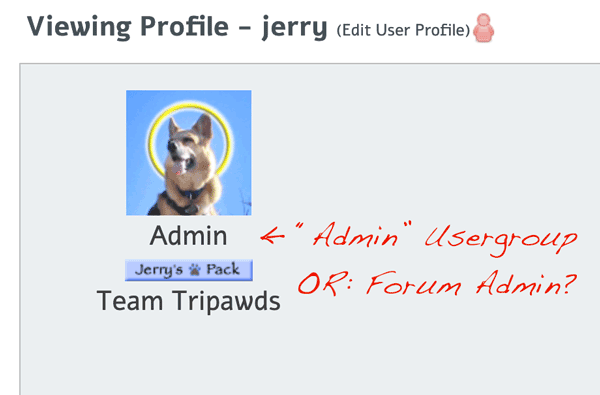
On a related note: In the third attached screenshot, is the “Admin” listed under an admin’s forum profile indicating the user (Jerry) as a Forum Administrator, or a member of the “Admin” usergroup.

Forum Member List Search:
https://tripawds.com/forums/members/

Forum Member List Select Specific Usergroup (Admin – ID 9):
https://tripawds.com/forums/members/?ug=9
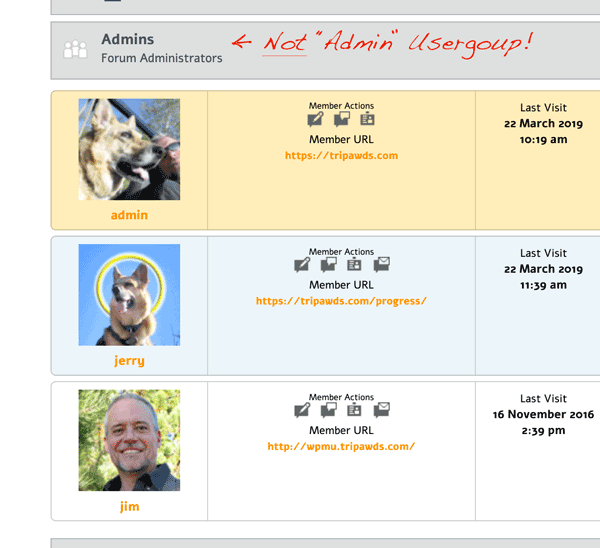
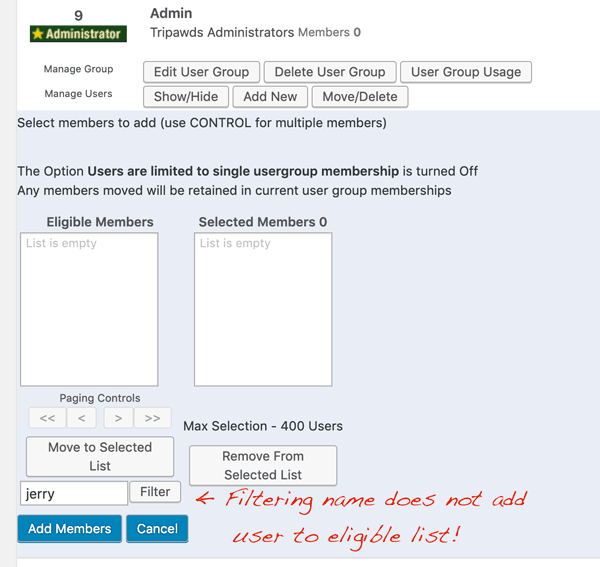
forumadmins.pngnofilter.pngprofile-admin.png

15 Answers

New Answer

SP Simple Press
Simple Press
Admin

Hi:

This is going to sound like a weird question but, if you were to go to the WordPress users list, can you search for those users in the user list?  Or does that user list come up empty when you do the same search?

Thanks.

JI jim
jim
Member

Simple Press said
…go to the WordPress users list, can you search for those users in the user list? 

Good question! Thank you for the prompt response.

All the users in question return in the search results for both the primary site (blog id:1) where the SP Forums reside, and in the Network Users search…

I neglected to mention this is a multisite setup. FYI: Users Jerry and Admin are Super Admins of the network, and Admins of the main site. Jim is a Subscriber of the main site.

I definitely remember these users previously appearing in the “Admin” usergroup when setting that up long ago – many SP versions ago – or I would have sent up a flare for help at the time. Something has clearly happened since then.

SP Simple Press
Simple Press
Admin

hmmmm…are you running WordPress 5.1 by any chance?  There were new Multi-site functionality added in there – maybe that has something to do with it.  

JI jim
jim
Member

jim said
Jim is a Subscriber of the main site.

FYI: After changing Jim’s WP user role to Admin for the main site, I re-saved SP mapping of WP Admins to the “Admin” usergroup and he was still not added…if that means anything

SP Simple Press
Simple Press
Admin

What are the versions of your key components?  WP, PHP, Simple:Press?

Thanks.

JI jim
jim
Member

Simple Press said
…running WordPress 5.1 by any chance?

WordPress Version 5.1.1

SimplePress Version: 6.0.6. Build: 15852

JI jim
jim
Member

Simple Press said
What are the versions of your key components?

PHP Version: 7.1.27

MySQL Version: 5.7.25

Server Version: Apache

WordPress Version 5.1.1

SimplePress Version: 6.0.6. Build: 15852

SP Simple Press
Simple Press
Admin

Hi:

Since you’re a platinum member lets just log in and take a look.  Can you do two things?

1. Open a ticket referencing this topic.  After you open it, add your credentials for the site using the Private Credentials button.

2. Can you make a video showing exactly what you’re doing to try to add the users and add a link to the ticket.  This way when we log in we don’t do something that is different than what you’re doing.  (I think I know what you’re doing but you’d be surprised how often I’m talking about something different than the customer so this helps to avoid that).

Thanks.

SP Simple Press
Simple Press
Admin

Oh, please make sure you include credentials for the SUPERADMIN.  And, if you are comfortable, for your regular admins as well (if not, we’ll add our own admins temporarily).

JI jim
jim
Member

Simple Press said
Open a ticket…add your credentials…make a video showing exactly what you’re doing…

Working on that now, but I just figured out what’s going on…

I’ll need your team to figure out why, and develop a fix:

I can filter the list and add a user to the user group only if that user is not already a forum administrator.

Make that user and Admin, and he cannot be added. Remove forum administration capabilities, and the user can be added. Something is going on under the hood to prevent a user from being added to a group with capabilities similar that which the user has.

Please try to replicate while I get a screen capture together.

Thanks!

JI jim
jim
Member

Simple Press said
…add your credentials for the site using the Private Credentials button.

I am not seeing this Private Credentials button anywhere after submitting a ticket.

Where do I submit credentials privately, this made me presume doing so via the ticket was not private.

JI jim
jim
Member

Simple Press said
Open a ticket…

Please check your Private Messages. The ticket submission is not functioning properly (Firefox, Mac OS). See PM for details, video and credentials.

SP Simple Press
Simple Press
Admin

Hi:

Thanks for the PM and the video. I thought you were doing something different so the video clarified some things.  What you’re running into is a general Simple:Press restriction – Simple:Press admins cannot be added to groups.  There’s no need – they have a different access process.  So once designated an admin they are bound by a different set of rules outside of group rules so it makes no sense to add them to groups.

If you try to add an admin to a group on a regular wp site (i.e.: not a multisite), you’ll see the same thing.

I hope that makes sense.

Thanks.

JI jim
jim
Member

Simple Press said
Simple:Press admins cannot be added to groups…I hope that makes sense.

Technically, yes.

I presume the reason Jerry was a member of our “Members” group is because he was a member before being made an SP Admin. He obviously retained that usergroup membership after being made an SP Admin, because he was listed in the group earlier today, then disappeared from the group when attempting to move him to the “Admin” usergroup.

So…

1. It sounds like you’re telling me the only way to address the empty search results for the specific usergroup “Admin” is to delete that usergroup.

2. It would then seem the only way to assign a badge to forum admins would be to create a Special Rank, correct?

Thank you for the quick support, and confirming that this is actually expected behavior.