Support Forum

After 5.2 upgrade, forum is displaying three times on each page

SK Se Kim
Se Kim
Member

Forum seems to function fine, however, right after upgrading to 5.2, the forum now displays three different times per page. 


Problem clearly visible without even logging in:


http://www.expathell.com/?page_id=4145


Prior to the upgrade, I used the information contained in this wiki (http://wiki.simple-press.com/faq-answers/custom-wp-page-template/) to modify the width of my forum, and to eliminate the sidebar when the forum page is used.  I feel that this probably has something to do with it.


Would really like to solve without wiping everything and starting from scratch.  I have 100 members and over 8000 posts so far.  Would be a shame to lose them all =(

16 Answers

New Answer

MP Mr Papa
Mr Papa
Member

try going to forum – integration – page and permalink…  and play with the options for display multiple and display wiithin the loop…  should be able to account for the wonky theme or plugin…

SK Se Kim
Se Kim
Member

Thanks for the fast reply.  That did the trick, except now the header is being displayed under the actual forum instead of above it.  Any idea why?


Also receiving this error, though it doesn’t seem to be affecting the forum:


ERROR: The page slug is either missing or incorrect. The forum will not display until this is corrected

MP Mr Papa
Mr Papa
Member

on that same admin panel, make sure the correct wp page is selected for the forum… and make sure you dont have another page with the same slug including in the trash…

so what did you end up with for the options?  the main one should be limit forum display to within the wp loop… and then optionally as needed the multiple display – ideally off…

if those still dont work, then try enabling the wp strict api option on same panel…

SK Se Kim
Se Kim
Member

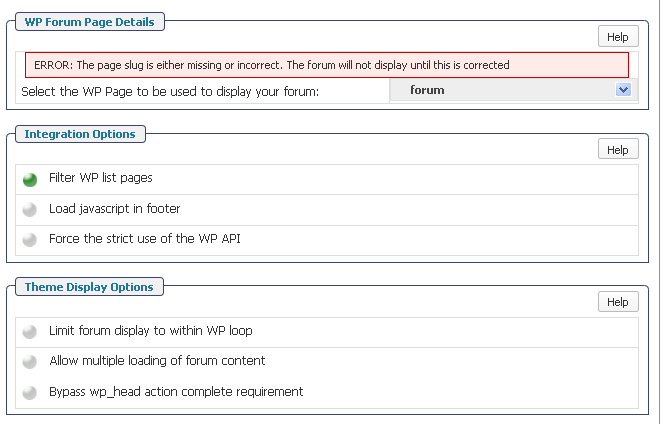
Below is a screen capture of my setting on that page.  As for selecting the correct page, there is only one page available under the drop down menu, and it is called “forum”. 


screencap.jpg

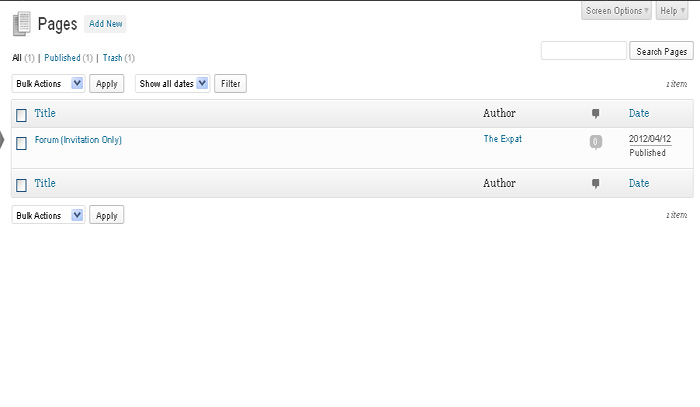
Here is a screen capture of my “pages”

pages.jpg

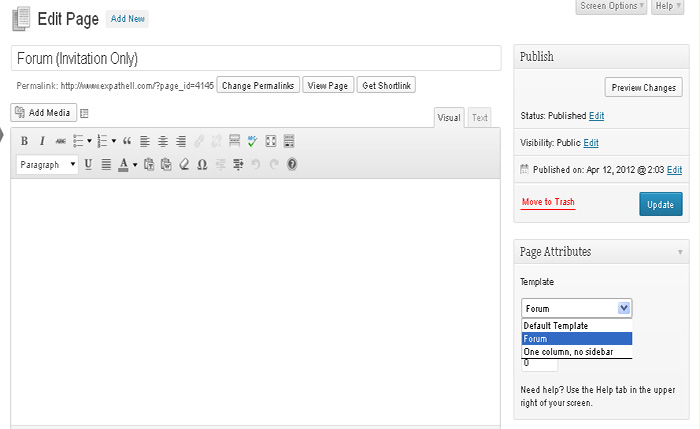
And here are the drop down options for that forum page:

pages2.jpg


SK Se Kim
Se Kim
Member

Enabling “Force the strict use of the WP API” causes the entire forum to vanish.


Enabling “Limit forum display to within WP loop” also causes the entire forum to vanish.


MP Mr Papa
Mr Papa
Member

really? that would certainly indicate another theme or plugin violating wp api, I would think… when you did that, what were the other two options?

no caching plugins, right?

what theme is this? sorry answering via email and phone so cannot see earlier posts or your site… can you try a quick switch to the default wp theme and see if it rectifies? just gathering info…

SK Se Kim
Se Kim
Member

Your help is beyond appreciated. 

On the “integration” page, the only option I have selected is “filter WP list pages”.  Everything else is unselected.

I am using the default simple:press theme and the Twenty-ten 1.5 theme for WordPress (I believe this is the default theme).

Forum is now functioning just fine, however for some reason, when I access the forum or forum login page, my WP header is now appearing at the bottom of the page. 

Prior to updating WP and SP a few days ago, I’d been running the forum with the display width modified.  I used the instructions in the simple:press wiki (google “simplepress width wiki”) to do the modification of the .css file.  It was so long ago, I can’t remember all that was modified, and it seems that the update either over-wrote, or deleted some of the old files.

Switching between themes has not rectified the problem.

Anyhow, as mentioned, your help is greatly appreciated.


MP Mr Papa
Mr Papa
Member

can you show us a copy of your forum.php (or whatever the name is) page template file? 

ignoring the sidebars for a second, if you select the default page template for the forum page, does it come out correctly?  would help rule out the template page (or in)…

so the slug missing error is fixed now?

SK Se Kim
Se Kim
Member

I still have the “ERROR: The page slug is either missing or incorrect. The forum will not display until this is corrected” error.


If I go to the “forum” page and change to “default template”, the forum still displays, but it also displays my header, side bar, and a blank content area at the bottom of the page. 

Where might I located the forum.php file?  It’s been so long since I did the install, and haven’t had to touch it since then.

Somewhere, one of my .css files is telling the browser to display the page incorrectly.  I’m thinking the update overwrote some settings, but not others, causing confusion. 


SK Se Kim
Se Kim
Member

This is my forum.php file:


<?php
    /*
    Template Name: Forum
    */
?>
<?php get_header(); ?>
<div id=”fullwidth”>
    <div class=”post” id=”post-<?php the_ID(); ?>”>
        <div class=”entry”>
            <?php the_content(‘Read the rest of this entry »’); ?>
        </div>
    </div>
</div>
<?php get_footer(); ?>


MP Mr Papa
Mr Papa
Member

the template file looks fine…

are you using default permalinks for any particular reason? a bit confused by your wp page name and its permalink vs the option you get on forum – integration – page and permalink…  they should match…  on that same panel, what is the permalink listed?  does it have the ugly ?page_id=xxx?  have you thought about using a custom permalink to make them prettier and easier for seo?

did you ever look in the trash for another forum page?  how is the page id so huge 4145?  doesnt matter, just odd if its the only page you have…

at this point, I still think the answer lies in the forum – integration – page and permalink display options…  especially if using a standard twentyten theme… we test with that all the time…  you dont seem to have many other plugings…

if you want to shoot me and yellow swordfish a pm with some temp credentials with wp admin and sp admin caps, it might be easier for us to look around…  if that works, just send us a pm and include a link to this topic so we know what its about…

SK Se Kim
Se Kim
Member

I sent a PM with login info, thanks.


I’m using default permalinks because I had no reason to alter those settings previously.  The forum is a private, invite only forum, so SEO isn’t a priority. 

I didn’t find a forum page in the trash, but maybe I’m not looking in the right place.

No clue as to why page_id is so huge for one single page, wish I knew more!


MP Mr Papa
Mr Papa
Member

take a look now… think its working the way you want…  just had to tweak those integration settings…