Support Forum

Attachments doesn't show up for all users

ER ernohannink
ernohannink
Member

A customer has a forum with several groups. Each group has its own forum and Full Access to that part.

All users have the same rights in that group. However not all users are able to see attachments:
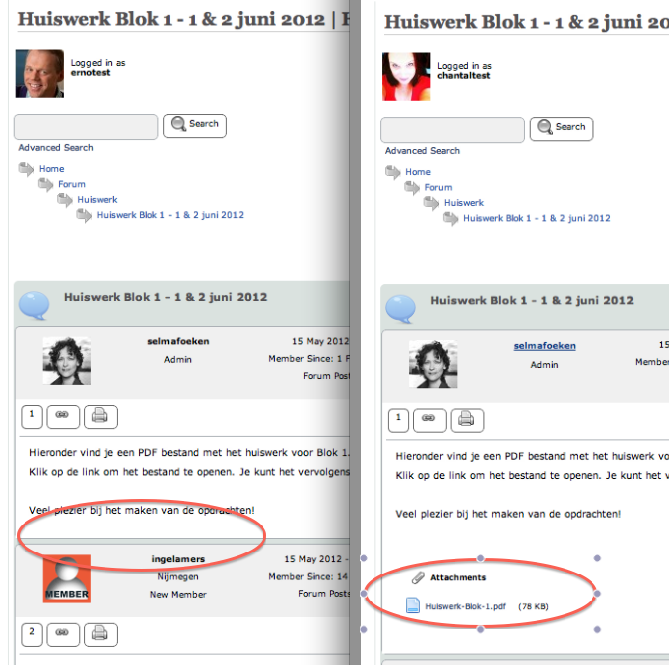
Schermafbeelding-2012-06-04-om-12.21.16.png

Any idea how to solve this? I already checked permissions, removed and re-added users to the forum group. No result.

19 Answers

New Answer

YS Yellow Swordfish
Yellow Swordfish
Member

I know you state you have checked the permissions setup but this is the most obvious answer. I see that the user on the left can not only not see the attachments but can also not view the profile of the user who made the post. All of which points to permissions.

A good test here would be to ask each of those two users to visit their profile on the site and click on the User Groups tab and report back what information is shown. They could do the same with the Permissions tab for the forum in question.

That data would help both you – and us – determine if there is an issue and what it might be.

ER ernohannink
ernohannink
Member

Both are test accounts where I have access to. I will take a look.

Left user:

Memberships:
Basiscursus Trainingsacteren juni 2012
Members

Right user:

Memberships:
Members
Basiscursus Trainingsacteren juni 2012

YS Yellow Swordfish
Yellow Swordfish
Member

Can you check the permissions reported as well. Specifically for the ‘Can download other file type attachments’ and the ‘Can view profiles of members’ settings for this specific forum.
Sorry – just trying to gather data…

ER ernohannink
ernohannink
Member

Both are on for the Full Access permission. Both users have that permission.

YS Yellow Swordfish
Yellow Swordfish
Member

Most odd and, I believe, a unique report.
I need top get Steve (Mr Papa) involved in this one and he should be along a little later. Meanwhile I shall ask his advice in case he can think of anything else I should ask.

YS Yellow Swordfish
Yellow Swordfish
Member

Something we would like you to try.

Can you please go to the forum admin > Toolbox > Housekeeping panel and click on ‘Reset the Auth cache’. In case the cache has somehow become incorrect.

YS Yellow Swordfish
Yellow Swordfish
Member

OK. As I said I need Steve involved in this one and you have now missed him of course. It is certainly curious and unknown behaviour. He is in the US so it is going to be while before he makes an appearance but again I will try and work out how best we can investigate this one.

YS Yellow Swordfish
Yellow Swordfish
Member

Would it be possible for us to take a look inside the admin? I think we may need to look closely at the data and setup here. If this is possible please PM credentials to both myself and to ‘Mr Papa’. Please include in the PM a link to your site, a link to this thread and brief reminder of the problem. And one of us will take a look for you.

And again – if you can do this – please make sure the account is an SP admin as it is really only the forum settings we need to see.

RJ Rudy Jaspers
Rudy Jaspers
Member

I have the same problem that the attachments are not shown for most users. I think the problem started after the last update.

Any news?

MP Mr Papa
Mr Papa
Member

same problem??  have you given users permission to download attachments?  check forum – permissions – manage permissions…

RJ Rudy Jaspers
Rudy Jaspers
Member

You’re right Mr Papa, the permission was missing. For me only the question why my customer started complaining after the last upgrade.

Thanks.  

MP Mr Papa
Mr Papa
Member

More than likely because we fixed a bug in the permissions checking… It was doing it wrong before and letting some through and stopping others… So now that it was fixed, it showed up…

PR Phil Robins
Phil Robins
Member

I’m having this problem where only moderators can download/upload attachments.  The posts show an attachment until you click on the post to read it – then there are no attachments shown.  All other registered users are using Standard Access – and “Can download other file type attachments” is ticked for this permission set.


Any ideas?