Support Forum

Available smileys show in post preview but not submitted post?

DN David Norman
David Norman
Member

Hi team

A forum member of mine brought this to my attention and I have confirmed it is so.

I have standard and uploaded Smileys showing on the (Component > Smileys) page. All are ticked for Use and they always used to work fine.
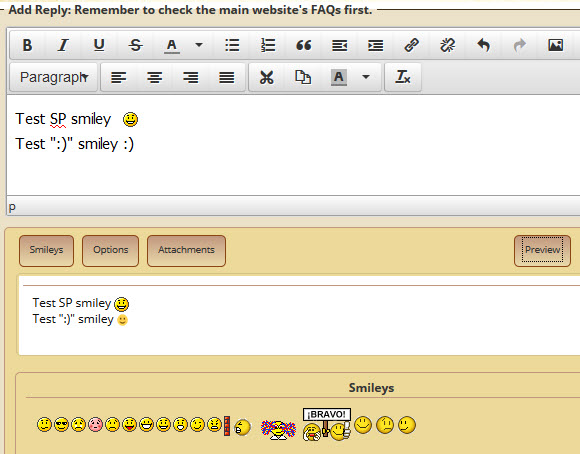
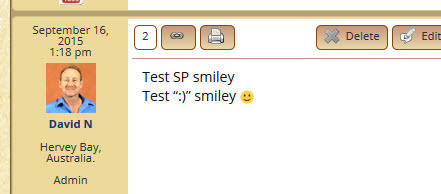
I don’t when this first started, though now, when added to a draft post they show in the draft screen and also in the post Preview. However, when the post is Submitted, the smileys are missing from the post. confused

I have searched your forum and can’t find a similar problem.

I have SP 5.5.10 active at present (haven’t updated to 5.5.11 yet).

Cheers,
David
www.alcohemy.com

15 Answers

New Answer

MP Mr Papa
Mr Papa
Member

any chance you are limiting the number of smileys in a post?  would be on forum – options – content…   does it happen with just one?

what do you see if you inspect the html of the site with the published post?

DN David Norman
David Norman
Member

Hi Steve

Max smileys allowed is “0” = “unlimited”.

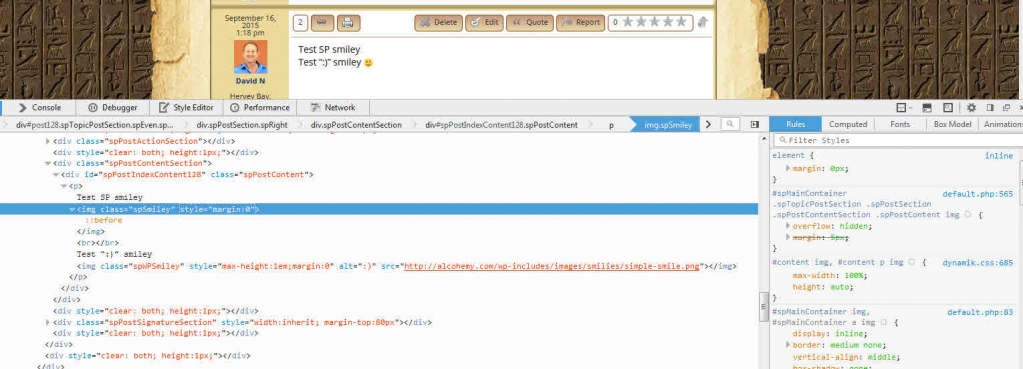
Have attached 3 ‘named‘ screen shots to show results.

Smiley-Preview.jpgSmiley-Submitted-post.jpgSmiley-post-Inspector.jpg
YS Yellow Swordfish
Yellow Swordfish
Member

Looks to me like you have something there that is effecting the way image tags are constructed, For a start a closing ‘img’ tag is being inserted which is neither necessary nor is being put there by Simple:Press,

This usually suggests some sort of ‘filter’ or parser of post content being used at display time. So first question is – do you have any active plugins that in ANY way claim to effect the content of posts and pages?

DN David Norman
David Norman
Member

I haven’t added any new plugins for quite awhile and haven’t personally fiddled with any existing settings that I can recall (WP does do it’s version updates automatically though??).
I use iThemes Security (and have for a long time). I can’t see where a setting would affect the SP posts.
I use Yoast SEO and again I can’t see where a setting would affect the SP posts.
My WP ‘Writing’ settings are set to “Convert typed emoticons like 🙂 and 😛 to graphics on display”. The results of this can be seen in my screen capture above.

DN David Norman
David Norman
Member

These are the active plugins.

Admin Bar Disabler
Advanced iFrame
Akismet
Capability Manager Enhanced
Column Shortcodes
Contact Form 7
CubePoints
Duplicator
Easy Pricing Tables Lite by Fatcat Apps
Form Lightbox
Google Analytics by Yoast
InfiniteWP – Client
iThemes Security
Lightbox Plus Colorbox
Limit Login Attempts
LocalCurrency
Nginx Helper
PHP Exec
PromoSimple
Quick Chat
Really Simple CAPTCHA
Remove Widget Titles
Simple:Press
Sociable
Subscribe to Comments Reloaded
Tippy
Ultimate Category Excluder
UpdraftPlus – Backup/Restore
Widget CSS Classes
WishList Content Control
WishList Directory
WishList Member™
WishList Widget Control
WordPress Database Backup
WPBeginner’s Compact Archives
Yoast SEO

YS Yellow Swordfish
Yellow Swordfish
Member

Are you able and willing to look directly at database tables?

DN David Norman
David Norman
Member

I believe I can.
Since my latest web support mob moved my website to their ‘Rackspace’ server here in Australia late last year I don’t have the same access to my files I used to have on Hostgator.
I’m sure I can use sFTP to access directory files and can access some files via a basic secure server portal. They don’t allow a cPanel interface.

Let me know what to look for and do. I will have to do it tomorrow (Brisbane time) as I have to prepare now for an early morning breakfast meeting.

Thanks again,
David

YS Yellow Swordfish
Yellow Swordfish
Member

Ah – no – it’s not files I was hoping to get you to look at but actual database tables. You would need something like phpMyAdmin for that – which is most often bundled with the hosting control panel. I will need to think about how we can try and work around that in some way…

DN David Norman
David Norman
Member

Yes. I do have access to the server via phpMyAdmin.

YS Yellow Swordfish
Yellow Swordfish
Member

Great, So –

  1. Load  up the same post you used for the screenshot and click on the forum tools icon withon that post.
  2. From the forum tools menu select ‘Properties’ and note the POST_ID in the properties listing.
  3. Go to phpMyAdmin and load the database and select the XXX_sfposts table where XXX is your WordPress table prefix.
  4. You need to find the row where the post_id is the one we found in stage 2. You might need to resort the table to get the recent posts at the top of the display by clicking on the post_id column lanbel.
  5. When you locate the row use the ‘browse’ icon and when the display pops up look at the ‘post_content’ column. Copy the content pt the clipboard.
  6. Come back to this thread and paste the content into a new post. Best to use the syntax highlighter. So…
  7. Paste the content of the clipboard.
  8. very carefully select the pasted text and ONLY the pasted text.
  9. Click on the Syntax Highlighter button in the toolbar above – (top right).
  10. Select HTML from the drop down menu.
  11. Save the post

`let;s see what was in the database as opposed to what was displayed.

DN David Norman
David Norman
Member

Test smiley: <img title=”smile” alt=”smile” src=”http://alcohemy.com/wp-content/sp-resources/forum-smileys/sf-smile.gif” />
Test typed smile: 🙂

End of test.

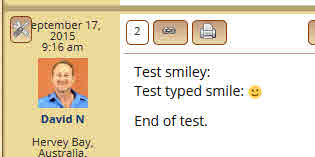
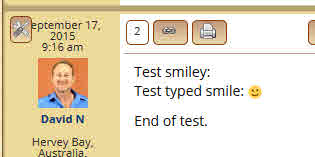
I had deleted the previous ‘test post’ from my forum, so I created another one much the same.
This is the screen shot of it.
I then copied the text above from the row in the database and pasted as ‘text’. Hope this is what you were after, as the Syntax Highlighter button was greyed out for me.

Smiley-Submitted-post-2.jpg

DN David Norman
David Norman
Member
Test smiley: <img title=”smile” alt=”smile” src=”http://alcohemy.com/wp-content/sp-resources/forum-smileys/sf-smile.gif” />
Test typed smile: 🙂

End of test.

I had deleted the previous ‘test post’ from my forum, so I created another one much the same.
This is the screen shot of it.
I then copied the text above from the row in the database and pasted as ‘text’. Hope this is what you were after
.
Smiley-Submitted-post-2-1.jpg

YS Yellow Swordfish
Yellow Swordfish
Member

If the toolbar button was greyed out it means you missed out stage 8. But not to worry. We can see what we need.

So here you have the image tag HTML in the database that is just fine. Yet when it gets to display time on the page it is heavily corrupted and changed. And for some bizarre reason has an unnecessary closing ‘img’ tag.

I will test it here the same way – frown– but I am betting it will work…