I am getting a warning popup when i upload an avatar image that is within the file size allowed.
The avatar image is uploading but I am getting an error message stating that it exceeds the size.
Can you help to solve this problem?
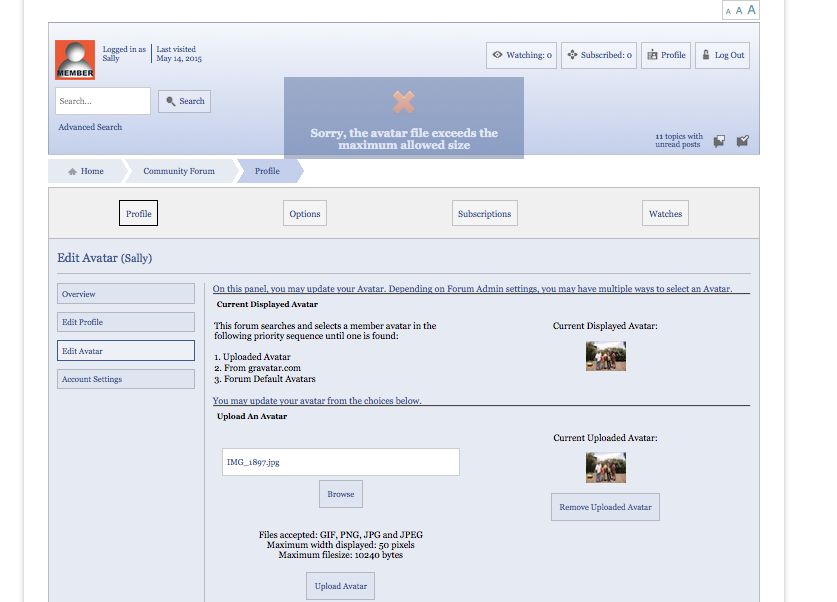


I am getting a warning popup when i upload an avatar image that is within the file size allowed.
The avatar image is uploading but I am getting an error message stating that it exceeds the size.
Can you help to solve this problem?

You’re saying that the avatar is uploading, and capable of being used, but is still throwing a size warning?
What file size is the avatar and what is the size constraint you have set? And can you paste the exact message here?
Yes, sorry I thought I attached my screenshot for you. Here it is… you will see the error message popped up.
These are the settings displayed on the Edit Avatar window:
Files accepted: GIF, PNG, JPG and JPEG
Maximum width displayed: 50 pixels
Maximum file size: 10240 bytes
The size of my avatar was either 6KB or 8KB.
But I just tried again, twice, and I got an “uploaded avatar updated” message. So maybe everything is ok.
I don’t understand why I have been struggling with so many weird errors and problems that then seem to fix themselves!?!?

caching? or cloud? often culprit for these kinds of things…
please let us know if its not resolved for you…

Sorry, need a bit converter 🙂
[ I am having the same problem: my Avatar is 16,8kb and 49×36 pixels (.jpg). I am not able to upload it to my Forum and actually not here either].

What is your avatar size set to…?
16.8kb is 17204 bytes. Our maximum here is set to 10240 or 10kb.