
Support Forum

BB Codes are no where to be seen.

EL ElTaino
ElTaino
Member

Hello fellow members. I installed SP last night v4.5, many of the features were left ready so I could this morning work on creating the forums topics, etc.. This morning shortly after I started working, I’ve got a message in the control panel that v5 was available. I upgraded without major setbacks. The thing is that if I want to create a new post, the row of B, U, Links media, font color is not there anymore. All I see is a row of smilies at the bottom. Please, attache screen grab.

Also, with FireFox, my text shows below my member’s info leaving a white empty space. With Google’s Chrome it does not happen and my text starts right next to my avatar. Here is a link: http://modelkitsreview.com/?page_id=1159/forums-rules/forum-etiquette.

What did I do wrong? it was not happening with v4.5. Any help will be greatly appreciated.
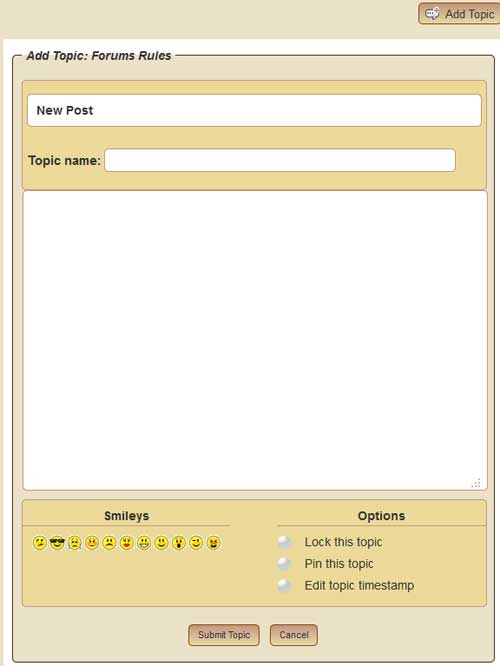
screen-grab-sp.jpg

14 Answers

New Answer

MP Mr Papa
Mr Papa
Member

did you install the sp plugin for the bbcode editor?

EL ElTaino
ElTaino
Member

No Mr Papa, since I don’t recall having to do it with the 1st version last night, I didn’t do it with v5. Where can I get it?

Thanks for your speedy reply.

MP Mr Papa
Mr Papa
Member

all of the 5.0 plugins for SP are on our download page… as are the themes…

plugins are new for 5.0… only need to have the stuff you want and use on your site…

EL ElTaino
ElTaino
Member

Got it! I can’t thank you enough. Any idea why the long white space on the post?

MP Mr Papa
Mr Papa
Member

looks like its because you have an extremely narrow width allocated to the forum… and you wp page css is adding some padding…

so in your sp theme, and we highly recommend making your own instead of editing ours, in the spTopicView.php template file, change the width of the spPostSection to 80% instead of 84%.

EL ElTaino
ElTaino
Member

Sorry to bother you again MP, where do I actually upload those plug-in folders?

EL ElTaino
ElTaino
Member

Mr Papa said

looks like its because you have an extremely narrow width allocated to the forum… and you wp page css is adding some padding…

so in your sp theme, and we highly recommend making your own instead of editing ours, in the spTopicView.php template file, change the width of the spPostSection to 80% instead of 84%.

Will do amigo.

MP Mr Papa
Mr Papa
Member

http://codex.simple-press.com/codex/plugins/using-plugins/

BR Brandon
Brandon
Member

ElTaino said

Got it! I can’t thank you enough. Any idea why the long white space on the post?

You might also try the Stacked theme. It puts the info on top above the post. It might look better on your narrow theme.

EL ElTaino
ElTaino
Member

MP, Plugins uploaded and working like a charm.

Brandon, pardon my ignorance, but where do I get that theme?

MP Mr Papa
Mr Papa
Member

which theme? sp or wp? I am not sure exactly what customizations he might have made, but you could get close with the default theme and shades of grey overlay…

sure Brandon will chime in wink

BR Brandon
Brandon
Member

ElTaino said

Brandon, pardon my ignorance, but where do I get that theme?

You mean the Stacked theme?

That is available on the download page here.

Once you download it then see http://codex.simple-press.com/codex/themes/theme-basics/using-themes/ on installing it and selecting it as your new theme.  You don’t have to uninstall your current default theme so if you don’t like it you can switch back easily.

EL ElTaino
ElTaino
Member

Found the Stacked theme, exactly what I needed for my WP theme. Thanks MP and Brandon.