I uninstalled SP and installed it again. As before no problem so far when switching from forum to site and back. When you hover over the log out button in the forum you will see in the status row of the browser that the wpnonce value is there. Clicking the log out button will produce a blank page. I assume that repeated log in and log outs will eventually produce the problem that the forum cannot be loaded at all. The first thing should therefore be to get this log out nonce to work. If this works it might also not produced the error that the forum eventually cannot be loaded. I am not a programmer, but it feels that the nonce-value is confusing the system. And the first place to make sure that the nonce thing is working properly is the log out problem.
Support Forum
I apologise. That whole post was intended for someone else and I confused the user names. Really sorry and I have removed it.
To get rid of SP completely then either turn on the uninstall option in the admin > toolbox or select the uninstall option against the SP plugin in the Wp plugins list. This will remove all data.
When you are back up and running then a visit to the site sounds like it would be the best move.
A step further. Numerous log in and log outs. No problem. After that I added the SP plugins (13). First attempt to go to the forum = blank page. Forum is not loaded. Seems that a SP plugin is cause the problem. Trying to narrow down the plugin.
Is that a complete and total blank page? Or just a page without the forum showing up on it?
Complete blank. New developments. I started to add just the PM plugin. And what a surprise: There is no logout problem anymore. To repeat:
New installation: Logout problem remains
Adding all plugins: Forum page goes blank
Adding just PM: The whole system works as it should. Logout perfect, forum access perfect.
Well, well. I am looking further into the issue.
Added most plugins, the system works again. Will document now every step I make to get a clue what the problem was when it happens again. For the moment things are back on track but there is definitively a bug around. Thanks for your assistance.
Logout error found: The localization of the timezone of the server does not work. There is a mo-file (continents-cities-de_DE.mo), but wherevever in the SP languages folders I put it, it does not apply to SP. I assumed that the value must be stored in the MySQL database, where I also found it (wp-options table). After I changed the English value for the German equivalent the logout error occured. When I changed back to the English term the error did not occur anymore. I reproduced the behaviour several times. So for so good. Will make a list of localization problems that need to be tackled (not the hacking way I did).
Thanks for helping in this.
1. The ‘continents-cities-de_DE.mo’ came with the German WP and is located in the languages folder of WP. It is used in the WP admin section, but seems not to work for SP. I assumed that it must be placed in one of the SP language folders but to put a copy there does not help.
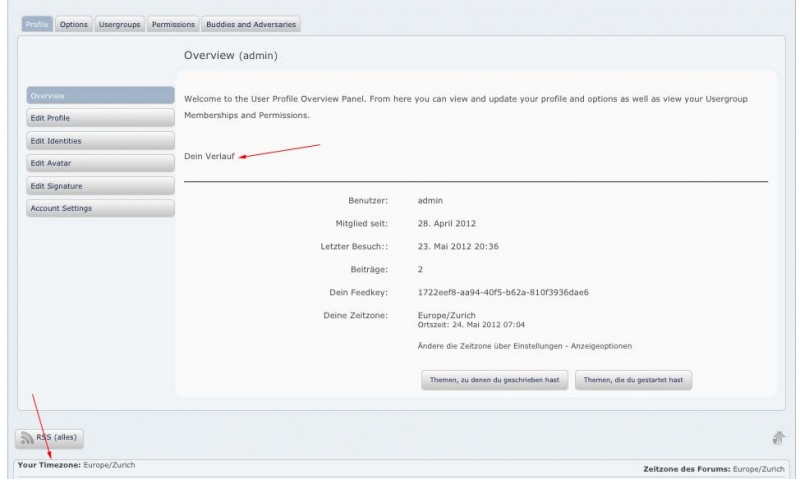
2. There is also a strange behaviour for some translations. E.g., in the sp-de_DE.mo from the translation site there is the string “Your Timezone”,”Deine Zeitzone”, but the German is not displayed, when the mo-file is put into forum-language/simple-press. Just six lines above in the same mo-file there are the strings “Your History”,”Dein Verlauf”, but in this case the German is displayed.
[Image Can Not Be Found]
3. In addition: In the spa-de_DE.mo there are all the German translations for the profile (edit profile, edit identities, edit avatar, edit signature etc.), but as you see from the screenshot, they are not displayed.
4. Furthermore: I do not know, in which mo-file the profile page tab labels such as “Buddies and Adversaries”, etc. are located. They are not in sp-de, spa-de nor spDefault.
Jürg Eggler said
Thanks for helping in this.1. The ‘continents-cities-de_DE.mo’ came with the German WP and is located in the languages folder of WP. It is used in the WP admin section, but seems not to work for SP. I assumed that it must be placed in one of the SP language folders but to put a copy there does not help.
If this exists in the usual WP theme languages folder then it should actually be loaded by WordPress itself. We use the core WP function to create and display the timezone selection control and that function explicitly checks for and loads this mo file. If this is not happening then that is something that will need to be investigated but it may potentially be a WP issue. However, if it is not finding it then it should not cause any errors. mo files are only loaded if they exist and if they do not then they should be ignored.
2. There is also a strange behaviour for some translations. E.g., in the sp-de_DE.mo from the translation site there is the string “Your Timezone”,”Deine Zeitzone”, but the German is not displayed, when the mo-file is put into forum-language/simple-press. Just six lines above in the same mo-file there are the strings “Your History”,”Dein Verlauf”, but in this case the German is displayed.
I can not replicate this I am afraid. I have just downloaded the latest ‘de’ mo file for the core SP and in the profile for this particular string I see ‘Deine Zeitzone’ as expected. Are you sure it is actually in the mo file you are using. Have you recompiled it?
3. In addition: In the spa-de_DE.mo there are all the German translations for the profile (edit profile, edit identities, edit avatar, edit signature etc.), but as you see from the screenshot, they are not displayed.
‘spa’ is the SP admin language file. Any translations found in here will only apply to the forum administration panels. In these cases – these are set and used for the admin panel Profiles > Profiles Tabs and Menus. Additionally there are some areas that are not translated via mo files but are available for the user to translate within the admin panels. The profile tabs and menus utilises the standard WP menu controls which allow the user to change their text within the controls. This may be a little confusing I agree but it is the way WP menus work. For this reason these text strings are not included in the po file.
4. Furthermore: I do not know, in which mo-file the profile page tab labels such as “Buddies and Adversaries”, etc. are located. They are not in sp-de, spa-de nor spDefault.
This particular label is added by the Private Messaging plugin but again is controlled by the WP menu system and can be found on the Profiles > Profile Tabs and Menus admin panel.
Sorry – one more thing. I took another look at your attached image and realised that the ‘Your Timezone’ string you referred to was NOT the one in the profile which I assumed it was – as all of the other queries were regarding the profile.
This particular instance is derived from your SP theme.
One of the more common requests we used to receive prior to V5 was to split the po files into front and back end. Many users wanted to ensure their front, public facing side was translated but did not care about the admin.
We took this on board for V5 and, of course, each SP theme and SP plugin also requires it’s own po file. Most of what is displayed in the forum actually comes from the theme you are using – not the core.
1. You speak about “WP theme languages folder ” meaning this? /problem-with-post-edit-buttonttpdocs/wp-content/languages
There the ‘continents-cities-de_DE.mo’ is currently located and I think there it should be as it is loaded in WP admin, but seems not to be seen by SP. As you said: needs probably some investigation.
2. Thanks. Realized that the default theme mo-file I had did not have “Your Timezone”. Downloaded from the translation site and made the translation. Works now.
3. Found admin panel Profiles > Profiles Tabs and Menus. But when I enter my own titles the tabs on the front end disappear. Must be a bug.
I will open a ticket on item 1 although I am unsure what we can do about it as WP is already doing it! But I will see if I can work around it.
As to number 3 – I can’t replicate this. Seems to work fine. What are you doing exactly?
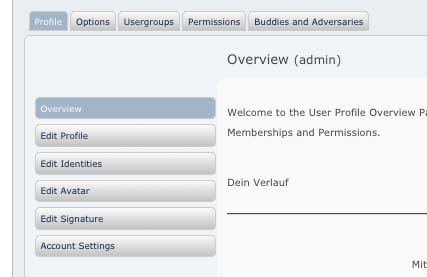
Step 1: View after loading profile page.
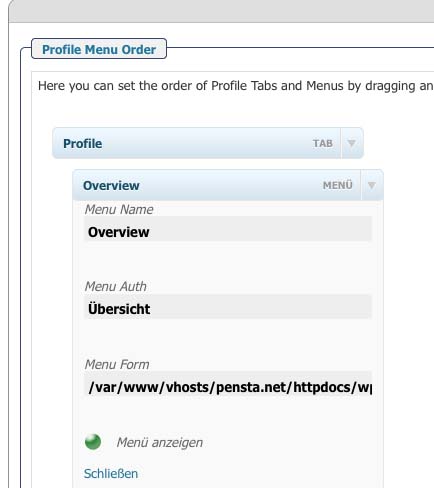
Step 2: Changing tab title to “Übersicht” then clicking update at the bottom of page.
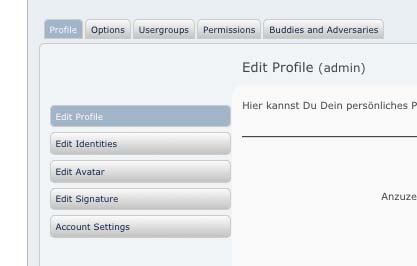
Step 3: View after loading profile page again.
Overview tab is gone (blank space). Next available tab (Edit Profile) is selected by the system as it is now the first and its corresponding info part to the right is shown. Thus, not only the overview tab is gone, but also the corresponding info part of the overview is gone.