Support Forum

Cannot upload images

19 Answers

New Answer

YS Yellow Swordfish
Yellow Swordfish
Member

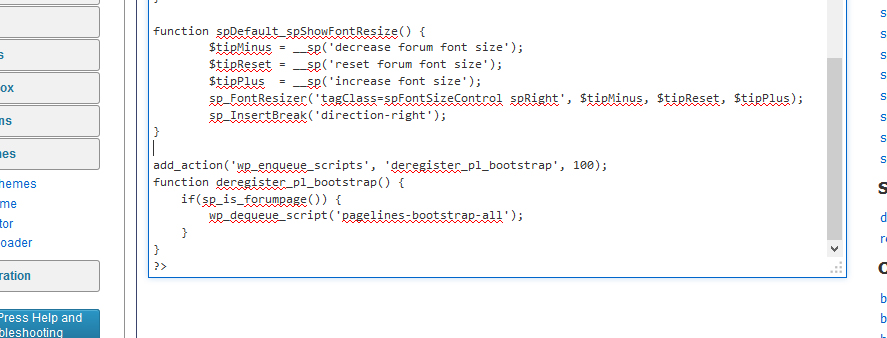
Try this variation. This definitely works for me by the way…

add_action('wp_enqueue_scripts', 'deregister_pl_bootstrap', 100);
function deregister_pl_bootstrap() {
    if(sp_is_forumpage()) {
        wp_dequeue_script('pagelines-bootstrap-all');
    }
}

so we will see…

OD Olivier Duong
Olivier Duong
Member

Nope

Nopes….

Am I doing something wrong???

Might not matter but the PUUPLOAD does not have that rectangleUntitled-2.jpg buttons on mine…

It’s just text…


Untitled-1.jpg
YS Yellow Swordfish
Yellow Swordfish
Member

Yes the flat look and no buttons is exactly what Bootstrap does. Basically it stomps all over the jQuery UI. This is a problem as jQuery and the jQuery UI are the de facto recommended and supported libraries to use with WordPress but BootStrap is starting to crop up here and there.

Well I can see no reason why it should still load with that code in place and it certainly stops it from loading on my tests. The only difference I can see is that I put the code in the WP Theme functions.php NOT the in the SP theme but that really shouldn’t make any difference.

Can anyone see anything I may have missed?

OD Olivier Duong
Olivier Duong
Member
add_action( ‘wp_enqueue_scripts’, ‘deregister_pl_bootstrap’ );
 
function deregister_pl_bootstrap() {
 
// some logic needs to check if your in the forums!!
wp_deregister_script( ‘pagelines-bootstrap-all’ );
}
 
 
The code above in the function.php of the THEME, not the forum functions makes it work.
Thanks for your tremendous help, Swordfish, much appreciated
MP Mr Papa
Mr Papa
Member

so there is a diff between the two functions files… interesting… thanks for the update!