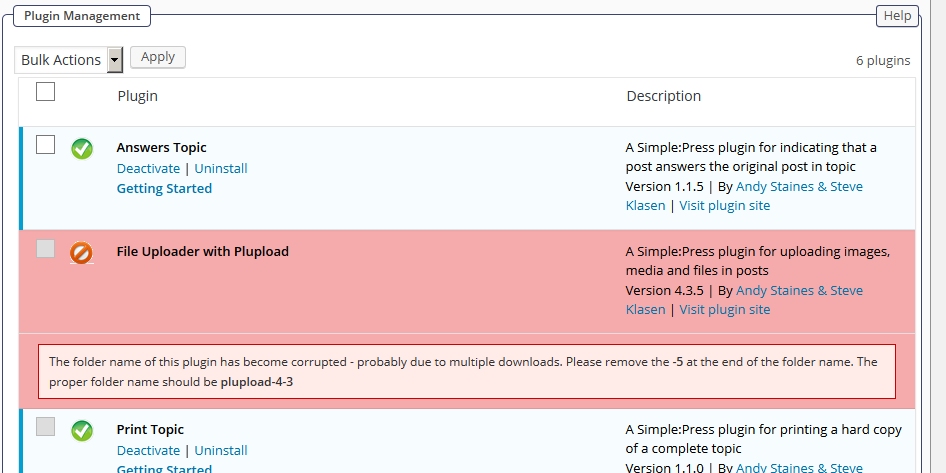
Hi … sorry … didn’t upload it – trying again 
Support Forum
well that will occur if there are multiple download attempts and is basically WP getting its proverbial knickers twisted… If you follow the instruction (and ensure there is only one file-uploader folder created) then it should be fine.
or the permissions are not set correctly on sp-resources and forum-plugins…
check @yellow-swordfish comment first, but if not the issue, then compare permissions and ownership (uid and gid) of wp-content to sp-resources.. checking forum – integration – storage locations may yield more info…
Hi All
The message I attached said to remove the ‘-5’ from the folder name. When I did that, it told me to remove the next ‘-3’ part … I could see where this was going.
So, I think I’ve resolved the directory name issue.
Whenever I download a plugin which doesn’t have a version number in the name, I always rename the zip file to include the version – this helps me keep track of zips stored, and makes it easy to use a particular version if I need to (which does happen from time to time).
I renamed the SP plugin zips as per normal, and now that I’ve taken the version number off them, they install without any problems.
So in some way the SP zips are not like all the other WP plugin/theme files I’ve used in the last five years – they are sensitive the the name of the zip file.
Don’t know if this has a bearing on the original bad zip encoding error … but if SP zips differ in some way from all other WP plugins and themes I’ve used, it has to be a possibility.
Could the zip file name (which I would have changed prior to the original install) be stored in the db, and affecting the WP update process (which you’ve said SP uses)?
Regards, David

yeah I dont of many plugins that would allow you to rename their based directory (or base file), but hey, millions out there…
Hi guys
I rename just the zip file that’s downloaded (adding it’s version number), and with all those I’ve renamed previously it has absolutely no effect on the files or folders created when the plugin is installed and activated.
Some examples are:
- Beaver Builder Lite
- SI Contact Form
- WP Spam Shield
- Conditional Widgets
It seems to be no different to the authors adding the version number to the zip file (which 95% do anyway) … it doesn’t affect the installation.
Does that make sense?
Regards, David