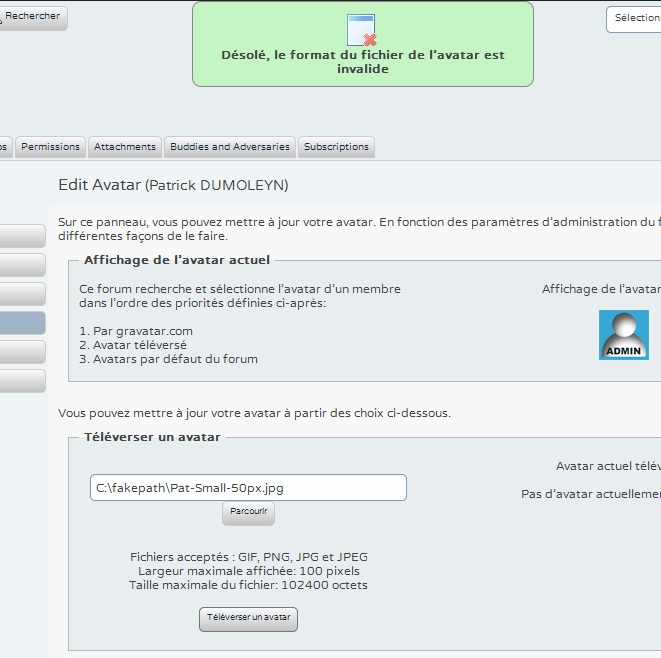
My avatar upload is rejected. This is the file attached to this post.
What’s the trouble ?
Thanks.


My avatar upload is rejected. This is the file attached to this post.
What’s the trouble ?
Thanks.


Sorry, are you talking about it being rejected on this forum? on your own forum? or both.. I have successfully uploaded it on my local working copy
Also when you say ‘rejected’, what message do you get?
What are your settings in WP Admin > Forum > Profile > Avatars

Can you translate that return message for me please? Any any other useful informartion – like avatar priority, avatar set size etc., would be useful.
The error message is : “Sorry, the avatar file format is invalid”.
The order is :
– By gravatar.com
– Uploaded avatar
– Default forum avatar
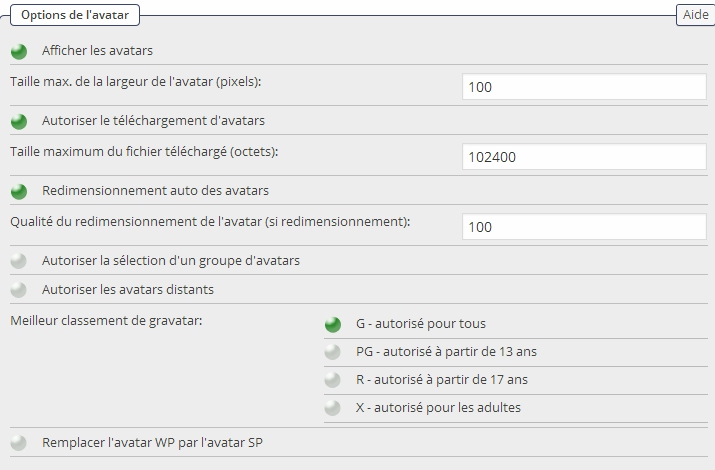
In configuration :
Maximim width : 100 px
Maximum size : 102400
Resizing : 100
Best gravatar ordering : G – allowed for anybody
Curious. What sort of file is it?
Why do you not try uploading it to your profile on this site and see what happens? Be a useful test.
By the way – that message is generated if the file being uploaded has an incorrect mime type.
Upload on this forum was successfull….. I don’t understand it does’nt work on mine….
Well – as I say – to return that message the file is failing the exif_imagetype() check which ensures the file is a proper jpg, png or gif.
If that works here then it may be a setting on your own server perhaps? Although I have to be honest and say that I do not know what that might be.
It might also be worth you checking that your php ‘tmp’ folder is correctly set up on the server. Your hosting support should be able to check this. I do not think that would trigger this particular return message but if there is a problem there it might be confused!
After spending a lot of time trying to find the problem origin, I commented the follwing lines of code in sp-ahah-profile-save.php :
/**
# check image file mimetype
$mimetype = 0;
$mimetype = exif_imagetype($_FILES[‘avatar-upload’][‘tmp_name’]);
$mimetype = exif_imagetype($uploadfile);
if (empty($mimetype) || $mimetype == 0 || $mimetype > 3) {
$message[‘type’] = ‘error’;
$message[‘text’] = sp_text(‘Sorry, the avatar file is an invalid format’);
return $message;
}
**/
And now, my avatar il correctly uploaded and displayed. I don’t understand why exif_imagetype returns an empty string !
Although commenting it out might work, I doubt it’s the source of the problem. exif_imagetype simply checks to make sure the image being uploaded holds the correct image type value, e.g .gif = 1, jpeg = 2, png = 3. SP Only supports these first 3 formats. Bypassing this I’m guessing will just allow you to upload whatever image you like as long as it is a web format (although I could be wrong).
I’m guessing you managed to use the same picture here, where you have uploaded the same image as an attachment, and also for your avatar, so there is nothing wrong with the image itself. Also the image would have been run through the same ‘# check image file mimetype’ process when you did this here..
Did you check to see if your PHP tmp folder was correctly set up as Andy suggested? Also have you checked your PHP error log?
It would be worth noting that commenting out the code is probably not the solution. Also, It will most likely revert or be overwritten the next time you have an update from SP.
The tmp directory is ok.
The Apache error log indicates this :
[Mon Sep 08 16:40:48.954010 2014] [:error] [pid 804:tid 1128] [client 31.34.57.3:63702] PHP Warning – getimagesize(C:\Program%20Files%20(x86)\EasyPHP-12.1\tmp\phpA440.tmp): failed to open stream: No such file or directory – file: /simple-press/forum/profile/ahah/sp-ahah-profile-save.php – line: 16 – function: getimagesize
, referer: http://www.aceos-93-95.fr/forum/profile
[Mon Sep 08 16:40:48.954010 2014] [:error] [pid 804:tid 1128] [client 31.34.57.3:63702] PHP Warning – getimagesize(): Filename cannot be empty – file: /simple-press/forum/profile/ahah/sp-ahah-profile-save.php – line: 16 – function: getimagesize
, referer: http://www.aceos-93-95.fr/forum/profile
[Mon Sep 08 16:40:48.954010 2014] [:error] [pid 804:tid 1128] [client 31.34.57.3:63702] PHP Warning – getimagesize(): Filename cannot be empty – file: /simple-press/forum/profile/ahah/sp-ahah-profile-save.php – line: 16 – function: spHandleShutdown
, referer: http://www.aceos-93-95.fr/forum/profile
The PHP default upload directory was C:\Program Files (x86)EasyPHP-12.1tmp.
I changed it to c:Temp and now the avatar upload is ok even with the code uncommented !!
Why ? I don’t know.
Well the warnings generated regarding sp-ahah-profile-save.php are only generated as a result of the original error, in which I would assume it was trying to access a folder that didn’t exist, or didn’t have access to. Although I’m sure someone who has a bit more experience with this side of things will enlighten us to the exact reason!
but in any case, glad you have it working
Program FIles from the C: drive is way outside of the website scope and I should imagine that access to calls like getimagesize() would never work. It seems an odd place to keep a php temp folder. But there again so does having it off of the C root.