FYI only here… just reporting a few errors from our logs apparently being thrown by missing image files in SP Plugins and Themes.
I dug up some legacy versions of the files from previous downloads, and uploaded them to the indicated directories, where sure enough, they were missing, Just thought y’all should know…
[Tue Apr 07 10:53:02 2015] [error] [client 69.19.14.30] File does not exist: /problem-with-post-edit-buttonome/tripawds/public_html/wp-content/sp-resources/forum-plugins/tinymce-richtext/resources/skins/SPlightgray/img/items.gif, referer:…
FYI: I have never used any skins for TinyMCE, just using the downloaded plugin version, fresh out of the box…
[Tue Apr 07 09:10:15 2015] [error] [client 70.198.3.27] File does not exist: /problem-with-post-edit-buttonome/tripawds/public_html/wp-content/sp-resources/forum-plugins/blog-linking/resources/images/sp_BlogLinkWhite.png, referer: http://www.google.com/
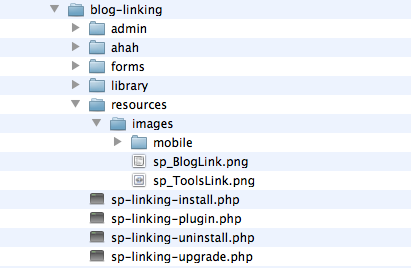
The Blog Linking pplugin download I have only includes sp_BlogLink.png but no sp_BlogLinkWhite.png so I uploaded an image of the same name i found in the Reboot images folder.
[Tue Apr 07 05:27:42 2015] [error] [client 88.198.180.41] File does not exist: /problem-with-post-edit-buttonome/tripawds/public_html/wp-content/sp-resources/forum-smile
This one is just weird, with what seems like an invalid file link and no referrer.
And finally…
[Tue Apr 07 11:11:34 2015] [error] [client 70.192.214.201] File does not exist: /problem-with-post-edit-buttonome/tripawds/public_html/wp-content/sp-resources/forum-themes/rebootkid/images/lightpack/mobile/sp_Mouse.png, referer:…
It would seem this file should exist in the parent Reboot folder, perhaps why it’s looking for it in the child directory…
Hope this helps!