Support Forum

Changing Default Search Options

27 Answers

New Answer

JW Jenn Walker
Jenn Walker
Member

That is ok, thank you.  

Ok, so now that I have a child theme, I can go into the spHeadDesktop.php file in my c-panel file manager and edit it.  

PHP is like latin to me so I am not sure what I need to change to adjust my search options.  What I would like is to have the default set to search posts and topic titles.  I am unsure what to change in this file for that to happen. 

Can you direct me?

MP Mr Papa
Mr Papa
Member

know the feeling since having to look at perl and ruby today… 😉

I gave it to you back in post 5… lol, seems like long ago doesn’t it?  change

‘searchIncludeDef’        => 1,  # 1 = content, 2 = titles, 3 = content and title (warning #3 is a resource hog)

to

‘searchIncludeDef’        => 3,  # 1 = content, 2 = titles, 3 = content and title (warning #3 is a resource hog)

its just one character change…  1 to 3…

IK Ike
Ike
Member

You’d need to do exactly as Steve described in post #5

At the top of spHeadDesktop.php, you should have a long list of items under

# == Search FORM - OBJECT DEFINITION ========

At the very bottom of the list, you should see

'searchIncludeDef'        => 1,

1 defaults to ‘Posts only’, 2 defaults to ‘Topic titles only’, and 3 defaults to ‘Posts and topic titles’. So change it to:

'searchIncludeDef'        => 3,

Should do the job!

JW Jenn Walker
Jenn Walker
Member

Great. Thank you. 

I would also like to remove the New/Updated Topics & Select Forum dropdowns.  I assume I do this in the same file.  Can you guide me to where those are at and how to remove them?

IK Ike
Ike
Member

Sure, just find:

sp_QuickLinksForum('tagClass=spControl spRight', __sp('Select Forum'));
sp_QuickLinksTopic('tagClass=spControl spRight', __sp('New / Updated Topics'));

And comment them out with a hash at the start, i.e:

#sp_QuickLinksForum('tagClass=spControl spRight', __sp('Select Forum'));
#sp_QuickLinksTopic('tagClass=spControl spRight', __sp('New / Updated Topics'));

Commenting out is recommended over removing completely, as it’s a lot easier to put them back in if you need to.

JW Jenn Walker
Jenn Walker
Member

That’s brilliant, thanks!

One more, if I may, I want to remove the permalinks icon from the posts so that members don’t see it.  Not sure if that is in this same file or not.  

IK Ike
Ike
Member

No problem.

That would be spTopicViewDesktop.php, so you’d need to bring that template in to your child theme, placed in the same ‘desktop’ folder as your spHeadDesktop.php, and the function you would want to comment out with the hash is:

sp_PostIndexPermalink('tagClass=spButton spLeft', '', __sp('The post permalink'));
JW Jenn Walker
Jenn Walker
Member

Is there anyway to change that for everyone except the administors?

MP Mr Papa
Mr Papa
Member

change what???  the permalink??

if so, change it to:

if ($spThisUser->admin) sp_PostIndexPermalink('tagClass=spButton spLeft', '', __sp('The post permalink'));
JW Jenn Walker
Jenn Walker
Member

Great, thank you!

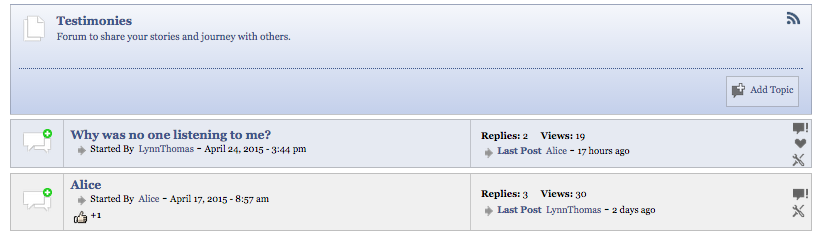
One more if I am may, when I am viewing the forum with a list of threads, I would like to remove the name of who started the thread. So the section that reads Started By: LynnThomas.  The date and time can stay, I would just like to remove the name. 

MP Mr Papa
Mr Papa
Member

from spForumViewDesktop.php, just remove this line:

                                    sp_TopicIndexFirstPost('iconClass=spIcon spLeft&icon=sp_ArrowRightSmall.png&nicedate=0&date=1&time=1&stackdate=0&stackuser=0&stackdate=0&itemBreak= - ', __sp('Started By'));

keep in mind, we keep telling you about desktop, but you may need to make similar changes in the mobile version too if you want…

JW Jenn Walker
Jenn Walker
Member

Thanks.  Is there anyway to just remove the name from this line and keep the date? 

I notice when I put a “#” in front of the line the date goes away as well. 

YS Yellow Swordfish
Yellow Swordfish
Member

Yes. If you see the article here: https://simple-press.com/documentation/codex/api/template-functions-and-the-api/display-template-functions/forum-view/sp_topicindexfirstpost/

You can decide which components to display as shown