Support Forum

Conflict with WordPress SEO plug-in

KI Kimi
Kimi
Member

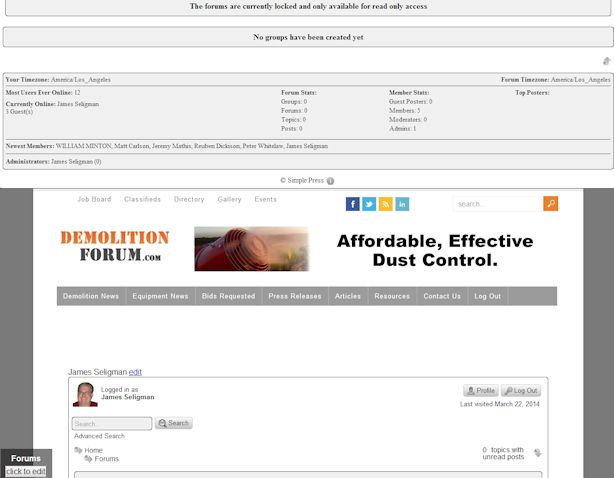
So I’ve been trying to use the WordPress SEO plug in and everything seems fine until I click on my forums and then it’s all a mess. It changes the width of the forums and the forums get duplicated, etc. Is this a known issue with the conflict and is there anything that can be done?

Any other info you need (images, etc), I can provide, just let me know.

Thanks!

15 Answers

New Answer

YS Yellow Swordfish
Yellow Swordfish
Member

I do not believe we are aware of any such display conflict with the WP SEO plugin. Images rarely help as we can not look behind them at the code source or use the web console tools. The only way to help with diagnosis is really to be able to load the actual forum page.

KI Kimi
Kimi
Member

I don’t want to change it and leave it that way while waiting for a response, so I just won’t use the plug-in for now. It was recently updated, so maybe I’ll try again and see.

Thanks.

YS Yellow Swordfish
Yellow Swordfish
Member

We were waiting for a link to the forum page as proposed so that we could take a look at it…

KI Kimi
Kimi
Member

Oh I know, but I assume you’d want it with the plugin installed. It’s fine, no biggy. Thanks anyways.

JA JA
JA
Member

WordPress SEO by Yoast?  Here is my issue:   https://simple-press.com/support-forum/sp5-general-topics/forum-page-loses-wp-theme-when-activating-wordpress-seo-by-yoast/

YS Yellow Swordfish
Yellow Swordfish
Member

OK. It looks like by some complete coincidence we have had a second, almost identical report of this just last night. Some differences but similar sort of issue. I have asked them for some further information…

JO John
John
Member

We are also have the same issue, when we active WordPress SEO, our forum is shown above the theme in full width and also within the page container.

We’re using WordPress SEO 1.5.2.5 and Simple-Pwordpress-seo-error.jpgress 5.4.1

YS Yellow Swordfish
Yellow Swordfish
Member

Go to the forum admin > integration > page and permalink admin panel. In the ‘Theme Display Options’ section try turning one of the top two options on and see if that helps when you reload the forum page. If not try the other one…

JO John
John
Member

Sorry I missed your reply. I thought I subscribed the the thread.

We have the Allow multiple loading of forum content (second one), if we use the Post Loop (top one) our forum completely disappears.

I should have said we are having this issue when we active the WordPress SEO plugin, not SP version. We’ve tried with both plugins on, one on and not the other and vice-versa, same results. 

MP Mr Papa
Mr Papa
Member

did you remove the allow multiple?  and try the force in loop options as Andy said?

are you also running the latest version of our sitemap plugin?  or not at all?

JO John
John
Member

Yes, we followed Andy’s instructions.

When the Yoast WordPress SEO Plugin is activated:

and use only Limit forum display to within post loop, our forum does not display.

When we use the Allow multiple loading of the forum content, we end up having multiple forums, one above the header as seen in our image in the previous post.

If the two Theme Display Options are used, our forum does not display.

If the Yoast plugin is deactivated and we use Allow multiple loading of the forum content, we have no issues. One of the reasons we are not using Arne’s plugin is that it is not compatible with one of our other plugins.  

We are running Wordpres SEO Version 1.5.2.5 which is the latest, and using the SP Google XML Sitemap Version 2.1.3. Currently the Yoast plugin is deactivated until we get our issue resolved.

I have this feeling that the issues are maybe being caused by our framework, which is Thesis 2.1 running a custom theme.  

JO John
John
Member

So we reached out to Thesis support, just to cover all our bases and here is their reply:

A significant portion of the HTML which is generated by the Simple Press plugin is being output inside of WordPress SEO’s meta tags, which are in the HEAD section of your forum page (in addition to being output inside the BODY tags where it rightfully belongs).

Since the conflict in this case is between two third-party plugins (which are not covered by our official support), and the issue persists regardless of the theme involved (I confirmed this myself in TwentyFourteen) then your best option for a resolution is to contact the respective developers of these plugins, inform them of this issue….

MP Mr Papa
Mr Papa
Member

wouldnt think it was thesis…   I run both on multiple sites as do many, many sp users without issue…

you have disabled the wp seo fixing of ugly permalinks correct?

you do want to limit the forum display to within the loop… not sure why that would kill the display – works on 3 sites I looked at…  perhaps when you limit the forum display to loop also makes sure the strict wp api option is enabled too…

some combination of multiple display, limit to loop and strict api is likely to get this unique situation working…

JO John
John
Member

I didn’t think so either, but like I said, just wanted to cover everything.

So we went back over looked at everything and we finally fixed it.

It looks like when we built the custom forum page, we did not have the WP Loop on the page. Once we figured that out, we added it and now we have no more issues.

Thanks guys for all the help, you pointed us in the right direction!