Support Forum

Editor Options

CO coffee
coffee
Member

After upgrading, When I go to add a new topic I don’t see the editor options at the top of the entry section, like I do here. Such as:

B I U – etc… I have tried in Firefox and chrome. Is there a setting I need to change?

I have a screen shot below for clarity. 🙂
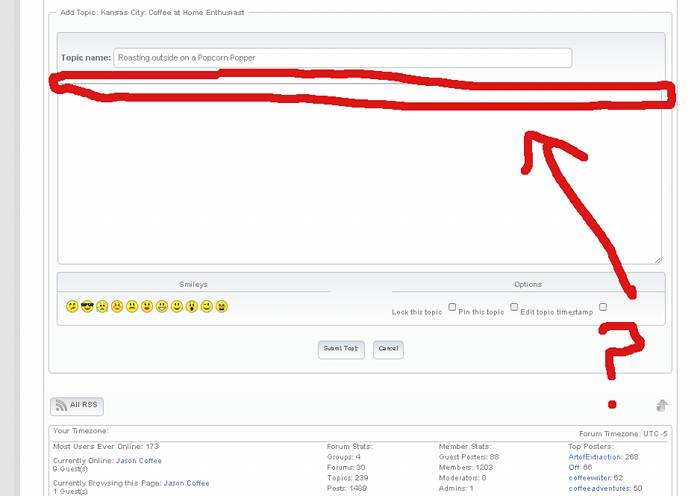
simpleforumscreenshot11.jpg

5 Answers

New Answer

BR Brandon
Brandon
Member

The editor they are using here is the TinyMCE rich text editor. It is available as an added Simple:Press plugin.

You can get it here. https://simple-press.com/download-plugins/ then see the codex using plugins on how to install.

http://codex.simple-press.com/codex/plugins/using-plugins/

CO coffee
coffee
Member

your second link takes me to a page listing my Membership sign up options…. I don’t see a tutorial on how to install plugins when I go there.

YS Yellow Swordfish
Yellow Swordfish
Member

Sorry but you will need to login to the codex at the moment, using the same credentials as this site. We are working on the single, liked login issue but it is not as easy as it sounds. We will get there!

CO coffee
coffee
Member

No I mean it totally redirects me to: https://simple-press.com/membership/?wlfrom=%2Fcodex%2Fplugins%2Fusing-plugins%2F and I don’t see an option to login, because it shows me logged in on the top right.


NEVER MIND figured it out. rofl