to work properly your email client should be set up to include the original post after the new reply… and then remove any text as directed above this line
[– To reply by email insert your text above this line – instructions below –]


to work properly your email client should be set up to include the original post after the new reply… and then remove any text as directed above this line
[– To reply by email insert your text above this line – instructions below –]

How do I do that ? Can you provide an example of what you had to do ?
On Fri, Feb 14, 2014 at 4:33 AM, Simple:Press Support wrote:
> >
an example of what?
I dont know what email client you use, so cannot tell you how to make sure the quoted email is below the reply, but it will be in the options…
As to the string, in all subscription emails (if running the post by email plugin) we add that string into the email content:
[– To reply by email insert your text above this line – instructions below –]
just testing to see how it works here.
On Fri, Feb 14, 2014 at 7:40 AM, Simple:Press Support wrote:
> >

The instructions do ask you to ‘remove all old text from ABOVE the insert line’ which, if done, will remove all of the garbage text that an email client puts there whether you want it or not. The PBE code can have no idea whatsoever whether all this is a part of your reply post or not.
I’m confused. Let me rephrase what I see and what I do not understand:
When I replied my forum, I got this test, below the reply:
—–Original Message—– From: [AppGo2Market.com] [mailto:contact@appgo2market.com] Sent: Wednesday, February 12, 2014 4:37 PM To:myemail@gmail.com Subject: Forum Post – AppGo2Market: [test]
I do not want this text on the forum, and the reply was above the relevant part, as instructed.
What I see when I reply to your forum ( my previous reply was by email), is that only my comment is being captured. Somehow, the rest is being removed automatically, as I didn’t remove it myself. Just written in reply. didn’t delete anything myself (though this was done via gmail, and previous one by outlook).
I am using bluehost hosting email service.
What I didn’t understand from your replys is:
1) Isn’t the deleting stuff below the line done automatically ?
I see it does for you, in your forum, but it didn’t happen for me in my forum.
2) I do not understand what action is required to enable that. You are not asking the users to delete themselves each email they send up to the point, are you ?
Thanks,
Ronen.
I’m sorry but I really do not understand what you are asking me… So – let’s try this a different way.
This is what I see when I receive an email from the forum… (a genuine email I just received regarding a different topic):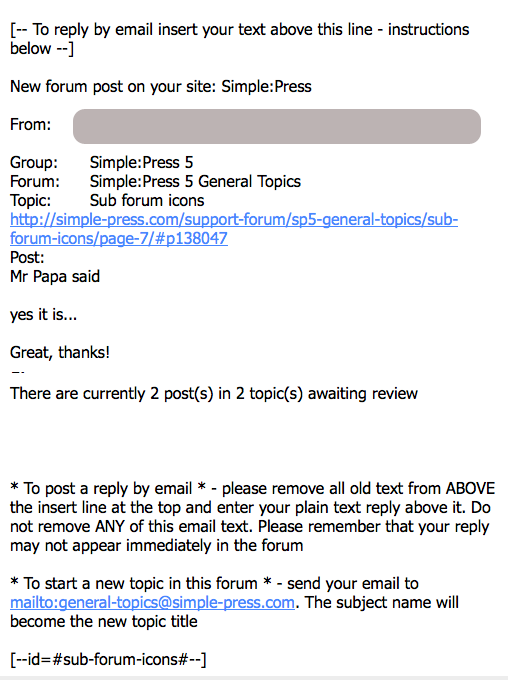
All we are saying is – write your new text ABOVE that line at the top. We suggest, when you click ‘reply’ in your email client that you remove anything that appears ABOVE it which is cruft some email clients insist on putting there and which can not be automatically removed.
