Try creating a new row with that as the name and 1 as the value. They would be the only fields you need to enter data into.
Support Forum
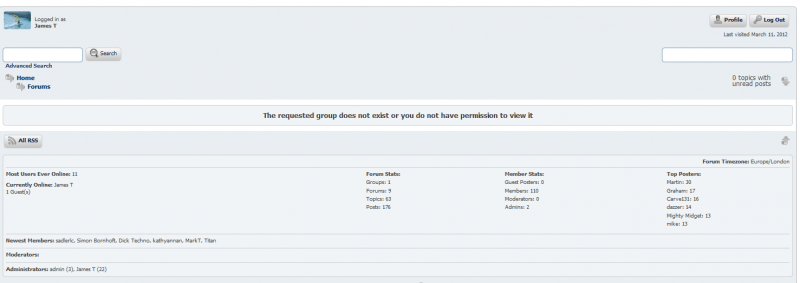
oh dear..spoke too soon. My forums page looks like this:
[Image Can Not Be Found]
and Recent Forums Posts widget shows like this:
[Image Can Not Be Found]
what have I checked?
- Integration and PermaLink Forum Dashboard page looks fine
- have tried each setting under Theme Display Options
- Posts are all still there in table wp_sfposts
- Forums are all still there in table wp_sfforums
- Storage locations are all showing as Location Found, and Write OK
any thoughts on what could be causing the display problems?
btw the forum page is here: http://www.hicklingbroad.co.uk/forums
looks like permissions issue on the sp-resources directory:
“NetworkError: 403 Forbidden – http://www.hicklingbroad.co.uk/wp-content/sp-resources/forum-themes/default/styles/default.php?color=caribbean”
“NetworkError: 403 Forbidden – http://www.hicklingbroad.co.uk/wp-content/sp-resources/forum-avatars/guestdefault.png”
“NetworkError: 403 Forbidden – http://www.hicklingbroad.co.uk/wp-content/sp-resources/forum-themes/default/images/sp_LogInOut.png”
“NetworkError: 403 Forbidden – http://www.hicklingbroad.co.uk/wp-content/sp-resources/forum-themes/default/images/sp_Registration.png”
“NetworkError: 403 Forbidden – http://www.hicklingbroad.co.uk/wp-content/sp-resources/forum-themes/default/images/sp_Search.png”
“NetworkError: 403 Forbidden – http://www.hicklingbroad.co.uk/wp-content/sp-resources/forum-themes/default/images/sp_ArrowRight.png”
“NetworkError: 403 Forbidden – http://www.hicklingbroad.co.uk/wp-content/sp-resources/forum-themes/default/images/sp_ArrowDown.png”
“NetworkError: 403 Forbidden – http://www.hicklingbroad.co.uk/wp-content/sp-resources/forum-themes/default/images/sp_Feed.png”
“NetworkError: 403 Forbidden – http://www.hicklingbroad.co.uk/wp-content/sp-resources/forum-themes/default/images/sp_ArrowUp.png”
“NetworkError: 403 Forbidden – http://www.hicklingbroad.co.uk/wp-content/sp-resources/forum-themes/default/images/sp_Information.png”
so can you go verify the permisions on sp-resources? usually 0755 but you might see what yours is and what wp-content is… they should match… want sp-resources to match wp-content (dont change wp-content)
might also need to check the owner and group of sp-resources (ie via ‘ls -la’ in ssh) and again compare to wp-content…
do you have ssh (shell) access to your server?

getting there but still an error when viewing forum home page:
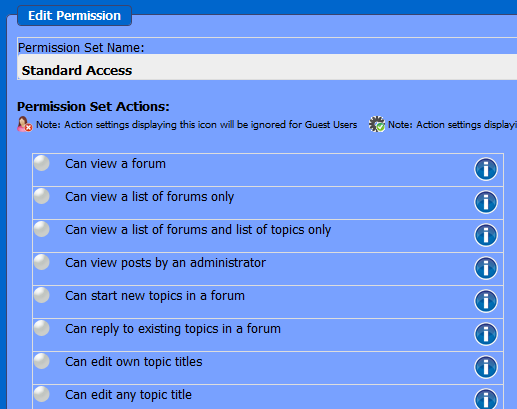
I wonder if the permissions have got all screwed – this is an example for standard access:
what should this look like?
It was a while ago (post 10 in this thread to be exact) that I said we can get past the upgrade problem but you would have to go back in and repair it afterwards. This was the bit I was talking about – the permission settings. We lost those when we skipped that section to finish the upgrade.
You can, of course, set them all up manually to get them how you want them – which is not really as big a task as it sounds. But if it is any help I can send you a SQL script that you can import using phpMyAdmin that will reset the permissions to their default values so you would then only need to tweak them.
Let me know if you would like me to send that to you and I can drop it into an email.
that sounds good. can you send me the SQL script? I hadn’t changed any of the default permissions settings before
think I’m sorted now. The script didn’t like the fact that role_actions was not a valid field in that table. also the permissions were still not appearing in the Forum admin interface so I dug out the sf-install.php script, found the bit where it set permissions for each type of user, and manually changed them in the interface. Hope that was the right thing to do?
Interesting, SO originally the column name HAD been altered by the upgrade script so the ALTER statement in my script was redundant. Removing that statement at the top of the script would then have worked.
But manual is good – just a little more tedious.
It’s been a long haul and I am sorry you had all those problems and it took so long to get it all resolved. Hopefully you are back up and good to go now.