You now what. Let’s make it easier and just cut out step 4 completely.
and step 6 – no.


You now what. Let’s make it easier and just cut out step 4 completely.
and step 6 – no.

Below is my final process. Right now I’m up to step 6. The forum looks/looked like it should be working properly, but none of my legacy forums, posts, or topics are there. But it does show all my users.
The forum and the admin pages looked complete and updated.
I investigated the sf tables in the database and found they were empty (except for the members which had all my legacy data). I then realized I have 2 databases (i realized this before, but didnt give it any attention. i thought 1 was not used) – _wp & _wp1. So, I had imported the sf tables into the _wp database, and thats when it updated correctly (but w/ only the members data). The sf tables in the _wp contained the legacy data, but the sf tables in the _wp1 database were empty (except for members). So I imported the sf tables into the _wp1 database. Now all my legacy data is in the _wp1 database and the even shows up in the forum admin. But the forum isnt showing on my forum page.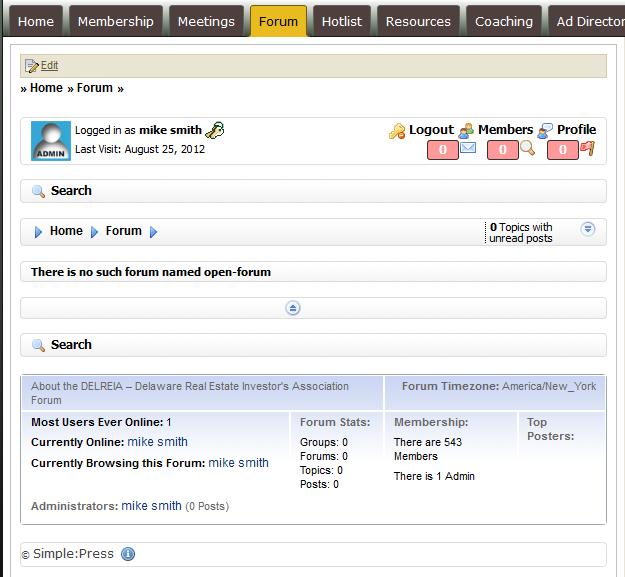
These are screenshots of my website from when the forum was updated correctly and then from when it the data was imported into the _wp1 and now isnt working currently.
1 – Deactivate V5
2 – Download V4.5.1
3 – Install V4.5.1 via FTP
4 – Restore all sf tables from V4.3.5 back-up using files that only contains sf tables via IMPORT
5 – Activate the V4.5.1
6 – Upgrade the V4.5.1 from admin. Forum should be functioning properly.
7 – Create a database back-up while on V4.5.1
8 – Deactivate the V4.5.1
9 – Activate V5
10 – Upgrade V5 from admin
11 – Delete all V4.5.1 folders
i wish somehow you could share my screen (goto meeting or something) to see all that I am talking about.


I continued on thru step 10. But the forum page and admin showed no groups or forum, but the admin page did show all the users. So, I restored the sf groups and sf forums tables, and they showed currently on the forum page and the admin. But now I’m back to this:
I am having two problems that I’m thinking may be related.
1) When I upgraded to V5, I lost my data. So I had to rebuild certain tables from a back-up. Certain tables were still in tact correctly. But some of the information in the tables isnt showing correctly on the website itself. The tables show content, and even the forum footer shows a topics and posts count. But the forum reports no topics in this forum.
2) When I try to add a new topic, I receive this error
Fatal error: Call to undefined function sf_pop_topic_page() in /problem-with-post-edit-buttonome/delreia/public_html/wp-content/themes/DELREIA_2.bkp/templates/post_title.php on line 61
The forum appears on http://delreia.com/forum/open-forum/
I’m not about to restore the sf options table
I have it working on V4.5.1
But something is wrong w/ the process to go to V5.

is your wp theme really calling that sp function? If so, try removing it as that is a 4.x function and not valid in 5.x… not even sure what you might be trying to do in that wp theme with that call…
or are you referring to something else?
interesting
i don’t know how to answer your first question. how would i find out if it is really calling that function?
and how would i remove it? would removing it have adverse affects on anything else?
look at the error message… its says the error originates in your wp theme… tells you which file too… have a look and see if its in there… is it possible its leftover change from long ago using 4.x?
Fatal error: Call to undefined function sf_pop_topic_page() in /problem-with-post-edit-buttonome/delreia/public_html/wp-content/themes/DELREIA_2.bkp/templates/post_title.php on line 61
so check that file in your theme at the referenced line number…
Here’s the section of code near the line 61
# Forum link (Paren or Child forum)
if(!empty($sfvars[‘forumslug’]) && $sfvars[‘forumslug’] != ‘all’)
{
# if showing a topic then check the return page of forum in sfsettings…
$returnpage = 1;
if(!empty($sfvars[‘topicslug’])) $returnpage = sf_pop_topic_page($sfvars[‘forumid’]);
$forumname = $sfvars[‘forumname’];
$out.= $tree.str_repeat($treespace, $xtree).'<a class=”sficon sfpath” href=”‘.$sfvars[‘forumslug’].'”>’.$arr.$forumname.'</a>’.”n”;
$xtree++;
}
How should the code read?
Well afraid I cannot really say… that is custom code that you or some predecessor of your site added… obviously we cannot add code like that to your wp theme…
It looks like its trying to do some sort of breadcrumbs display… but not sure why you need that – especially in 5.x as we already have a breadcrumb display built into our sp themes…
personally, I would remove all that code – or at least comment it out… and see if you even notice…
Sorry, its been so long in getting back to this.
In comment it out, you mean to insert <!– and –> into the code around the part of the code I dont want the site to access? I did that to the above code and the site didnt work at all.
I’ve attached the whole file.
Can you tell me what the problem is?
None of this code is good – the whole file. Not even sure what it is really trying to do either.
Bit is also not a function – it will be ‘included’ somewhere – probably on your page.php template file. See if you can find a line in that file that has the keyword ‘include_once’ and the name of the file post_title.php and cpmment that line out. The easiest way is with a double slash in front of it. So //include_once(etc… like that.
I don’t know what you mean in the ‘Bit is also not a function’
But the phrase ‘include_once’ does not appear in any of my page related files.
And why would it only affect the V5 and not the V4?
This is getting very frustrating for me and my client.
Is there anyway we could try to solve this via GoToMeeting?
what is gotomeeting??
v5 was almost a complete rewrite of v4… so things that were done in v4 wont work in v5… v4 using skins – fixed layout with css… v5 uses themes with far greater control over appearance, layout, elements and css… all data from 4.0 was carried over, but for displaying, its completely different…
the file you attached is NOT one of our files… it is not something we did or provided even with SP v4… it is something you, your client or some other agent of the client did… we are simply suggesting to remove the old non functioning v4 customization that was done on that site…
somewhere you in your theme had to invoke it with an include or require statement… Andy was suggesting you comment out (coding term) the location where you were including that file with // characters (indicates comment follows)…
Sorry, we are trying to help best we can, but it was not us that did that customization… it needs to be removed for 5.0 to work or you will get the errors you are seeing… if you want to provide us a temp wp admin account with sp admin capabilities, we could log into the site and correct the wp theme using the wp theme editor… if that works, just pm the details to yellow swordfish and myself…
GoToMeeting is an online screen sharing software tool. I was offering for us to have a ‘meeting’ where you would then be able to see my desktop and access my files to edit as you see fit to fix this. Though we would both have to be online at the same time.
Yes, I know the file I uploaded wasnt from SP. It was set-up prior to me.
And yes, I know that we were trying to comment out the old non-functioning code.
If you say a ‘require’ or ‘include’ statement is being used, I’m sure it, but I cant find it.
You and Yellow Swordfish have been wonderful is all this. Very helpful. The frustration isnt over you, its over the overall update just being so long and complicated (through no fault of your own).
I will create an admin username and password for you and PM you the info.
OK – I have a vague idea what is going on but can’t test anything directly of course.
I THINK (fingers crossed) that the attached post-title.php file should work with SP V5 and continue to do whatever it is doing now for the other pages. NOT 100% because of no testing that I can do. If it fails for any reason it will be an easy fix I believe.
Keep the old file handy somewhere just in case it is needed!