Support Forum

File Attachments problems

SP sptab
sptab
Member

Hello,

I have recently noticed 2 problems with the file attachments in posts:

– when non admin/non moderator users try to upload files of “Other Files Types”  (according to the forum configuration), the upload seem to be working, but the file isn’t created in the user’s directory on the server, and the file is not attached/linked to the user post contents after the reply is submitted. Everything works fine for the admin user without any problem.

– when editing an existing post, the Upload Attachment does not allow uploads of files from “Other Files Types”. 


The first issue seem quite recent, as there have been uploads by regular forum members since many weeks without problems.


Thank you.

22 Answers

New Answer

MP Mr Papa
Mr Papa
Member

yeah, the editing of posts was designed for images…  but I guess I can see a point to allowing it for media and attachments…  let me look into that…

on the uploading, do the users have upload file permission?  have not seen that happening, but will try to run some tests this weekend…  odd because the uploading process really does not now what type of file it is… have you tried this with media?

MP Mr Papa
Mr Papa
Member

as to the users and file uploads, are you sure?  can you please check what you have for the permission “Can download other file type attachments”?

I suspect you have that set to false…

It exists because users have requested it to only allow downloads for certain membership levels…

MP Mr Papa
Mr Papa
Member

okay, I have updated the uploader to be able to allow media and other file type uploads on edit… cannot for the life of me remember why it was done that way… but seems to work fine…

additionally, I have corrected another error with users trying to remove attachments when editing a post with them…

would appreciate it if you could give the changes a whirl for me to validate them…  you can get the changes here…

Please do NOT make the version change (the first one) so when the plugin update is pushed out, you will be sure to get the latest..

SP sptab
sptab
Member

Mr Papa said
yeah, the editing of posts was designed for images…  but I guess I can see a point to allowing it for media and attachments…  let me look into that…

on the uploading, do the users have upload file permission?  have not seen that happening, but will try to run some tests this weekend…  odd because the uploading process really does not now what type of file it is… have you tried this with media?

For the admin user, included “other file types” (actually zip files in my case) are correctly attached and displayed on the posts.

I just retried, after giving the permission the “Can download other file type attachments” to a normal user: the upload works fine and the attachment is showing on the user post. That seem to fix my #1 problem. wink 

I don’t know if it makes sense, but it would be great that future updates (for core or plugins) maintain the behavior of previous versions where new settings could default to previous values. In this particular case setting “Can download other file type attachments” to true as default would avoid this kind of surprise…. or have a warning in the changelog that this setting should be set to true in the permissions, so it works like previous version.


Regarding your patch for problem #2, I’ll check it over the week-end and will report back here.

Thanks again for your great support.

SP sptab
sptab
Member

Mr Papa said
okay, I have updated the uploader to be able to allow media and other file type uploads on edit… cannot for the life of me remember why it was done that way… but seems to work fine…

additionally, I have corrected another error with users trying to remove attachments when editing a post with them…

would appreciate it if you could give the changes a whirl for me to validate them…  you can get the changes here…

Please do NOT make the version change (the first one) so when the plugin update is pushed out, you will be sure to get the latest..

I checked revision 8394, the “other file types” upload problem is fixed, I managed to edit my test post and upload a zip file.

I also tried removing existing attached files when editing a previous post, it worked without any problem.

YS Yellow Swordfish
Yellow Swordfish
Member

Excellent news. Thanks for the test and for updating the topic.

PC phyllis crandall
phyllis crandall
Member

Please tell me where I can find the permission setting – “Can download other file type attachments”?

I do not see it and for the life of me can’t figure out where it is.

I am having similar issue – Upload Attachments was working beautifully and then all of a sudden stopped working (files are uploading – I can see them in the directory, but they are not appearing w/ the posts).

I’m troubleshooting another issue w/ yellow swordfish and went through deactivating/reactivating plugins and am wondering if I broke something. eek

BR Brandon
Brandon
Member

I would make sure you have Editor (TinyMCE – Rich Text) and File Uploader (using Plupload) both activated. Then go to their options pages and check the setup there.

You should see ‘Can download other file type attachments’ in the permissions pages for each type of access.

MP Mr Papa
Mr Papa
Member

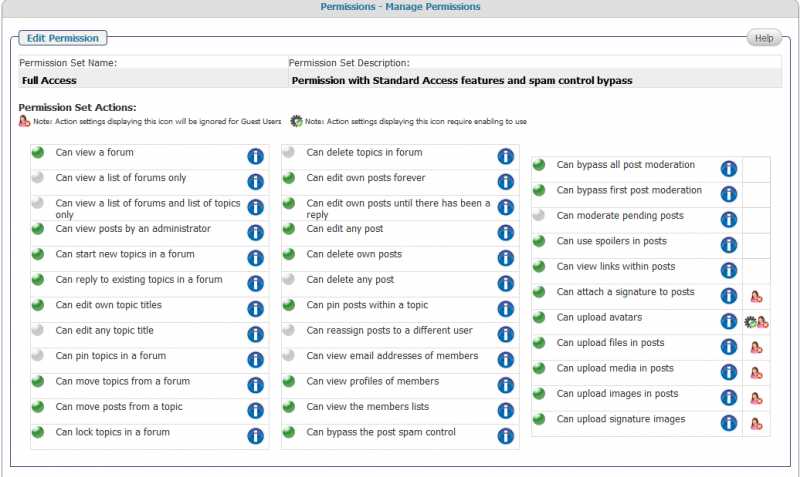
the permission can be found on forum – permissions – manage permissions…

PC phyllis crandall
phyllis crandall
Member

Hi – Yes, both TinyMCE and Plupload are activated. See screenshot of permissions here: (and I still have upload problems, even when logged in as Admin – I do get the uploader interface and it *is* uploading the files b/c I checked via FTP and can see the uploaded files in the correct folders. However, the attachments are not showing up within the posts.).

I don’t see ‘Can download other file type attachments’ –

sp-upload-attachments-issue.png
MP Mr Papa
Mr Papa
Member

Phyllis, what version of the file uploader plugin are you using?? 

also, did you make the code changes as detailed in post #4?

Also, when I added an attachment with the file uploader, it showed up in the post for me…

unfortunately, the temp account you set up for us is very limited and we cannot see hardly any of the wp or sp admin stuff…  if you could allow the account permission to have all sp admin caps on forum – admins – manage admins, it would allow us to see more of your set up…

PC phyllis crandall
phyllis crandall
Member

Hi – it’s Version 1.1.1 of plupload.

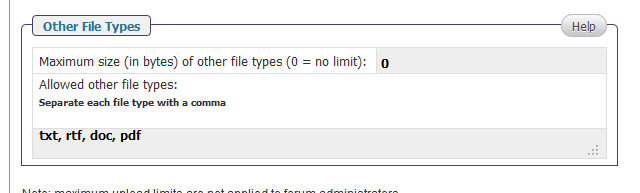
The upload works w/ images but not PDF and it’s appearing as allowed other file types in the options.

I PM’d you admin access info.plupload-options.png

MP Mr Papa
Mr Papa
Member

in which forum are you having issues uploading pdf?  not all of them the forums grant permission to upload other files… in some approved members only have read only access…  just making sure you tried in forum that has the permission…