Hey guys, my poll Found Here is not working.
I don’t even see the buttons anymore, and when buttons existed, I received reports that they didn’t work.
Please let me know what I can do… I made sure that the forum is no longer cached by nginx helper.


Hey guys, my poll Found Here is not working.
I don’t even see the buttons anymore, and when buttons existed, I received reports that they didn’t work.
Please let me know what I can do… I made sure that the forum is no longer cached by nginx helper.

have you enabled polls on the forums you want to use them??
more info: http://codex.simple-press.com/codex/plugins/our-plugins/available-plugins/plugin-polls/
I don’t even see the ability to add a NEW poll… what the heck is going on here?
This plugin is frustrating me.

You are using all kinds of caching on that page including W3 Total Cache. It will never display properly if cached because the page is dynamically generated. And it may well explain all of these anomalies you are mentioning. The Simple:Press forum page needs to be free from all page content caching so you do need to exclude it from ALL sections of W3TC and any other caching that may be in operation.
If – after that – there is still a display/button issue then it will probably be best to create an account for us so we can log in to the site to inspect that poll you linked to at the top of the thread.
There are page caching exceptions in effect for all of these pages… and any subpage of the forum. Is there any way that you can show me directly that they are being cached, or is it just caching “ads” that are popping up somewhere?
I’m mainly going on the report at the end of the html source being generated for that page:
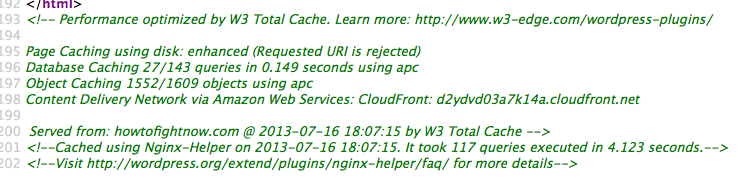

I have completely disabled both plugins. Are you still seeing the same thing?
looks like w3tc is gone… but looks like still some server side caching
<!–Cached using Nginx-Helper on 2013-07-10 03:38:20. It took 48 queries executed in 0.337 seconds.–><!–Visit http://wordpress.org/extend/plugins/nginx-helper/faq/ for more details–>
so I see a couple of votes on that poll… are there still difficulties?
Yes, there are still difficulties. I disabled every plugin on the site, and the thing still didn’t work. I have w3 total cache on right now because my server is getting mobbed. However, even with it disabled and nginx deleted from my site entirely, I was still experiencing the same dead poll.
I can’t even figure out how to make a new one.
you can have w3tc on with the forum, you just need to tell it to ignore the wp page the forum is on… if you leave the forum cached, users will not see the latest data and you will have all sorts of js/jquery issues…
On your site now, I see the page caching is disabled – good… but the database caching, cdn and other caching still running…
hard for us to debug when its cached…
btw, what kind of hosting do you have? most ever online in the forum is 140 users… that is not a large number and most hostings should handle that kind of traffic across all of a wp site including the forum…
Everything is hosted on linode. I dont think that the forum page is cached… it’s in my exclusions. Are you absolutely 100% certain that it is being cached?
With w3tc there is an exclusion list for each cache type. Did you enter the exclusion for each cache type or just on the page caching exclusion.
That’s a great question. I will add the same exception to the other caching types, but the issue persisted when w3 was off entirely. That said, even though I DELETED nginx helper, it’s still showing me a caching message in the page source. My developer sent this support request to the mod of the nginx forum if this helps clarify:
This HTML comment has persisted through full server reboots, nginx restarts and reloads, and a move to different physical hardware. It’s almost as if the HTML itself has actually been modified.
Nginx does have the
module enabled, but we’re not doing anything with it — W3TC is handling caching here.
Here’s the Nginx config: https://gist.github.com/williejackson/defdbaba9c71572abc6e
Please advise and/or email me directly, and thanks very much for your help in advance.
Can I also refer you back to my earlier post (#5) where I did suggest you set up a member account for us so we can inspect the polls page you linked to.
Please PM credentials to both myself and to ‘Mr Papa’. Please include in the PM a link to your site, a link to this thread and brief reminder of the problem. And one of us will take a look at that page.