Well, haven’t had an urgent plea for help here in a while…so here goes!
After thoroughly testing a new WP theme and SP theme on our dev install, I go to overhaul our live site this morning and encounter this issue after updating to SP 555, with all current SP plugins and the current version of Reboot with my child theme that I have working fine on the test site.
I go to change the themes on my live site and neither the Tablet nor Mobile SP Theme tabs will load. Clicking their link only jumps the page to the top. So, I cannot change my SP theme for Mobile and Tablet. The Desktop theme changed fine.
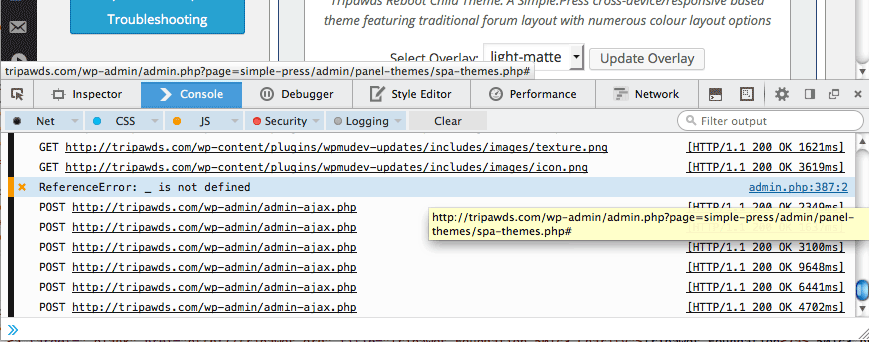
The FF error console identifies one issue with spa-themes.php that seems related (ReferenceError: _Is not defined), see screenshot.
I deactivated and reactivated SimplePress, uploaded the theme files again, and the issue persists.
Can I just change this via the db for now? I found the wp_1_sfoptions table entries below. Is it possible to just copy the current theme data to the other two?
sp_current_theme
a:5:{s:5:"theme";s:9:"rebootkid";s:5:"style";s:13:"rebootkid.css";s:5:"color";s:11:"light-matte";s:6:"parent";s:6:"Reboot";s:5:"icons";s:9:"lightpack";}
sp_mobile_theme
a:9:{s:6:"active";b:1;s:5:"theme";s:13:"stacked-c553b";s:5:"style";s:11:"stacked.php";s:5:"color";s:11:"brown-cream";s:6:"parent";s:0:"";s:11:"usetemplate";b:0;s:12:"pagetemplate";s:26:"page-full-width-forums.php";s:7:"notitle";b:1;s:5:"icons";s:0:"";}
sp_tablet_theme
a:9:{s:6:"active";b:1;s:5:"theme";s:17:"default-custom553";s:5:"style";s:11:"default.php";s:5:"color";s:11:"brown-cream";s:6:"parent";s:0:"";s:11:"usetemplate";b:0;s:12:"pagetemplate";s:26:"page-full-width-forums.php";s:7:"notitle";b:1;s:5:"icons";s:0:"";}
Any other suggestions are desperately needed, and greatly appreciated.
Thank you!