Support Forum

Fourm loading at page top and in website page

ZS Ziggy Smith
Ziggy Smith
Member

Hi folks all,

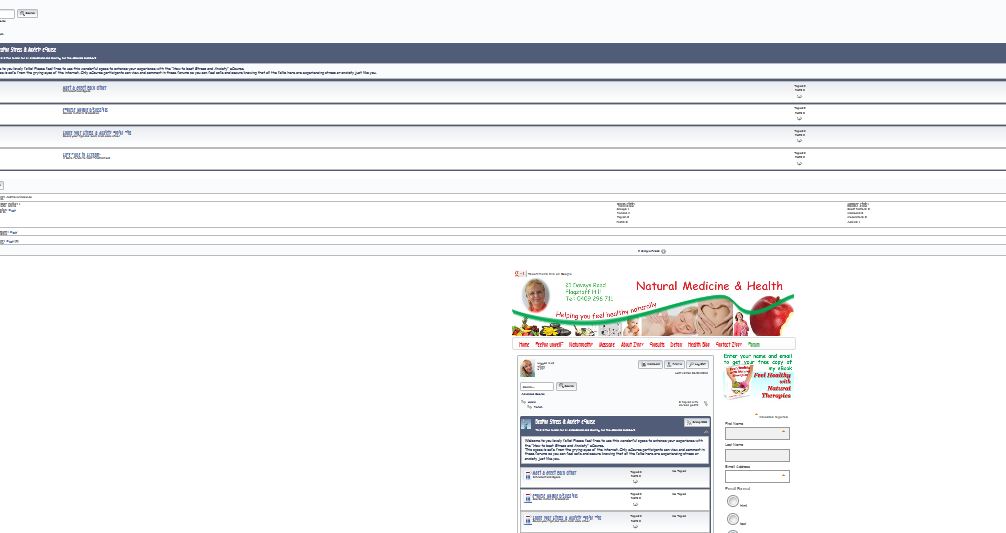
I’ve just installed Simple Press but it is loading at the top of my page and also inside the webpage lower down as well. I just want it to be inside my webpage and not above it also. (Screenshot attached) Can anyone advise what I need to do please?

Many thanks

Ziggyfaulty-page.JPG
10 Answers

New Answer

YS Yellow Swordfish
Yellow Swordfish
Member

Try this: http://codex.simple-press.com/codex/faq/troubleshooting/i-am-seeing-multiple-forums-displayed/

ZS Ziggy Smith
Ziggy Smith
Member

Thank you Yellow Swordfish. I tried all combinations of those two and now I have it displaying once but actually abover the header. So it sits way over the banner at the top of the website. Any ideas aout how I can bring it dwn and actually into the website  content area under the header?
Nice to see it displaying once now but just nbot where it should be! :)

YS Yellow Swordfish
Yellow Swordfish
Member

Try turning on the ‘strict WP API’ option. If that doesn’t do it then there will be a need to investigate just what your theme – or maybe another plugin – are doing that is so special…

ZS Ziggy Smith
Ziggy Smith
Member

Yep, tried that and it makes the forums dissapear entirely. Ooops! :)

I’m running 2010 Weaver as the site theme. I’ll go and one by one switch off all the other plug ins to see if theres a conflict. If I still cant get it fixed, I will need a professional to go into the site and fix it for me I think. Fingers crossed. Will check the the plug ins now :) Thanks :)

YS Yellow Swordfish
Yellow Swordfish
Member

If you can try a brief switch to the Wp default theme which is a more likely candidate.
You would, I would think, know if there is a plugin actively adding content to pages…

ZS Ziggy Smith
Ziggy Smith
Member

Ok, so I swapped to the default WP theme andit still threw the forums up above the header so still no luck. So now I’m going to one at a time deactivate each plug in to see if that’s the culprit. :)

ZS Ziggy Smith
Ziggy Smith
Member

Found the culprit. WP Open Graph was the plugin casuing the rpoblem. All fixed now. Thanks for the ideas Yellow Swordfish, appreciated :)

Smiles, Ziggy

YS Yellow Swordfish
Yellow Swordfish
Member

Does that mean you do not need this plugin? If so then great of course.
I would advise you to check the settings again on the page and permalink admin panel as if you do not need those options turned on it will be best to set them off.