Support Forum

Hide Member Group from Profile

TA TS Admin
TS Admin
Member

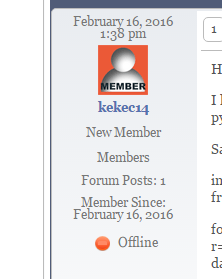
I attached screenshot of a post profile from my forum. How do I remove the line that says “Members”. I want to hide this to clean up the profile look. Also, when users have a badge, the profile also displays the badge name and icon. Thanks.

3 Answers

New Answer

MP Mr Papa
Mr Papa
Member

no screenshot attached…  are you sure you are talking about profile? if so, you can adjust whatever you want in the profile template of your sp theme…  if using a popup profile, it would be spProfilePopup.php… if full page profile, it would be spProfileShow.php…

for example, to remove the line

                    sp_UserMembership('', $spProfileUser->memberships);

when you say badge, what do you mean?  forum rank badge, special rank badge or usergroup badge??  all will support what you want, you just need to tell it to hide the title… so

                    sp_UserForumRank('', $spProfileUser->rank);

would become

                    sp_UserForumRank('showTitle=0', $spProfileUser->rank);

as always, before editing any of our themes, we recommend making a child theme for it so you dont lose any changes if you update the theme…

TA TS Admin
TS Admin
Member

Thanks for the info. I eventually did find spTopicView.php and added the showTitle=0 switch.

I found: https://simple-press.com/support-forum/sp5-general-topics/how-to-hide-user-group-label/

Not sure why my attachement didn’t post. I tried to include the screenshot. (Isee – I didn’t press start upload).

members.PNG

Thanks again.

MP Mr Papa
Mr Papa
Member

Ah, so you didnt mean profile… but the user info area of each post on topic view… so yes, the template file is spTopicView.php…

to get rid of their memberships (ie Members), you would remove

                                    sp_PostIndexUserMemberships('tagClass=spPostUserMemberships spCenter');