Support Forum

How To Hide User Group Label

JI jim
jim
Member

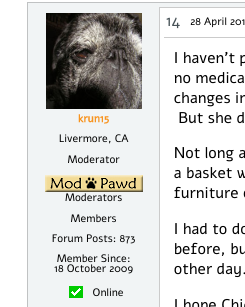
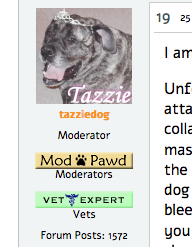
So… I realized I had multiple badges displaying for some users, and sorted that out after realizing I had set up some Special Ranks long ago. Now I’m still noticing a couple issues related to Ranks and/or User Groups.

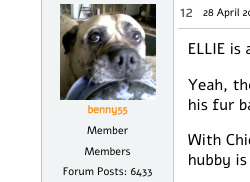
1. Is there a way to hide the default User Group displayed for Members?

Please see the first screenshot of user “benny55” below. Note how the rank is showing Member, and the User Group immediately below that shows Members. Perhaps this could be resolved better by asking it this way…

2. Is there a way to hide the label for Ranks or User Groups?

I notice no option in the User Groups admin nor on the Ranks pane to hide the label. Could this be considered feature request? That would certainly allow me to address my concern above and with the other two user screenshots, where I don’t need it to say “Moderator” right above the Moderators badge—or when the badge that is self-identified without need for a label, like our “Vet Experts”

Confused yet?

I’d rather not hack the theme (Reboot/Child) to just remove the rank display, since I do use one Special Rank to identify certain members…guess I’m just looking for a way to hide the name/label of Ranks and Groups, even if there is no badge.

Thanks in advance for any feedback!
Screen-shot-2015-04-28-at-4.55.19-PM.pngScreen-shot-2015-04-28-at-4.44.18-PM.pngScreen-shot-2015-04-28-at-5.07.27-PM.png

6 Answers

New Answer

MP Mr Papa
Mr Papa
Member

to remove or change the display, you will need to change the template tag used…

see:  https://simple-press.com/documentation/codex/api/template-functions-and-the-api/display-template-functions/topic-view/sp_postindexuserspecialrank/

show_title argument can be used to turn off the rank title… its what we do here…

I think that is the majority of what you wanted to do…

it also appears you might be getting a regular forum rank there?  if so, you read:  https://simple-press.com/documentation/codex/api/template-functions-and-the-api/display-template-functions/topic-view/sp_postindexuserrank/

can you can either remove the template function or use the hideIfSpecialRank argument to just not show if the user has a special rank…

If you dont want to do the standard way of changing  your template file, you might be able to hide with css…  just inspect and see if you can get specific enough… at moment, I dont have a test config that shows your situation…  but hiding via css is a bit hacky…

JI jim
jim
Member

Thanks! Guess I do have to edit the template, and should be able to figure that out..

In the meantime, what’s wrong with this picture? wink

/reboot/templates/desktop/spTopicViewDesktop.php:136-138

sp_PostIndexUserRank('tagClass=spPostUserRank spCenter&showBadge=0&hideIfSpecialRanl=1');
sp_PostIndexUserSpecialRank('tagClass=spPostUserSpecialRank spCenter');
sp_PostIndexUserMemberships('tagClass=spPostUserMemberships spCenter&show');

FYI: This is from a current Reboot v.1.0.2 download.

Looks like first line should be &hideIfSpecialRank (Perhaps this is why the UserRank is still displaying in my template!)

And the third, &showBadge or &showTitle … no?

JI jim
jim
Member

FYI: Found same error in reboot/templates/mobile/spTopicViewMobile.php 

sp_PostIndexUserRank(‘tagClass=spPostUserRank spRight&showBadge=0&hideIfSpecialRanl=1′);

IK Ike
Ike
Member

That’s embarrassing! 🙂 You are right, although I think as standard sp_PostIndexUserMemberships shouldn’t be set to show badge or title.

The good news is, you know how to put it right! I’ll get a ticket open to get this fixed up.

Thanks for spotting!