Support Forum

Images in posts not enlarging

66 Answers

New Answer

YS Yellow Swordfish
Yellow Swordfish
Member

It is looking much better in that only a single version of jQuery and the correct version of both this and the jQuery Ui libraries are now being loaded on the forum page. The site is still throwing serious errors however as the points I made in my last post above are still valid and that is that the theme is creating some inline script and addressing jQuery in a non-WP standard way. at least i believe it to be the theme.

I am seeing this error and also an error in prettyPhoto which I an guessing is bundled with the WP theme.

But let’s move on to talk about these images. As I also said in my last point the urls to these images are malformed. I am looking at the second link you provided way back at the start of this thread where there are two links to docs.google.com (i.e., not actually attachments held on your server) and the urls that have been pasted in are incorrect. It almost looks like they have been given a closing quote in some way and they could probably do with the post being edited so they can be looked at and corrected. But it would be useful to know exactly what was pasted in to have caused this.

MA max99
max99
Member

Ok, on those links, they were made by a forum user, so I don’t know what the issue was, might be user error.


The other issue (more concerning) is that I also added an image myself (that I could open/enlarge during preview mode):

http://www.excellernen.de/excel-forum/excel-fragen/ergebnisfindung/


Re: the errors in the scripts, is there anyway you could be more descriptive, so I can go ahead and fix. I really don’t know what to do. Would love to fix those serious errors you mentioned.


Thanks,
Max

MP Mr Papa
Mr Papa
Member

I think the main js issue right now resides with pretty photo as andy says… but I think its simpler… its now loaded before jquery is so the errors…

can you please reload your latest code where jquery is loaded?  should be the loading of pretty photo right there too if I remember…

MA max99
max99
Member

I had to enable the hybrid-connect plugin again. So we’ll see the googleapi call again.


Re: the theme which calls for the prettyphoto.jquery, here’s the header.php:


Thanks!


<!DOCTYPE html PUBLIC “-//W3C//DTD XHTML 1.0 Transitional//EN” “http://www.w3.org/TR/xhtml1/DTD/xhtml1-transitional.dtd”>

<html xmlns=”http://www.w3.org/1999/xhtml” <?php language_attributes(); ?>>

<head profile=”http://gmpg.org/xfn/11″>

<meta http-equiv=”Content-Type” content=”<?php bloginfo(‘html_type’); ?>; charset=<?php bloginfo(‘charset’); ?>” />

<!– <meta name=”keywords” content=”<?php echo get_option(‘simplo_keywords’); ?>” /> –>

<!– <meta name=”description” content=”<?php echo get_option(‘simplo_description’); ?>” /> –>

<title><?php wp_title(‘«’, true, ‘right’); ?> <?php bloginfo(‘name’); ?></title>

<link href=”https://fonts.googleapis.com/css?family=Lora:400,700,400italic|Oswald:400,700″ rel=”stylesheet” type=”text/css”>

<link rel=”stylesheet” type=”text/css” media=”all” href=”<?php bloginfo( ‘stylesheet_url’ ); ?>” />

<link rel=”icon” href=”http://www.excellernen.de/favicon.ico” type=”image/x-icon”>

<link rel=”shortcut icon” href=”http://www.excellernen.de/favicon.ico” type=”image/x-icon”>

<?php if(get_option(‘simplo_style’)!=”){?>

<link rel=”stylesheet” href=”<?php bloginfo(‘template_directory’); ?>/css/<?php echo get_option(‘simplo_style’); ?>” media=”screen” />

<?php }else{?>

<link rel=”stylesheet” href=”<?php bloginfo(‘template_directory’); ?>/css/blue.css” media=”screen” />

<?php }?>

<link href=”<?php bloginfo(‘template_directory’); ?>/css/ddsmoothmenu.css” rel=”stylesheet” type=”text/css” />

<link href=”<?php bloginfo(‘template_directory’); ?>/css/prettyPhoto.css” rel=”stylesheet” type=”text/css” />

<script language=”JavaScript” type=”text/javascript” src=”<?php bloginfo(‘template_directory’); ?>/js/cufon-yui.js”></script>

<script language=”JavaScript” type=”text/javascript” src=”<?php bloginfo(‘template_directory’); ?>/js/DIN_400-DIN_700.font.js”></script>

<script language=”JavaScript” type=”text/javascript” src=”<?php bloginfo(‘template_directory’); ?>/js/ddsmoothmenu.js”></script>

<script language=”JavaScript” type=”text/javascript” src=”<?php bloginfo(‘template_directory’); ?>/js/jquery.prettyPhoto.js”></script>

<script type=”text/javascript”>

<?php if(get_option(‘simplo_cufon’)!=”no”):?>

Cufon.replace(‘#topMenu ul li a’,{hover: true})(‘#colRight h2’)(‘.reply’,{hover:true})(‘#footer h2’);

<?php endif ?>

</script>

<script type=”text/javascript”>

$(document).ready(function(){

//DROPDOWN MENU INIT

ddsmoothmenu.init({

mainmenuid: “topMenu”, //menu DIV id

orientation: ‘h’, //Horizontal or vertical menu: Set to “h” or “v”

classname: ‘ddsmoothmenu’, //class added to menu’s outer DIV

//customtheme: [“#1c5a80”, “#18374a”],

contentsource: “markup” //”markup” or [“container_id”, “path_to_menu_file”]

});

// PRETTY PHOTO INIT

$(“a[rel^=’prettyPhoto’]”).prettyPhoto();

});

</script>

<?php wp_head();?>

</problem-with-post-edit-buttonead>

<body <?php body_class(); ?>>

<!– BEGIN MAIN WRAPPER –>

<div id=”mainWrapper”>

<!– BEGIN WRAPPER –>

<div id=”wrapper”>

<!– BEGIN HEADER –>

<div id=”header”>

<div id=”logo”><a href=”<?php bloginfo(‘url’); ?>/”><img src=”<?php echo get_option(‘simplo_logo_img’); ?>” alt=”<?php echo get_option(‘simplo_logo_alt’); ?>” /></a><p style=”margin: -95px 0 0 80px;”> <?php echo get_settings(‘blogdescription’);?></p></div>

<div id=”topSocial”>Folgen Sie Uns:

<?php if(get_option(‘simplo_delicious_link’)!=””){ ?>

<a href=”<?php echo get_option(‘simplo_delicious_link’); ?>” title=”Google Plus”><img src=”<?php bloginfo(‘template_directory’); ?>/images/google_plus_32.png” alt=”Google Plus” /></a>

<?php }?>

<?php if(get_option(‘simplo_facebook_link’)!=””){ ?>

<a href=”<?php echo get_option(‘simplo_facebook_link’); ?>” title=”Join Us!”><img src=”<?php bloginfo(‘template_directory’); ?>/images/facebook_32.png” alt=”Facebook” /></a>

<?php }?>

<?php if(get_option(‘simplo_twitter_link’)!=””){ ?>

<a href=”<?php echo get_option(‘simplo_twitter_link’); ?>” title=”Follow Us!”><img src=”<?php bloginfo(‘template_directory’); ?>/images/twitter_32.png” alt=”Twitter” /></a>

<?php }?>

<?php if(get_option(‘simplo_linkedin_link’)!=””){ ?>

<a href=”<?php echo get_option(‘simplo_linkedin_link’); ?>” title=”YouTube”><img src=”<?php bloginfo(‘template_directory’); ?>/images/youtube32.png” alt=”YouTube” /></a>

<?php }?>

<a href=”<?php bloginfo(‘rss2_url’); ?>”><img src=”<?php bloginfo(‘template_directory’); ?>/images/rss_32.png” alt=”RSS Feed” /></a>

</div>

<div id=”topSuche”>

<script>

(function() {

var cx = ‘011031864178790338416:iieo-xc-um4’;

var gcse = document.createElement(‘script’);

gcse.type = ‘text/javascript’;

gcse.async = true;

gcse.src = (document.location.protocol == ‘https:’ ? ‘https:’ : ‘http:’) +

‘//www.google.com/cse/cse.js?cx=’ + cx;

var s = document.getElementsByTagName(‘script’)[0];

s.parentNode.insertBefore(gcse, s);

})();

</script>

<gcse:search></gcse:search>

</div>

</div>

<!– END HEADER –>

<!– BEGIN TOP MENU –>

<?php if ( function_exists( ‘wp_nav_menu’ ) ){

wp_nav_menu( array( ‘theme_location’ => ‘main-menu’, ‘container_id’ => ‘topMenu’, ‘container_class’ => ‘ddsmoothmenu’, ‘fallback_cb’=>’primarymenu’) );

}else{

primarymenu();

}?>

<!– END TOP MENU –>

<div id=”link_ads”>

<?php echo show_ad_camp_1(); ?>

</div>

<!– BEGIN CONTENT –>

<div id=”content” class=”twocols”>

MP Mr Papa
Mr Papa
Member

well with that googleapi call in there, you will likely have problems no matter what we do here…  but, try changing:

<script language=”JavaScript” type=”text/javascript” src=”<?php bloginfo(‘template_directory’); ?>/js/jquery.prettyPhoto.js”></script>

to

wp_enqueue_script(‘pretty-phoot’, get_template_directory_uri(), array(‘jquery’));

which makes it dependent on jquery for loading…

this is why theme and plugin authors REALLY need to use the wp api…

MA max99
max99
Member

I removed the pretty photo line, b/c the code you gave me needed to wrapped in something no? Based on what you copied, just showed up as is on the frontend.


Also, I turned both wt3c and the other plugin calling the googleapi completely off. Did not make a difference. Clicking on “enlarge image” still doesn’t work and shows “javascript null”

MP Mr Papa
Mr Papa
Member

the null is quite normal:  http://codex.simple-press.com/codex/faq/troubleshooting/i-am-seeing-javascriptvoidnull-for-a-browser-link/

Andy alluded to this earlier, but that image is not being served from your server… its cached over at amazon s3 it seems…  and its corrupting the image links…

<a ‘1’);”=”” ‘auto’,=”” ‘794’,=”” ,=”” onclick=”spjPopupImage(‘http://oi43.tinypic.com/dpbk2e.jpg” title=”a title” href=”javascript:void(null)”>
<img width=”100″ src=”http://oi43.tinypic.com/dpbk2e.jpg”>
<img alt=”” src=”http://www.excellernen.de/wp-content/sp-resources/forum-themes/default/images/sp_Mouse.png”>
</a>

note how the a tag is dorked up…  so something, is messing with image links…  any plugins you have come to mind?  the CDN maybe?

MA max99
max99
Member

Screen-Shot-2013-05-30-at-10.09.10-PM.pngScreen-Shot-2013-05-30-at-10.08.24-PM.png


Not sure that’s it really, just did a test post with an image hosted on my server (via CDN. Did w/ and w/o CDN). Same problem.

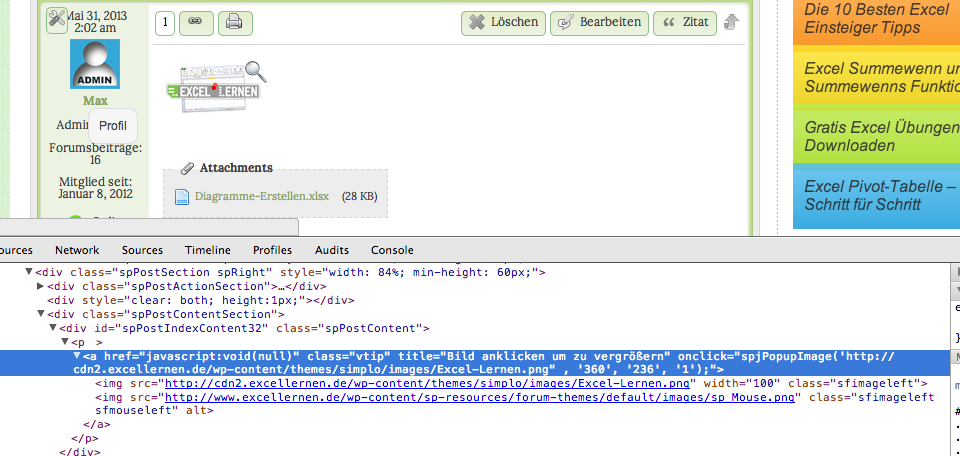
Maybe this’ll help, the post preview worked fine, the final post didn’t. I’ve attached images of the firebug results for both the working and non-working ones 


MP Mr Papa
Mr Papa
Member

can you give me a direct link to one that does not have the url link screwed up?  everyone I just looked at (granted only 3 or 4 – hard to find) had it screwed up…

MA max99
max99
Member

Would love to but that’s the issue I’ve been referring to. In preview mode it isn’t screwed up, but once posted it’s screwed up. Since I can’t send you link of the preview, would be easiest if you just posted a test post with an image inserted.

YS Yellow Swordfish
Yellow Swordfish
Member

I know you keep repeating that the post preview worked but this actually is just another very good pointer that you have a plugin of some sort messing with image and link urls via the WordPress filter API. Our Post preview does not include any filters that may have been set up whereas the whole forum page display does (at page level not individual forum post level). So if there is a plugin that in some ways wants to manipulate links, images or other urls embedded in post content then the display of a forum page is when you would see the result.

Sp – again I am afraid – do you have any WP plugins active that may be messing in some way with links, urls, images or a combination of all of them?

MA max99
max99
Member

Ok I will check, but I’m just answering Papa’s question asking for a link to a working image. Sorry to say that the answer is in the preview :)


Checked, disabled pretty much every plugin, didn’t work. Also, in the post I copied in the code for both the working and non-working version I didn’t see any issues with the URL being messed up in either one.

Can’t one of you guys just post a test post and see if you can identify why the preview works?

MP Mr Papa
Mr Papa
Member

okay, lets step back…  long thread, so apologies if repeat…

did we temp switch to the wp theme and it work?  if not can we try that?

if not a theme issue, can we disable other plugins and see if working?  is so, then reenable one by one til it breaks…

As Andy said, the preview is run totally through SP… We dont allow the theme or other plugins to affect teh content…  when its posted though, they get their chance… so we need to narrow down who is corrupting the url links for the images…

MP Mr Papa
Mr Papa
Member

hmmm.. did you edit that? ;)

did explain why preview works…  because only we touch the content…  when posted, themes and plugins can hook into the wp content filter and change things up…