How can I increase the font size used in the body of forum posts?
Thanks!


How can I increase the font size used in the body of forum posts?
Thanks!


Hey Ryan,
Using Default you would need to change the value of $PostContentFontSize in the overlay. As standard it’s set to 90% so an increase of 5% will probably be what you want, although you might have to experiment.
As always we recommend making a child theme to preserve the change, and seeing as it’s just an overlay it should be pretty straight forward.
Hope that helps!
Thanks Ike. Here is what I’m seeing when I look at my default.php stylesheet.
#spMainContainer .spTopicPostSection .spPostSection .spPostContentSection .spPostContent {
border-top: <?php echo($postBorder); ?>;
color: <?php echo($postColor); ?>;
margin: 5px 0;
padding: 10px;
font-size: <?php echo($PostContentFontSize); ?>;
line-height: 1.2em;
}
Where would you recommend I add the increase of 5%?
Thanks!
The font-size there uses the PHP variable $PostContentFontSize to control things – which is called from the overlay.
If you are using sky-blue overlay for example, open it up from:
sp-resources > forum-themes > default > styles > overlays > sky-blue.php
Then locate $PostContentFontSize and you can then change the value from 90% to 95%.
As this would be part of a child theme, you’d need to have the entire sky-blue.php overlay in your child themes styles > overlays folder for it to work, so once edited you can then save it to your child theme folder.
Hope that helps!
Thanks.
I located $PostContentFontSize within the silver.php overlay and increased it to 95%. I didn’t see any visible changes so I increased it again to 125%. I cleared my page cache and am still not seeing any changes.
$PostContentFontSize =’125%’;
$spMainContainerSmall =’90%’;
$spListTopicRowName =’90%’;
$spListForumRowName =’85%’;
$spListPostLink_spListLabel =’85%’;
$UserInfo =’80%’;
I’m also not using a child theme. I know you guys preach using a child theme but I haven’t yet gotten around to setting one up.
Any ideas on this one?
I will PM you login credentials. I just want the font to be a little bit larger because a lot of my forum users are older in age.
I appreciate the help!
Hey Ryan,
No problem, I’ve taken a look and am a little confused. First off are you sure you’re using Default and not CSS-Only?
If CSS-Only, it doesn’t use overlays so the stylesheet will have a 90% rule instead of a variable. I tried to check but your SP needs updating (Which we also highly recommend!).
Could you also try clearing the combined CSS cache.
Also just to add, have you thought about possibly trying out the Font Resizer plugin? It allows anyone to adjust the font size up and down throughout the entire forum.
Thanks for taking a look. Much appreciated!
I think I am using Default with the Silver Overlay based on what I see when I go to Forum > Themes (see below)
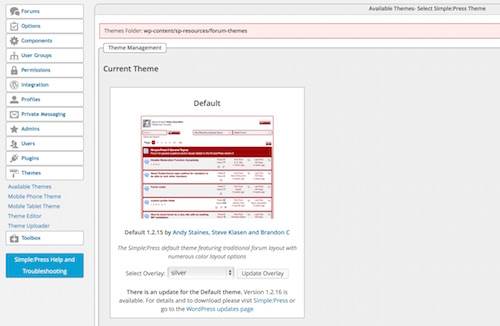
How do I clear the combined CSS cache?
The font resizer plugin sounds great but I’m super confused about how to access it. I’ve been using Simple Press for years now and I remember being able to just download plugins as I needed them, but it looks like I now need to purchase plugins individually or as bundles?
I know I need to update Simple Press but I recall losing a lot of customizations the last time I updated, and I know a child theme will help prevent that from occurring based on what I’ve read here in the forum.
Is there a tutorial for how to setup a child theme?
Thanks again for the insight!

I am going to leave Ike to continue to actual issue support but – you can reset the CSS cache in the forum admin > toolbox > housekeeping. Run the task there then clear the browser cache as well and then reload SP to see if it was just a caching issue.
Thanks!
I was able to reset the combined CSS cache and the font size increased to 125% which is the value I had given to $PostContentFontSize.
This was a bit large so I went back in and edited the $PostContentFontSize to 95% as orginally recommended. However now when I clear the combined CSS cache and after clearing my browser cache the font size appears to remain at 125%.
I’m sure I’ll get this squared away in time. Thanks for the help.
At least you have found the right part to edit. Glad you got it working.. ish!
The rest definitely sounds like a cache issue be that either local or within WP.