
Support Forum

Insanely paranoid about 4.4.5, wanted to check I got this right.

ST Staggered
Staggered
Member

Really excited to use 5.0 after you guys have been working on it for so long. HOWEVER, my spideysense has demanded I get proper clarification on the upgrade process, since it appears to require that I delete files.

So step one, no real issues:


But it’s step two I really want to check. You really want me to fire up FTP and delete this bad boy?
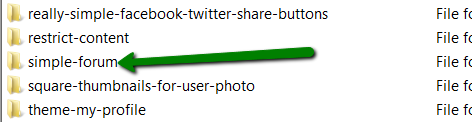
 

steptworeally.png


Then after that I go back to FTP upload 5.0>activate>install as per usual. 

Sorry to ask for the hand hold but deleting brings out the *twitch* in me *gibber*

3 Answers

New Answer

YS Yellow Swordfish
Yellow Swordfish
Member

yes – you will need to delete the old plugin files. follow these instructions:

http://codex.simple-press.com/codex/installation/upgrading/upgrading-version-4-5/

however – new SP plugins will need to be uploaded via ftp in the first instance – all of which can be downloaded from the V5 download page. Just download and install the ones you need.

ST Staggered
Staggered
Member

Woo-hoo! Thanks YS. So far, so good. I suspect that the codex page could just do with a touch of clarification around which files to delete. The thing that threw me is that there are some separate folders outside of the Simple-Press forum folder which contain profiles, etc. It’s not clear whether you wanted us to delete these too. Even a screenshot would be great. 

Likewise the new Codex doesn’t have the info on how to make a backup. I guess it’s because you’re still copying content over from the wiki but maybe it’s a good one to start with 🙂

Thanks again. 

YS Yellow Swordfish
Yellow Swordfish
Member

Backups are really outside of the SP province. Outside of the WordPress province really. Anyone with a website should have a backup regime in place – it is most prudent to do so. At the very least I would recommend using the tools your host probably provides. If that is cpanel, for example, there are options there to make both full-site backups and separate database backups including the option to download them when made so they are not just stored on the same server as the site which – it is fails would take the backups with it!
Trusting your host to make them and maintain regular backups is most unwise as many people find out!