Support Forum

inserting a picture error

KC kevin calvelli
kevin calvelli
Member

hey i am getting an error after I insert a picture and click on it ….the error says check file path and the topic doesnt stay. ummm help

24 Answers

New Answer

MP Mr Papa
Mr Papa
Member

going to need some more to go on…

what do you  mean by inserting picture?  are you using the file uploader plugin and uploading an image?  or are you using the editor and inserting link to external picture? or other?

can you explain further what “topic doesn’t stay” means??

can you give us the exact wording of the error message?  and maybe a screen shot…

the exact steps to try to replicate would be useful too…

thanks!

KC kevin calvelli
kevin calvelli
Member

ok i see its a two fold problem im an main admin and none of my posts stay …….and when using the editor and inserting link to external picture and the file uploader plugin it give this popup window m4dgaming says file path is wrong or missing…….the forums has been working for over a year……im ready to maybe uninstall completely and the sp database to install fresh …….what do you think?

KC kevin calvelli
kevin calvelli
Member

ok members are saying they can see my threads and topics but i cant see what i posted

MP Mr Papa
Mr Papa
Member

we have no facility for delaying posts showing up… sounds like perhaps you are running a caching plugin or server cache?

KC kevin calvelli
kevin calvelli
Member

And what about the images giving a pop up saying wrong pathway

MP Mr Papa
Mr Papa
Member

look back at post #2… I asked for more information on it… you havent given us much to go on…

KC kevin calvelli
kevin calvelli
Member

OK so now I’m getting error when setting up the link …blog link….and image ….only error I see in the logs are August 25, 2015 12:18 am | spaErrWarning | 4 | php


file: /m4dgaming.com-80/htdocs/wp-content/sp-resources/forum-plugins/blog-linking/library/sp-linking-blog.php
line: 153
function: trigger_error
Warning | Invalid error type specified


August 24, 2015 5:32 pm | spaErrError | 3 | database


file: /var/www/m4dgaming.com-80/htdocs/wp-content/sp-resources/forum-plugins/blog-linking/sp-linking-plugin.php
line: 148
function: sp_update_blog_link
error: You have an error in your SQL syntax; check the manual that corresponds to your MariaDB server version for the right syntax to use near ‘AND post_index=1’ at line 1

UPDATE wp_sfposts SET post_content=’McGuinness just created a new blog post“Exile Mod Arma 3 Hype!”‘ WHERE topic_id= AND post_index=1


May 17, 2015 8:09 pm | spaErrError | 2 | database


file: /var/www/m4dgaming.com-80/htdocs/wp-content/plugins/simple-press/admin/library/ahah/spa-ahah-multiselect.php
line: 25
function: spa_page_msbox_list
error: Table ‘m4d_pos.sftempmembers’ doesn’t exist

SELECT * FROM sftempmembers WHERE display_name LIKE ‘%le1t%’ LIMIT 0, 100

May 17, 2015 8:09 pm | spaErrError | 2 | database


file: /var/www/m4dgaming.com-80/htdocs/wp-content/plugins/simple-press/admin/library/ahah/spa-ahah-multiselect.php
line: 24
function: spa_get_query_max
error: Table ‘m4d_pos.sftempmembers’ doesn’t exist

SELECT COUNT(*) AS user_count FROM sftempmembers WHERE display_name LIKE ‘%le1t%’

KC kevin calvelli
kevin calvelli
Member

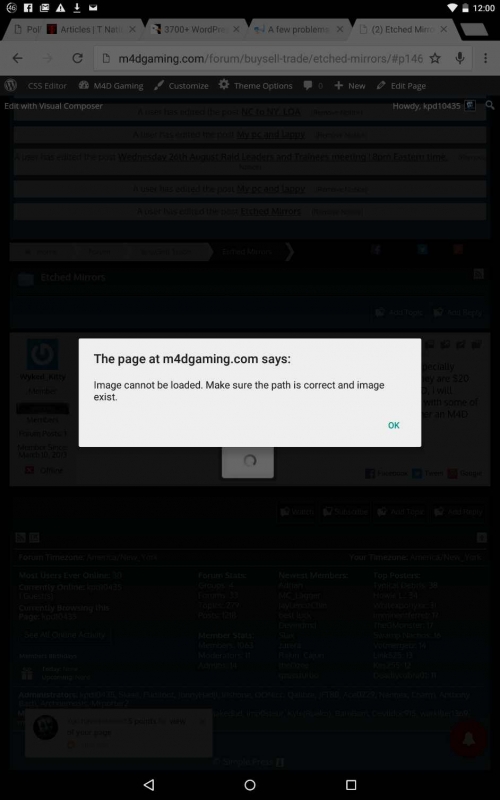
IMG_20150826_001033.jpgThis is what is said when you click on a link or image from attachment , embed images 

MP Mr Papa
Mr Papa
Member

error when setting up the link

is this in the tinymce editor?  can you walk us through how you are doing that?

sounds and looks like perhaps another plugin trying to do something??  have you tried similar with default wp theme?  and then with other plugins disabled?

more worried about the warning in yellow than the other ones…this is a blog post?  and then a linked forum topic?  and what is the problem?  the image in the linked forum topic?  what is the url to that image?

KC kevin calvelli
kevin calvelli
Member

I will try default theme tonight and deactivate plugins ……….I am using the tinymce also the image path I can not find after I insert it I keep getting the error in that picture I posted

MP Mr Papa
Mr Papa
Member

the pic you showed was from a popup of sorts…  you should be able to get the image url by inspecting the element in your browser…

KC kevin calvelli
kevin calvelli
Member

With the tinymce I put the url first line then the words of what I want then pick new window

MP Mr Papa
Mr Papa
Member

not understanding… so you are trying to link to an external image??   that is what tinymce will want you to do there…  so you must know the url…   and if it exists… right?

you wont use tinymce to upload an image from your computer… that is what the file uploader plugin is…

so a bit confused…  perhaps a step by step account of what you are doing…