Support Forum

Invalid database query error and can't create forum

DO dogsday
dogsday
Member

Hi there,

I’m looking to move a large forum over to SP and am creating a test environment to check functionality.

On installation with demo content, I’m getting an ‘Invalid database query’ error on the front end.. http://dailyphoto.co.uk/forum/ and in the admin, when I try and add a forum to a group, I’m getting a ‘New forum creation failed’ error.

I’ve installed SP version 5.7.5.2 running on WP 4.9.2

Any pointers to get me going would be much appreciated.

Cheers

DD

18 Answers

New Answer

YS Yellow Swordfish
Yellow Swordfish
Member

Odd. You clearly should not see any problem on a brand new install…

Can you go to the forum admin > toolbox > error log and report any SQL errors that are shown? include any php errors as well. Note these are all shown in pink.

DO dogsday
dogsday
Member

Thanks for the fast response. There are quite a few. Should I post them all here?

For example…

July 10, 2018 10:12 am | spaErrError | 1 | database


file: /mnt/target04/367543/367570/www.dailyphoto.co.uk/web/content/wp-content/plugins/simple-press/forum/database/sp-db-statistics.php
line: 200
function: spdb_table
error: Table ‘367570_DP16DbWP1.wp_sfforums’ doesn’t exist

SELECT * FROM wp_sfforums ORDER BY group_id

YS Yellow Swordfish
Yellow Swordfish
Member

No that will do… that one is bad enough! You are missing one of the most important tables!

So – some questions before going further.

  1. Is this a completely NEW and first time install of SP?
  2. If NO – i.e., it has been installed before but not used – was it properly uninstalled before (as opposed to simply being deactivated)?
  3. If YES – were no error messages shown during the install?
  4. If YES – do you have any sort of security plugin or restriction on being able to create new database tables?
DO dogsday
dogsday
Member

Thanks.

answers to your questions:

1 – completely new, 1st time install
2 – NA
3 – No error messages on install, it counted through the steps and the last one was the successful install message.
4 – Not that I’m aware of. I have successfully installed other plugins on this test domain that require database tables to be created.

4b – However, just to test, I have subsequently installed SP as new install on another domain, same host, and that too has the same front end error and inability to create a forum, so there may be a restriction somewhere. Any suggestions what to look for or update?

Cheers
DD

YS Yellow Swordfish
Yellow Swordfish
Member

Curious. Failing to create a table is a most uncommon experience. In fact I am not sure it has happened before.

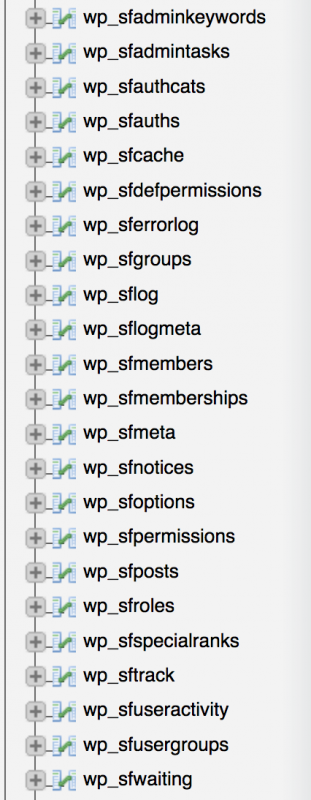
if you have access to the database – i.e., via phpMyAdmin for example – could you take a quick look at the table listing? All SP tables are prefixed with ‘sf’ (after the WP prefix of course). it would be useful to know if they are really there – especially the table ‘sfforums’.

If sfforums table IS there can you highlight it so that it lists structure and then click on the ‘Operations’ menu item at the top. This will show a page that includes a ‘Table Maintenance’ menu listing. If it comes up then click on ‘check table’ and see what the feedback is…

DO dogsday
dogsday
Member

Thanks.

Seems like there are loads of tables with ‘sf’ but no ‘sfforums’. Here’s a screenshot…sftables.png

Cheers

DD

YS Yellow Swordfish
Yellow Swordfish
Member

You are missing two tables and you have no idea how confused I am by this!

If I give you the SQL statement to create them are you comfortable running the SQL from phpMydmin?

That also has the benefit of reporting a problem if there is one and, perhaps, solving the mystery.

DO dogsday
dogsday
Member

That makes two of us confused. Especially as it’s the same on the second test site that I installed.

I’m limited in technical knowledge but not daft enough to try something that I don’t understand. I have a colleague who is very competent so I’d defer to him if what you suggest is beyond me.

Thanks for your ongoing support. It’s really appreciated.
DD

DO dogsday
dogsday
Member

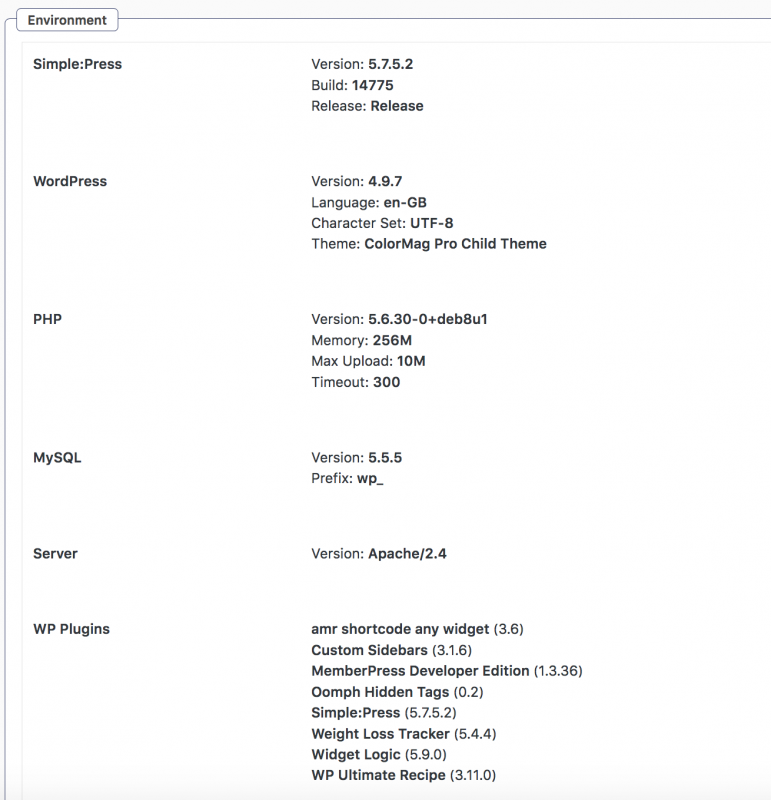
If it helps, here’s the environment.

Plugins are unique to this test site, not the other.

Environment.png
YS Yellow Swordfish
Yellow Swordfish
Member

It is, actually, very simple using phpmyadmin. If you run it – select the correct database so you have a listing of the tables in the main window and then select the ‘SQL’ menu option along the top.

Then in the input window you get, simply paste the SQL command and click on the ‘Go’ button beneath.

There are two tables missing so the following two commands should create them depending on the reason they were not created in the first place. Hopefully this may become apparent!

So – for sfforums table:

CREATE TABLE `wp_sfforums` (
`forum_id` bigint(20) NOT NULL AUTO_INCREMENT,
`forum_name` varchar(200) COLLATE utf8mb4_unicode_ci NOT NULL,
`group_id` bigint(20) NOT NULL,
`forum_seq` int(4) DEFAULT NULL,
`forum_desc` mediumtext COLLATE utf8mb4_unicode_ci,
`forum_status` int(4) NOT NULL DEFAULT '0',
`forum_slug` varchar(200) COLLATE utf8mb4_unicode_ci NOT NULL,
`forum_rss` mediumtext COLLATE utf8mb4_unicode_ci,
`forum_icon` varchar(50) COLLATE utf8mb4_unicode_ci DEFAULT NULL,
`post_id` bigint(20) DEFAULT NULL,
`topic_count` mediumint(8) DEFAULT '0',
`forum_rss_private` smallint(1) NOT NULL DEFAULT '0',
`post_count` mediumint(8) DEFAULT '0',
`parent` bigint(20) NOT NULL DEFAULT '0',
`children` mediumtext COLLATE utf8mb4_unicode_ci,
`forum_message` mediumtext COLLATE utf8mb4_unicode_ci,
`post_id_held` bigint(20) DEFAULT NULL,
`post_count_held` mediumint(8) DEFAULT '0',
`forum_icon_new` varchar(50) COLLATE utf8mb4_unicode_ci DEFAULT NULL,
`topic_icon` varchar(50) COLLATE utf8mb4_unicode_ci DEFAULT NULL,
`topic_icon_new` varchar(50) COLLATE utf8mb4_unicode_ci DEFAULT NULL,
`keywords` varchar(256) COLLATE utf8mb4_unicode_ci DEFAULT NULL,
`forum_disabled` smallint(1) NOT NULL DEFAULT '0',
`topic_icon_locked` varchar(50) COLLATE utf8mb4_unicode_ci DEFAULT NULL,
`forum_icon_locked` varchar(50) COLLATE utf8mb4_unicode_ci DEFAULT NULL,
`topic_icon_pinned` varchar(50) COLLATE utf8mb4_unicode_ci DEFAULT NULL,
`feature_image` varchar(50) COLLATE utf8mb4_unicode_ci DEFAULT NULL,
`last_topic_id` bigint(20) NOT NULL DEFAULT '0',
`topic_icon_pinned_new` varchar(50) COLLATE utf8mb4_unicode_ci DEFAULT NULL,
PRIMARY KEY (`forum_id`),
KEY `group_id_idx` (`group_id`),
KEY `forum_slug_idx` (`forum_slug`),
KEY `post_id_idx` (`post_id`)
) DEFAULT CHARSET=utf8mb4 COLLATE=utf8mb4_unicode_ci;

and for sftopics;

CREATE TABLE `wp_sftopics` (
`topic_id` bigint(20) NOT NULL AUTO_INCREMENT,
`topic_name` varchar(200) COLLATE utf8mb4_unicode_ci NOT NULL,
`topic_date` datetime NOT NULL,
`topic_status` int(4) NOT NULL DEFAULT '0',
`forum_id` bigint(20) NOT NULL,
`user_id` bigint(20) unsigned DEFAULT NULL,
`topic_pinned` smallint(1) NOT NULL DEFAULT '0',
`topic_opened` bigint(20) NOT NULL DEFAULT '0',
`topic_slug` varchar(200) COLLATE utf8mb4_unicode_ci NOT NULL,
`post_id` bigint(20) DEFAULT NULL,
`post_count` mediumint(8) DEFAULT '0',
`post_id_held` bigint(20) DEFAULT NULL,
`post_count_held` mediumint(8) DEFAULT '0',
PRIMARY KEY (`topic_id`),
KEY `forum_id_idx` (`forum_id`),
KEY `topic_slug_idx` (`topic_slug`),
KEY `user_id_idx` (`user_id`),
KEY `post_id_idx` (`post_id`)
) DEFAULT CHARSET=utf8mb4 COLLATE=utf8mb4_unicode_ci;

Just click the raw code button – select and copy from each of the above one by one, – and paste into th SQL window and click on Go…

DO dogsday
dogsday
Member

Thanks for the code.

Ran the first and got an sql error…
#1709 – Index column size too large. The maximum column size is 767 bytes.

Not tried the second

Best wishes
DD

YS Yellow Swordfish
Yellow Swordfish
Member

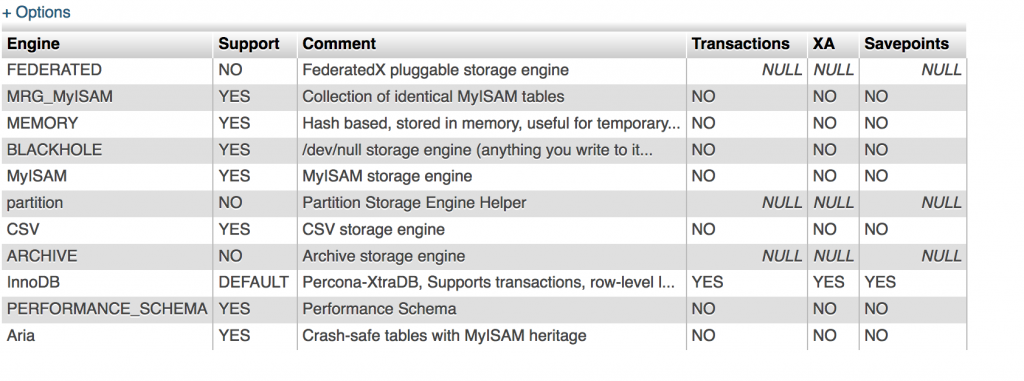
Ah – curiouser and curiouser… I am learning something new but am still surprised that this is a unique occurrence. Can you tell me what engine type you are using? By default – MySQL is usually installed using the MyISAM engine. But I suspect you may have switched to the InnoDB engine. Might be useful information…

Anyway – can you try this version for the sfforums table. You will note that all I have changed here is removing the collation data. This is probably best as it will then inherit from your database.

CREATE TABLE `wp_sfforums` (
`forum_id` bigint(20) NOT NULL AUTO_INCREMENT,
`forum_name` varchar(200) NOT NULL,
`group_id` bigint(20) NOT NULL,
`forum_seq` int(4) DEFAULT NULL,
`forum_desc` mediumtext,
`forum_status` int(4) NOT NULL DEFAULT '0',
`forum_slug` varchar(200) NOT NULL,
`forum_rss` mediumtext,
`forum_icon` varchar(50) DEFAULT NULL,
`post_id` bigint(20) DEFAULT NULL,
`topic_count` mediumint(8) DEFAULT '0',
`forum_rss_private` smallint(1) NOT NULL DEFAULT '0',
`post_count` mediumint(8) DEFAULT '0',
`parent` bigint(20) NOT NULL DEFAULT '0',
`children` mediumtext,
`forum_message` mediumtext,
`post_id_held` bigint(20) DEFAULT NULL,
`post_count_held` mediumint(8) DEFAULT '0',
`forum_icon_new` varchar(50) DEFAULT NULL,
`topic_icon` varchar(50) DEFAULT NULL,
`topic_icon_new` varchar(50) DEFAULT NULL,
`keywords` varchar(256) DEFAULT NULL,
`forum_disabled` smallint(1) NOT NULL DEFAULT '0',
`topic_icon_locked` varchar(50) DEFAULT NULL,
`forum_icon_locked` varchar(50) DEFAULT NULL,
`topic_icon_pinned` varchar(50) DEFAULT NULL,
`feature_image` varchar(50) DEFAULT NULL,
`last_topic_id` bigint(20) NOT NULL DEFAULT '0',
`topic_icon_pinned_new` varchar(50) DEFAULT NULL,
PRIMARY KEY (`forum_id`),
KEY `group_id_idx` (`group_id`),
KEY `forum_slug_idx` (`forum_slug`),
KEY `post_id_idx` (`post_id`)
);

Fingers crossed!

DO dogsday
dogsday
Member

Thank you.

that seems to have worked fine. It returned a comment that the table was empty. Looking at the schema, there is now a table called WP-sfforums.

Please could you send updated for the other table too?

I can’t find the information that you request regarding the engine. We are hosting with LiquidWeb, previously Rackspace Cloud, and they went through a database update last year to debian(?) from memory. Happy to dig around a bit more.

Thanks for your continued help
DD