Support Forum

Is there any way to enable embed tags on the forum?

KV kvr28
kvr28
Member

mingle utilized embed tags for the forum and it wan’t until I found a plug in where the videos would auto embed, so quite a few of our older posts where the embed tags were utilized, the posts show up as blank, I have been working through the posts removing the embed tags, was just wondering if there was a easier way to do this? thank-you

19 Answers

New Answer

MP Mr Papa
Mr Papa
Member

sorry, can you elaborate on what you mean by embed tags? do you mean shortcode? oembed? html tag? maybe a short example, be sure use the code editor…

KV kvr28
kvr28
Member

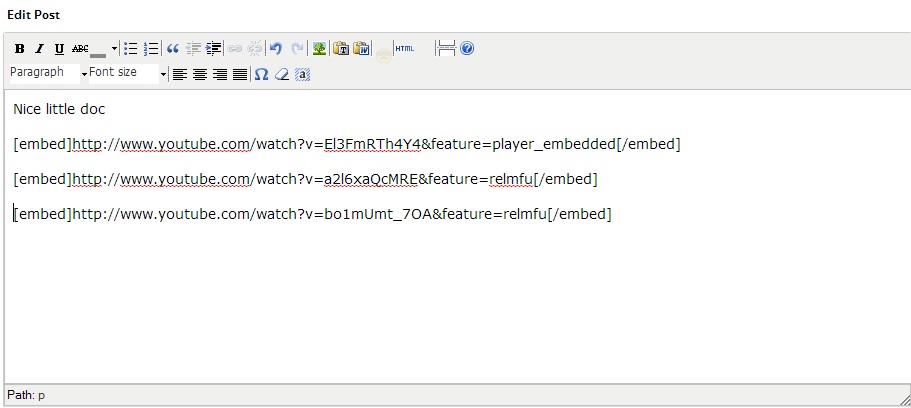
I wasn’t sure if I was using the right term, like this Mr Papa

embed.jpg
MP Mr Papa
Mr Papa
Member

no need to embed… just paste the url…  and wp oembed will handle the embedding automatically…

KV kvr28
kvr28
Member

that works now, but I’m talking about the old threads I imported from the other forum that needed the embed codes, they are still in place so now those posts just show as blank, I was wondering if there was a way the codes that are in the old posts can work, so I don’t have to manually remove the codes

MP Mr Papa
Mr Papa
Member

So what happens to the them???   embed is an allowed html tag…   might edit one of the posts and make sure they are html tags vice html entities (ie & lt; minus the space)…  use the tinymce code button to look at the underlying raw text…

YS Yellow Swordfish
Yellow Swordfish
Member

Not sure Steve noticed but the problem there is that these are bbCode ’embed’ tags and our bbCode parser does not support ’embed’ simply because it is not needed.

Off-hand I can only think of cavalier and sledgehammer ways of getting rid of all instances (like editing the database content as a text file) but let me try a couple of things this morning. If I find anything I will report back.

YS Yellow Swordfish
Yellow Swordfish
Member

OK – try this….

You need to add some code to the spFunctions.php file of the Simple:Press theme that you are using. This can be found in the /templates folder of the theme.

add the following code before the closing php tag at the bottom (that is the ?>). It is IMPORTANT that there is NO white-space or new lines after that closing tag so be careful. And use a plain text editor. Right try this:

[ – Ok removed by me as it is not going to show what is, in effect, a stripped tag – I will email it to you instead ]

You can paste it but be careful to note that that second parameter in those two lines of code is NOT a double quote but two single quotes. See if that helps.

KV kvr28
kvr28
Member

you my friend are brilliant, thanks yellow, works perfect, now I need to create a custom theme so I don’t lose it with a update. Question about that, so say I make a custom theme with this change and SP updates as well as the themes, will my custom theme with the changes still work with the updated SP? 

Also, when themes do get updated, would it make sense to add this function to the default themes?

YS Yellow Swordfish
Yellow Swordfish
Member

Excellent news. Glad I could help.

making a custom theme is the best solution. We will never update or try and update a custom theme folder. If there are really important changes that (rarely) we feel should also be applied to user’s custom themes then we do publish a codex article of all changes so they can make up their own mind whether to adopt or not.

The other alternative is to put the code in your WordPress theme functions.php file but you have the same issue there unless you are already using a personally customised WP theme.

KV kvr28
kvr28
Member

actually, that’s a good idea, I think my theme has a custom php file where I can add, I will have to look, it was either this one or the last one

MP Mr Papa
Mr Papa
Member

doh!  yup, read html tags but didnt see the bbcode part.. rolleys

KV kvr28
kvr28
Member

Yellow, could you send this to me again? I had edited our custom theme with it and we no longer use the theme any more and I can’t find your original e-mail for the life of me, thank-you