Support Forum

Issue with edit for admin and moderators

BS bjj scout
bjj scout
Member
simplepress-error.PNG


When viewing a member post while logged in, there’s buttons for editing, deleting and tools pane.


As shown in the screenshot below: the tools icon doesn’t highlight from the post view but does on the group view. 

Also hitting the edit button opens a new tab instead of editing the post. 


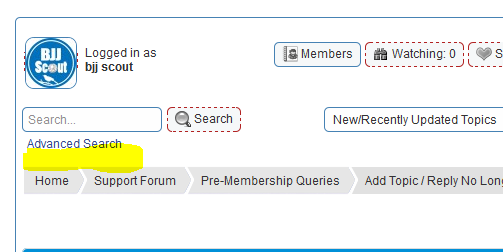
Finally, I would like to add a Google custom search bar below the “advance search” in the forum header.


Thanks

20 Answers

New Answer

IK Ike
Ike
Member

Hey,

Sorry can you elaborate on what you mean by ‘doesn’t highlight’, do you mean you can’t click it? It does look like it’s sitting behind text, but that could be due to the width of the forum as it looks quite narrow, and could also be due to a z-index problem inherited from the WP theme.

Have you got a link to your forum? It’s possible if buttons are behaving strangely that there is a conflict going on of some type. If you know how to use the console, are you getting any errors?

As for the Google search, I’m not sure what methods there are of adding the search to your forum. Do Google provide the search in a widget? Do they have a line of code for you to add? Would need to know more on that one I’m afraid.

BS bjj scout
bjj scout
Member

Yes, what I meant is that the icon isn’t clickable.

Google provides a javascript code similar to that of adsense.


Also hitting the edit button opens a new window instead of editing the thread or post. 

YS Yellow Swordfish
Yellow Swordfish
Member

Probably a javascript conflict with something else you have active. If you know how to use the browser console then you can look for any errors and report them back here so we can discuss. Or – we don’t mind taking a look if you can give us a link to your forum page and as long as guests can see the forums…

BS bjj scout
bjj scout
Member
donw-here.PNG

 Then about how to add Google custom search box at the highlighted area.

I mean https://www.google.com/cse

YS Yellow Swordfish
Yellow Swordfish
Member

Did you find the culprit?

As to your google search… Simple:Press is template driven, just like WordPress, so it is easy to change and move template display functions about.

In this case you would need to look at the spHead.php display template which can be found n the /templates folder of the Simple:Press theme you are using. If you find the call to the search form which probably looks something like:

sp_SearchForm($searchForm);

then you can put your own code after that to display something below it. Needs to be proper PHP code or HTML if you break out of the php block.

As always we recommend that you create your own SP child theme or custom theme so that any customisation is not lost during a future update.

BS bjj scout
bjj scout
Member

Hello sir,

I got the search button to work but having problem making all links by a post member group appear as text link instead of hyperlink. 

Is there any way to make all links appear as text link instead of hyperlink?

MP Mr Papa
Mr Papa
Member

there really isnt a way to disable that…  you can probably use a filter to keep it from happening… are you familiar with using wp filters?  can guide you through it…  are you using a custom theme?

BS bjj scout
bjj scout
Member

I’m using a custom theme and won’t mind if all new link goes as text link instead of hyperlink.

The old links shouldn’t be affected though

YS Yellow Swordfish
Yellow Swordfish
Member

I have to be honest and say I am noit totally sure what you are asking for here…

‘text link instead of hyperlink’ suggests that you just don’t want links to have any special styling – i.e., like an underscore. Is that what you mean? Can you elaborate…?

MP Mr Papa
Mr Papa
Member

believe when a user posts a url in a post, it gets made clickable… that is, the url text is converted to a hyperlink…

the user desires just the plain text url – not converted to hyperlink..

as I mentioned, if you are able to add a standard WordPress hook to a custom sp theme, this can be accomplished…  its only 3 or 4 lines of code…  but before posting it, just wanted to make sure you were willing to do that…

as to child theme, see:  https://simple-press.com/simplepress-version-5-5-child-themes/

as to custom theme, see:  https://simple-press.com/documentation/codex/themes/theme-basics/creating-a-theme/

BS bjj scout
bjj scout
Member

Sure thing sir, I’ll be willing to do it.

I don’t mind if every other person is stopped from posting links except admin and moderators. 

YS Yellow Swordfish
Yellow Swordfish
Member

If all you really want to do is prevent people from posting links in their forum posts then go to the permission set that your users utilise and turn off the permission ‘Can create links in posts’.. Leave this option turned on for the permissions being used by your moderators and admins get full permissions at all times.

BS bjj scout
bjj scout
Member

I’ll prefer the code to display links in text. Eg. A user drops http://www.google.com it should remain as a text instead of getting hyperlinked automatically. 

Or will setting such permission allow users to drop text link without getting them hyperlinked? 

YS Yellow Swordfish
Yellow Swordfish
Member

Try adding the following code to your spFunctions.php file in the /templates folder of the SP theme you are using. Note you must add this exactly as it appears here. Using the raw code button and then copying and pasting should work OK and you could use the theme editor admin panel provided by Simple:Press to make the edits with.

add_filter('sph_save_links_filter', 'remove_links_save', 1, 3);
function remove_links_save($content, $original, $charcount) {
    global $spThisUser;
    if (!$spThisUser->moderator) {
        return $original;
    }
    return $content;
}
add_filter('sph_display_links_filter', 'remove_links_display', 1, 3);
function remove_links_display($content, $original) {
    global $spThisUser;
    if (!$spThisUser->moderator) {
    return $original;
    }
    return $content;
}

See if that does what you want.

As always we recommend that you create your own SP child theme or custom theme so that any customisation is not lost during a future update.