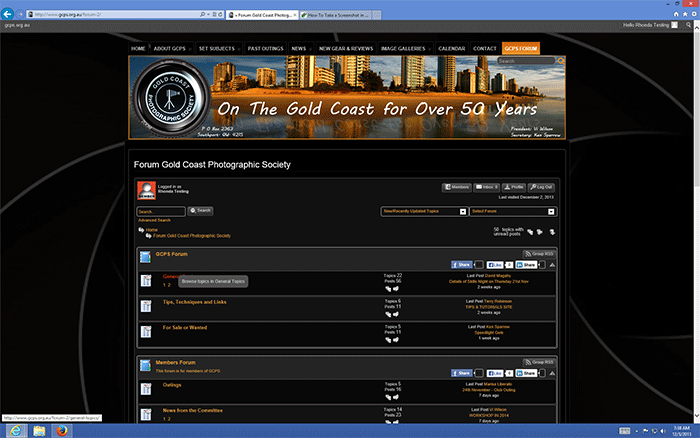
Forum links are not working for logged in users when IE10 and windows 8 used. Seems to be fine for guests not logged and fine in Firefox. Not sure it this is something new as I normally use Firefox but tested after complaint from user. Works fine if compatibility mode is turned off but things don’t render correctly then. Seems to work ok in IE10 and other operating systems like windows 7, xp. This is a link to my site www.gcps.org.au
Support Forum
I will have to wait for Steve or Brandon to pick up on this one as I am a Mac OSX user. But – I am curious about this statement that guest – or users not logged in to WordPress – do not have the problem. Links are links and are the same for all users. So which links are you referring to please? Page links? Breadcrumb links? Quick Links drop-down? First/last post links? Or general links that get posted in the forum content? Or all of them?
Seems to be all links. Here is a screenshot when hovering over link. When clicked nothing happens.
Since it only happens when someone is logged in we would need to try it that way.
If you would PM Mr Papa, Yellow Swordfish and myself credentials one of us could take a look. Please refer to this topic in your PM s we can refer to it.
I have sent PM with credentials to log in. Simple Press Support forum works fine in compatibility mode so doesn’t seem to be my computer settings.
Wanted to just say that you are not being ignored but as a Mac/OSX user i can’t really help with Windows/IE issues and the PC Windows guys should be around later on.
have you tried the workaround here: https://simple-press.com/support-forum/sp5-general-topics/cant-click-on-topics-in-ie10-after-recent-update/page-3/#p135495 ????