Support Forum

Member info in the topic view

YL Yao Li
Yao Li
Member

The user-role-function model is well supported by SP. I created some user groups and permission sets – bind them one by one separately.

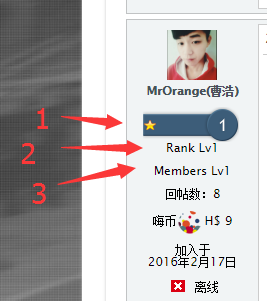
See snapshot below, #1 is the rank badge, #2 is the rank name, #3 is the group name – in fact the 3 items are the same. Only #1 is necessary for me….how to remove #2 and #3?
rank.png

5 Answers

New Answer

YS Yellow Swordfish
Yellow Swordfish
Member

What Simple:Press theme are you using and are you using a child theme so that you can make changes safe from losing them on a future update? 

YL Yao Li
Yao Li
Member

I’m using Reboot and it’s child theme for some modification.

I guess I shall edit the spTopicView.php in the Theme Editor. but I don’t know what to put in the php file…

Thank you.

YS Yellow Swordfish
Yellow Swordfish
Member

Well actually you will want to edit both the spTopicViewDesktop.php and the spTopicViewMobile.php files in their respective folders. Although come to think of it, it is possible that the mobile version already has the following change…

There are three template display tags one after the other in the ‘post’ section of the template. These are:

sp_PostIndexUserRank()
sp_PostIndexUserSpecialRank()
sp_PostIndexUserMemberships()

I would suggest you comment those out and replace them with a single tag:

sp_PostIndexUserBadges('tagClass=spCenter');

and see if that gives you what you want.