Support Forum

members list on multisite

LH Lee H
Lee H
Member

Whoa!

Like I said…  I’ve never seen the Members List error. But now I do. Something multisite related is doing a flip-flop.


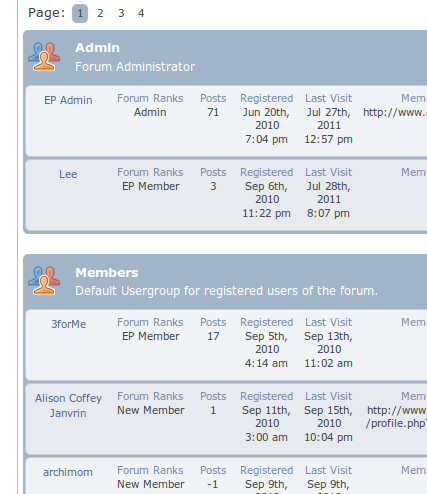
Should have only one Admin. User “Lee” is just a “Member”.

Edit: Screenshot taken as Admin <– SP, WP, SuperAdmin

Logging in as regular member, all seems correct. Although my moderators show as members. Not sure if it’s intentional or not.

20 Answers

New Answer

MP Mr Papa
Mr Papa
Member

have spun this off to its own topic since its not the issue that topic was dealing with…

not sure I follow – could you elaborate please… flip flop?

this i multisite?  and the forum and all users are users of the main blog – not a network site?  keep in mind users from a network site wont be users on the main site…

please expand on what we should be saying… as I said, zero multisite testing done…  just tried to fire up my multisite test site tonight and its crapped out on the wp end… argh…

LH Lee H
Lee H
Member

I’m sorry. I wasn’t aware I started a new topic?

All I know is Conrad and Andy could see a error in their Members List. I checked several times and could see no such error. You made an adjustment and asked me to confirm it was fixed. I let you know I couldn’t confirm as I’ve never been able to reproduce this error. Then for the heck of it I went to the members list later and saw that I could now see the error that was not there before. So I reported it.

I just assumed the adjustment you made fixed Conrads list and in turn made my list messed up (A flip flop).

Because you asked: Yes this is mulisite. But SP is only installed on blog one (main). All the users belong to the main site.  To be honest. With the exception of the multisite related check snafu SP has run awesome, and I’m pretty sure behaves like anyone elses.

I can run a new single WP install if you like, but I won’t have a database with users and posts to affectively test SP.

MP Mr Papa
Mr Papa
Member

no actually, its better having someone on multisite since it doesnt get the amount of attention from us it really needs due to just two of us…

sorry, if I misunderstood, but the original error reported was the wrong avatar showing – everyone getting the default avatar…  if I understand yours, its related to the rank?  but no worries…

LH Lee H
Lee H
Member

Ahhhh avatar. My mistake then. I was under the impression users that had no business appearing in the admin section were there.

For the record. This issue I’m speaking of now… the ranks are correct, but the sorting is not. I have a regular member showing up in the wrong section.  For what its worth, that member is actually me. But without privileges. Why SP singled that user out is a mystery. Maybe most recent activity?

And this behavior was introduced with whatever changes you made attempting to fix what Conrad and Andy were seeing.

MP Mr Papa
Mr Papa
Member

lol.  the only thing that has changed was the theme to pass the right user id…  nothing in core changed…

but now I understand your issue…  you are saying Lee should not be listed under admins?  so can you look in your db, sfmembers and make sure the admin column is 0 there? if so, what kind of sorting are you using for the members list?

LH Lee H
Lee H
Member

That is correct. Lee should be a ordinary member. And only EP-admin is the one and only admin. My confusion is because I thought according to Conrads screenshot on the other thread, he had a similar issue of user Br1an or something out of place and in the admin group as well.

I checked wp_sfmembers and the admin column exists and is all zeroes for every user except for the correct admin. His has 1 instead of 0.

As far as your sorting question I’m not sure how to answer, but I’ll try. I haven’t been using my custom theme lately (no time really), this occurs on the Default theme. So however it’s called (haven’t even looked at it), is how it’s called. Unless there’s a option in the backend for sorting, I haven’t messed with anything. I’m viewing the member list by clicking the Members button up near the Profile and Log Out buttons.

I hope that helps?


Edit: Forgot to mention I svn upped to 6791 before testing and posting this. It still behaves the same.

MP Mr Papa
Mr Papa
Member

yeah, nothing done for the grouping stuff yet…

and by sorting (really meant grouping), I meant did you alter the grouping of the members list… in 5.0, you can choose to group members… the default is by usergroup… or you can optionally just have a list of members…

this is done via the sp_has_member_groups() function call… if you change the groupby arg, you can alter that…

but sounds like you didnt do that…

so still need to work this… just cant duplicate right now…

MP Mr Papa
Mr Papa
Member

can you tell me if Lee belongs to any usergroup???  thinking I might see a path for this to occur…

MP Mr Papa
Mr Papa
Member

This looks like a bug we introduced way back in 4.4.0 Surprised

LH Lee H
Lee H
Member

Look at you go!

Lee is not a member of any groups other then Members (has slightly more than 2 posts). I only have one special user group “Private” for the mods and the Admin. Those in the Private group have access to the super secret, bitch about users section.

Sorry I didn’t notice the bug back in 4.4.0. I’ve never enabled the SP profiles or userlists before as I already had a solution coded. Although that will likely change since it will be easier to make seamless with the rest of the site now.

Just keep letting me know how to help. I’m willing to mod files on my end if pointed in the right direction.

Or… a bit later when my day gets more in control I can set up ftp and whatever else needed to get you in my dev server so you can see (and edit)  what you’re battling. Just let me know if that seems reasonable.

MP Mr Papa
Mr Papa
Member

Andy is working the query now… but if Lee is really part of the members usergroup, not sure its the same issue… was thinking the use case was member of no usergroups… but shall see…

LH Lee H
Lee H
Member

Yep, Members is the only usergroup Lee is in. I just checked every method I know and still only came up with the one group.

MP Mr Papa
Mr Papa
Member

a better answer would have been NO usergroups… Wink

which is what the fix in work is for…

LH Lee H
Lee H
Member

LOL I could of lied if that would make you happy!

I was browsing the database for clues and comparing the serialized data in wp_sfmembers, column memberships for “Lee” with other regular members (that don’t show in the Admin group) and couldn’t see any difference at all.

But here’s Lee’s memberships for the heck of it anyway:

a:1:{i:0;a:4:{s:12:"usergroup_id";s:1:"2";s:14:"usergroup_name";s:7:"Members";s:14:"usergroup_desc";s:52:"Default Usergroup for registered users of the forum.";s:14:"usergroup_join";s:1:"0";}}

HTH