Support Forum

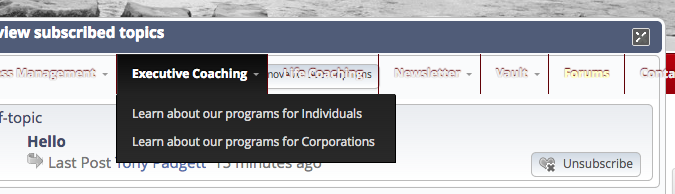
menu bar of site "bleeding through" SP popup

CB Charlie Badenhop
Charlie Badenhop
Member

Please take a look at the attached screen shot. Seems that the menu bar in the background is bleeding through the pop.

Note that I am using a plugin called Uber Menu to create menu effects.

Note that the X to close the popup also seems a bit corrupted.

http://69.195.124.111/~seishind/tokyo/forum

Thanks.

Screen-Shot-2013-08-09-at-5.01.40-PM.png

22 Answers

New Answer

YS Yellow Swordfish
Yellow Swordfish
Member

This looks like a custom SP theme. If so then WordPress updated and made quite few changes to the jQuery UI styling that we use for popups. You will probably nee to make some changes to your sp theme CSS I am afraid.

Please see this 5.3 codex article for the directions – this includes the dialog popup: http://codex.simple-press.com/codex/installation/changes/theme-and-templates-5-3-0/

CB Charlie Badenhop
Charlie Badenhop
Member

This is _not_ a custom theme. It is the Twenty-Twelve. I’d be really grateful for your detailed help on this. 

YS Yellow Swordfish
Yellow Swordfish
Member

I am referring to your Simple:Press forum theme which either IS custom. It certainly is not as delivered.

CB Charlie Badenhop
Charlie Badenhop
Member

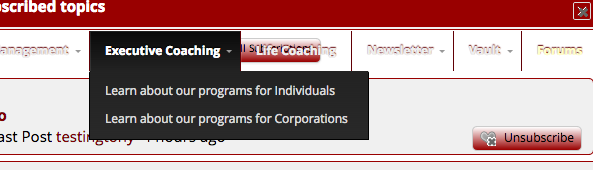
Okay, I’ll try this again. I’ve gone back to the SP theme that was supplied and it still happens. Take a look.


Screen-Shot-2013-08-09-at-9.11.33-PM.png
MP Mr Papa
Mr Papa
Member

where are you seeing this?  based on the link you provided in post #1, I am not seeing that… is it resolved?

if not, which browser? I was using FF…

YS Yellow Swordfish
Yellow Swordfish
Member

Charlie Badenhop said
Okay, I’ll try this again. I’ve gone back to the SP theme that was supplied and it still happens. Take a look.

OK – what version of Simple:Press and what version of the Simple:Press theme – the theme as supplied by us I mean?

CB Charlie Badenhop
Charlie Badenhop
Member

Mr Papa said
where are you seeing this?  based on the link you provided in post #1, I am not seeing that… is it resolved?

if not, which browser? I was using FF…

It happens whenever a SP popup is shown. For example, when I click the “subscribed” button and then move the popup over the menus of the site itself. You’ll see it bleeding through. You can even select some of the site menus so that it overlays on top of the popup. 

CB Charlie Badenhop
Charlie Badenhop
Member

Yellow Swordfish said

Charlie Badenhop said
Okay, I’ll try this again. I’ve gone back to the SP theme that was supplied and it still happens. Take a look.

OK – what version of Simple:Press and what version of the Simple:Press theme – the theme as supplied by us I mean?

I pretty sure I am using the latest version since I just downloaded it about 2 weeks ago or less, including the default theme. I tried finding the version number by clicking the “About Simple:Press” in the plugin admin area, but all it lists are the credits and copyright years, no version (perhaps something you all might want to think about adding in the future).

MP Mr Papa
Mr Papa
Member

guess I understood the popup part… but being a guest, the only popup I can use is the acknowledgements…and I cannot get it to happen on that one…

also, its why I asked about browser just to make sure not specific to one or the other…

MP Mr Papa
Mr Papa
Member

ah there we go…  its your mega menu thingy… its setting a high z-index value…

so you just need to up the dialog z-index in your sp theme…

.ui-dialog { }

change the z-index to like 200…

wow, just noticed something weird…  did you do something to make your forum display in different themes based on the page you are on?

I see default with cool blue overlay on the main forum page, but default with red overlay on others…

CB Charlie Badenhop
Charlie Badenhop
Member

Mr. Papa – I’ve sent you a PM with some login details so that you can see this in action. Thanks.


MP Mr Papa
Mr Papa
Member

But I already have you the answer..

But does tell me what the pm was for now ;)

CB Charlie Badenhop
Charlie Badenhop
Member

Mr Papa said
ah there we go…  its your mega menu thingy… its setting a high z-index value…

so you just need to up the dialog z-index in your sp theme…

.ui-dialog { }

change the z-index to like 200…

wow, just noticed something weird…  did you do something to make your forum display in different themes based on the page you are on?

I see default with cool blue overlay on the main forum page, but default with red overlay on others…

Okay, I will change the z-index but not sure which file this is in in the theme editor. Is it the the Style sheet?

Concerning the change in forum page, all I did was put that back to the default until you all could trouble shoot it. I have not change any code. I was going to ask you about this since I noticed it too. But, this can wait unless this happens with the theme I’m customizing. Thanks.