When I click on this button the popup window gets tucked behind my menu. Is there anyway to make it so that it stays over my menu or doesn’t go above it on the page?
I have attached a screen shot for you.
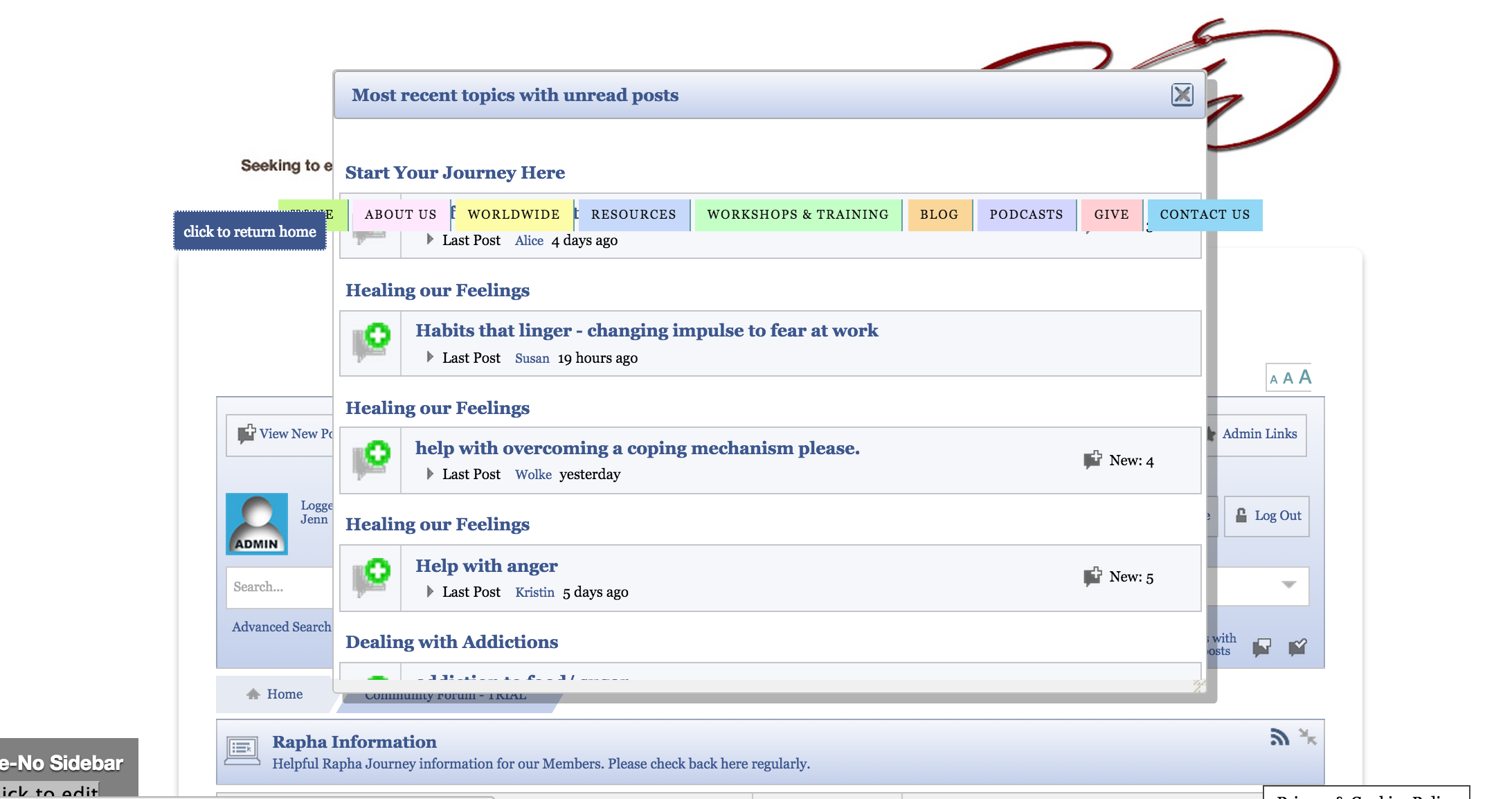


When I click on this button the popup window gets tucked behind my menu. Is there anyway to make it so that it stays over my menu or doesn’t go above it on the page?
I have attached a screen shot for you.

it’s usually a z-index issue with the theme, can read about it here
https://simple-press.com/support-forum/sp5-general-topics/testing-a-new-theme/


I think I may have a problem. I used the .menu css code to adjust my z-index on my menu and now my menu links are no longer working when this CSS code is applied. When I deleted this code they work fine again.
Any thoughts?
My WP theme support suggested adjusting the z-index code of the pop-up box, but I have tried that and it doesn’t seem to be working to adjust the layout of that box.
sorry, not really following… can you explain a bit more and perhaps a screenshot and link to example?
Here is the screen shot again:
Here is the screen shot of the problem. The recent topics pop up window sits behind my menu. I checked with both you and my theme (Thesis) support about how to fix it. Both said to adjust the z-index. I did that in the Custom CSS of my WP theme using the following code: .menu { z-index: -1}. This worked great, the pop-up window sat in front of the menu. The only problem is that my menu lost all it’s links so I wasn’t able to click on any menus.
So then I read your post about adjusting the z-index of the pop-up box. I used the code: .ui-dialog { z-index: 40; }, however that did nothing to adjust the placement of the box.
So now I am stumped.
Wondering if I should be making some adjustment within SimplePress or whether I can continue to add in this CSS code to Thesis Custom CSS? Or maybe the code I entered was wrong?
Does that help to clarify?
my site is: raphajourney.com/community-forum
but we (actually kvr28) gave you the css to fix it and it worked… but you alluded to something else breaking? I was querying as to the new issue…
or are you backtracking and saying the provided css did not correct the popup?? and the original issue exists? if so, we need a link to inspect the css… its still going to come down to a z index issue…
you would put the css in your sp theme… as always, we recommend a child theme or your own sp theme…
What I am saying is that the z-index adjustment that I used for my menu worked great, EXCEPT that the links stopped working.
I tried using your code to adjust the z-index of the pop up window and that didn’t work.
I provided the link in the previous post, but here it is again: raphajourney.com/community-forum.
At the moment you will see that my menu links are not working but the pop up box is properly place. As soon as I remove the z-index code then the popup box is not properly placed but I get the menu links back.

It seems to me the problem is with the .menu z-index being -1. z-index inherits as default, so chances are because the theme container doesn’t have anything to reference it uses 0, which would result in seeing the menu as the theme container probably doesn’t have a background colour, but not being able to click it as technically it’s behind the container it’s inside of… If that makes sense! 🙂
It really just needs to be less than the popup. If I change the menu’s z-index to 1 the links work fine and so does the ‘about’ popup in the footer.
I believe that does make sense. Before when I tried 1 the popup was still not displaying correctly, but I just tried it again and it is working.
Thank you!