MA

mann
Member

For some reason, the text in the post above disappeared(maybe the image overlapped with it)
Since yesterday google doesn’t show any search results for any forum topic on my website.
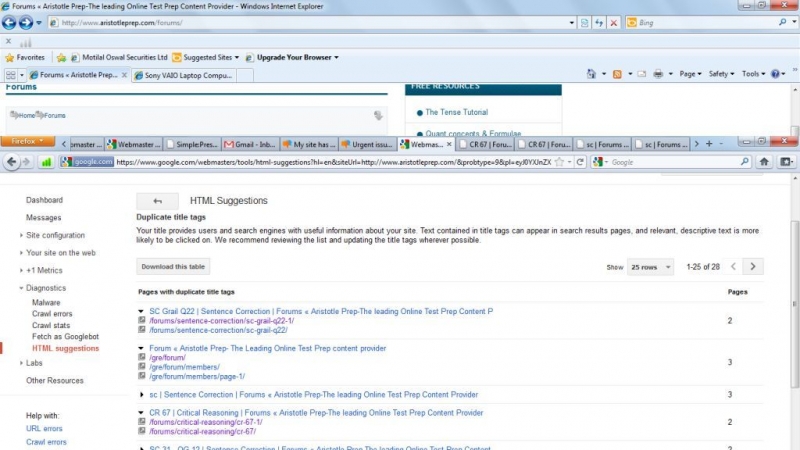
I saw that in the google webmasters tool, it shows that “Pages with duplicate title”. Can this be the reason my site has been penalized. For example, I don’t know how come two different URLs can be created for the same topic
http://www.aristotleprep.com/forums/critical-reasoning/cr-67-1/
http://www.aristotleprep.com/forums/critical-reasoning/cr-67/
How can the above thing happen and how do i rectify this ?
I’d really appreciate your insights because I’m puzzled and a bit nervous that why did this happen. If anyone searches on google for our website or products, he’ll not even see the links anywhere. On doing a google search for “gmat strategy help aristotleprep” also , there are simply no results.

The duplicate title tags shouldn’t affect your google search results. I have quite a few on some sites without issue.
The sitemap you are generating now does not include very many entries. http://www.aristotleprep.com/sitemap.xml
I would think about removing Better WordPress Google XML Sitemaps and installing the Google Sitemap Generator Plugin by Arne Brachhold. Install and configure it. Then download and install the Simple Press Google Sitemap Plugin. https://simple-press.com/download-plugins/ activate and configure (SP Admin -Components – SEO) I set mine to generate on every new post.
Go back to the Google site maps plugin settings and rebuild the sitemap manually. Submit that sitemap.xml file to Google Webmaster.
I don’t know whats causing those duplicate pages you mention. Maybe Andy or Steve have an idea.

Well I am no SEO expert – we need Steve for that one. But – your duplicate there is not a duplicate – one has a -1 on the end. This is topic with the same title as a previous topic. When we create the slug if the title has already been used then all we can really do is change it in the safest way possible. So one thing you could do is edit and change the slug of one of them.
Okay. Will first implement what Brandon has recommended(thanks a lot for the suggestions Brandon.You’re awesome!) . Will get back in a day and let you know whether I faced any difficulty.In the meantime, I hope that Steve pitches in and reflects on this issue.
I removed the Better WordPress Google XML Sitemaps plugin and installed the Google sitemap generator plugin for wordpress and its version for simple-press but seems like luck ain’t on my side as the plugins are not multi-site compatible. Is there any other plugin you would recommend ? There’s a tool http://www.xml-sitemaps.com/ but one needs to purchase it for generating sitemaps with more than 500 pages. Any alternative we have here ?
I don’t have any experience with multisite but according to the plugin page info.
http://wordpress.org/extend/plugins/google-sitemap-generator/
There is a beta download that says
This release is not compatible with the new multisite feature of WordPress 3.0 yet. The plugin will remain inactive as long as this feature is enabled. If you are using this feature, try out the new Beta version which fully supports multisite mode as well as network activation!
If that doesn’t work maybe do a little googling and see if anyone has figured out how to use Google XML Sitemaps on multisite.
The problem seem to have gotten resolved by itself. Seems like Google had run Panda 3.4 the last weekend and when Panda updates are run, sometimes a website may not figure in the google search results for a couple of days after which it automatically comes back

I have had some problems with getting my SEO tweaked for simple press.
I would suggest you do a search as follows site:www.yourdomain.com and see what is displayed for your simple press forum posts. I have found that without using a meta description for the main forum pages will cause a bunch of junk to be indexed.
Can’t upload a ss of my seo config because the webmaster is too stingy with disk space..  So below is a link to it on my server. http://www.fidosysop.org/misc/sp-seo.jpg
SP Guys.. I am happy to help support others on this forum with screen shots. But restricting the upload size to where an image has to be so small it is pretty much unreadable is counter productive. Not to mention what a PITA it is to upload the material to my server and link to it.
Another suggestion. Google is not too picky about duplicate internal links, but Bing seems to be very picky. And Bing is really coming on strong competing with Google.
Be sure you have visited Bing’s Webmaster Tools and downloaded the authorization file and uploaded it to your server and ran the validation routine. Here is the link: http://www.bing.com/toolbox/webmaster
What i have done is disabled WordPress comments and set up Facebook comments on blog posts, and have a link to the forum post right below the content that encourages comments by Facebook or in my forums as a guest without registering. Here is an example page: http://www.fidosysop.org/4451/04/space-shuttle-discovery-video-of-its-final-journey-04172012/
To be sure the bots understand that the forums are intended as blog comments, i made a forum called that name to auto create the linked topic page.
With Yahoo subbing out to Bing and AOL subbing to Google there are only 2 major US search crawlers to deal with, so getting everything right is an absolute must. 
FidoSysop said
SP Guys.. I am happy to help support others on this forum with screen shots. But restricting the upload size to where an image has to be so small it is pretty much unreadable is counter productive. Not to mention what a PITA it is to upload the material to my server and link to it.
Thanks for chipping in. I reckon we could up the upload size but were you actually referring to filesize or pixel width/problem-with-post-edit-buttoneight?
Yellow Swordfish said
FidoSysop said
SP Guys.. I am happy to help support others on this forum with screen shots. But restricting the upload size to where an image has to be so small it is pretty much unreadable is counter productive. Not to mention what a PITA it is to upload the material to my server and link to it.
Thanks for chipping in. I reckon we could up the upload size but were you actually referring to filesize or pixel width/problem-with-post-edit-buttoneight?
FidoSysop is talking about the filesize, an issue which I even wanted to highlight as it is quite frustrating to take a screenshot and then compress it only to realize that nothing is visible clearly. Then I have to resize it a couple of times to see what is below the permissible limit here AND is clearly visible.
Yellow Swordfish said
FidoSysop said
SP Guys.. I am happy to help support others on this forum with screen shots. But restricting the upload size to where an image has to be so small it is pretty much unreadable is counter productive. Not to mention what a PITA it is to upload the material to my server and link to it.
Thanks for chipping in. I reckon we could up the upload size but were you actually referring to filesize or pixel width/problem-with-post-edit-buttoneight?
See my linked screen shot as an example. It’s 640x581px and 150.2 kb. Not HUGE but big enough to be easily seen.
