Hi,
The link for the two drop down lists on top of my forum “New/Recently Updated Topics” and “Select Forum” are not working. Please see attached screenshot. Is this a setting?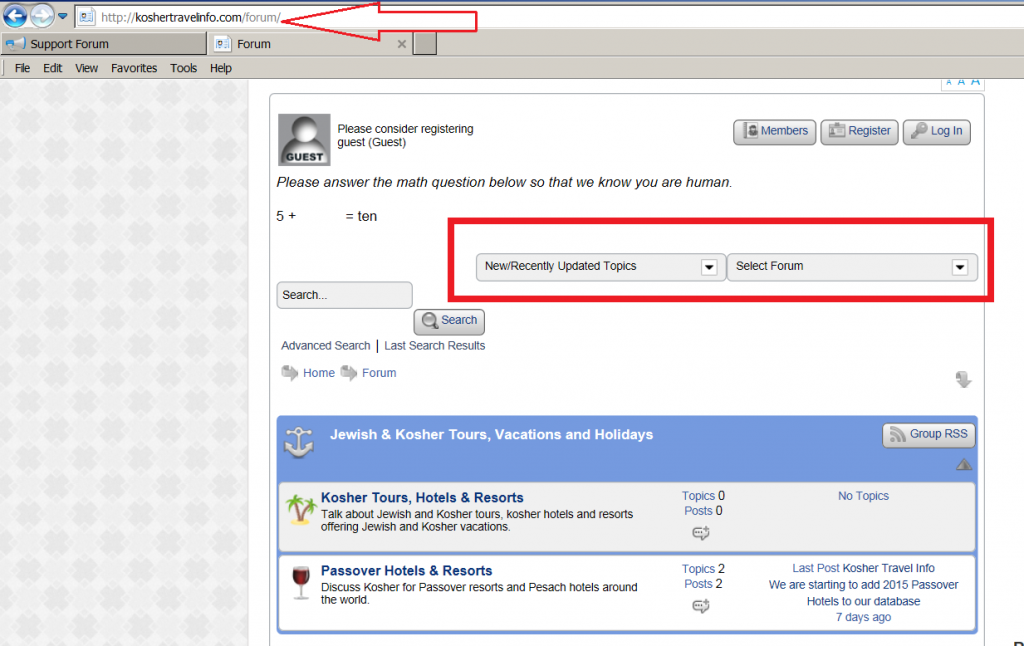


Hi,
The link for the two drop down lists on top of my forum “New/Recently Updated Topics” and “Select Forum” are not working. Please see attached screenshot. Is this a setting?


Hey,
It seems that you have the rule:
form, legend {
    position: relative;
}
which is throwing out the use of these drop downs.
Unfortunately this seems to be coming from your WP theme. Were they working before at all? has anything changed?
I think they never worked… I am not complaining on the position. It is not even a link.
Right OK,
Position doesn’t probably do what you are expecting! It doesn’t just control where elements are displayed. It’s actually the position of the entire block which houses the search form and the quicklinks that is being affected by the style imposed by your WordPress theme.
Our search forms don’t use a position rule, which means it defaults to static position, because your theme generically uses a position relative rule on its forms, our search form is inheriting this and applying it. Might sound a little complicated, but it’s not important to know, just thought I’d try and explain in case you were interested..
First thing to try, using ‘Default’ theme as an example:
Go to your theme folder and open:
sp-resources > forum-themes > default > styles > default.php
Add this line:
#spMainContainer .spHeadContainer form {
     position: static;
 }
It can go anywhere after the closing php tag (?>) at the start, and before the opening one (<?php) at the end..
Give that a try, and as always we suggest making this a custom or child theme to preserve changes.
I understand. Simple Press is inheriting the default rule for form from our theme. But I would never have figured this out myself! As always, thank you for the quick support going “beyond” normal support since this has to do with our site theme. Did the change and works! Added the following code:
/* Change form default inheriting position from relative to static
———————————-*/
#spMainContainer .spHeadContainer form {
position: static;
}
Excellent, the quicklinks shouldn’t be passed up on, they are useful! And no problem it’s what we’re here for!