Support Forum

Paragraph tags stripped from Page text above forum

BT Beth Terry
Beth Terry
Member

Hi.  I just upgraded from 4.4 to 5.0 manually.  I’m having a weird issue, but before I get into my problem, I want to say “Bravo!” The new version is terrific.  I love the layout so much better than previously.  


Okay, here’s my problem:  I used to have several paragraphs of instructions that were typed onto the Page and appeared above the forum itself.  After upgrading, the paragraph tags have been stripped so that the paragraphs run together in an unattractive way. 


Is there a setting I can change to allow html tags on that page?  Or a plugin for a message above the forum?  Or any workaround that doesn’t involve me creating a new theme and hardcoding the text into it?  I really don’t want to have to do that for this one simple issue.


Here is the page:  http://myplasticfreelife.com/forum/


Thanks,

Beth

25 Answers

New Answer

MP Mr Papa
Mr Papa
Member

Beth, welcome to the community!

Yes, I see what you mean.  I will need to go run some tests myself and see if it is indeed an issue..  but I will open a ticket so we dont forget about it…

will get back to you shortly…

MP Mr Papa
Mr Papa
Member

actually… we are using p tags now in our content… no issue…

can you post exactly what you have on your page?  please use the code button to highlight the html…

wondering if your wp theme is messing with the standard wp filters…  if you temp switch to the wp default theme (or twenty ten or twenty eleven), does it improve?

BT Beth Terry
Beth Terry
Member

Actually, I hadn’t put in p tags at first because I never have to.  WP recognizes hard returns as p tags.  So, when I had the previous version of SP installed, I didn’t type p tags manually but just hard returns.


After I upgraded to 5.0, I noticed that the paragraphs were no longer formatting properly, so I went in and added p tags manually.  And now, when I look at the html tab for that page, I can see that the p tags are gone.


I don’t think it’s WP because it was fine before the upgrade and only just changed after the upgrade.  When you look at the Visual editor for the page, you can see the text formatted as it should be.  But it isn’t on the page.  And this problem is not occuring on any other page.  I just checked by editing the Contact Me page and resaving.  The paragraphs remain just fine, even though I haven’t put in any paragraph marks.  Just hard returns.


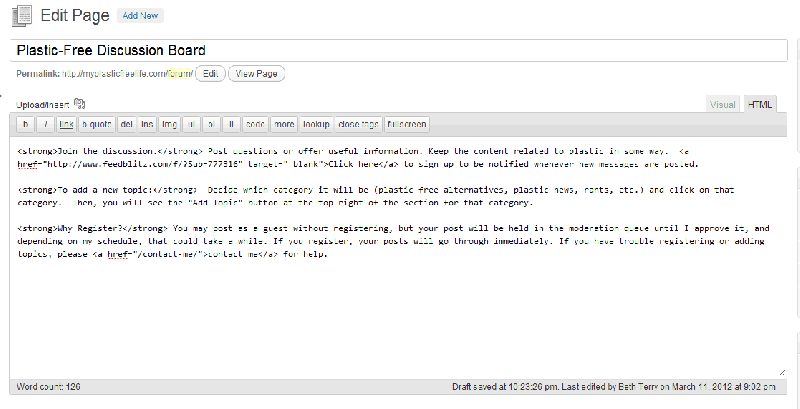
Attached is a screenshot of the html tab for the forum page.  No paragraph tags, although I did enter them and they were there when I published the page.


Thanks,

Beth


screenshot-for-SP-support.gif 

BT Beth Terry
Beth Terry
Member

Huh.  Is there some reason that the image that I just uploaded did not come through at full size?  Not sure you can read it.  I can’t.

MP Mr Papa
Mr Papa
Member

not full size image because we use thumbs in the post…clicking on the image opens it in a popup window full size…  just what we have set here…  its an option, but we use it…

so your image is of the html editor… and no p tags though I really see the proper returns…  did you add the p tags on visual or html tab?  they would need to be added on the html tab (or two returns)…  so if you explicitly add them, does it work?  hard returns are recognized as p tags on visual editor… you have to do two hard returns on the html editor…

my question on theme switch wasnt around wp, but the theme you use…  some themes choose to mess with a few of the standard wp filters such as wpautop…  just trying to rule out or rule in things…

I just tested a page with many paragraphs and the p tags come through fine… we dont filter, per se, the page content.. 

obviously, its a problem for you, so not denying that… just trying to track it down…  and solve…

BT Beth Terry
Beth Terry
Member

I’m smiling at your question about whether I added p tags in html or visual editor.  I’m an experienced user and have been blogging in WordPress for many years.  I added them to html editor.  🙂  


One thing — after I added the p tags in html editor and refreshed the forum page, it seemed to have worked.  There were paragraph breaks.  But after I clicked around in the forum and opened some posts, suddenly the paragraphs disappeared again.  That’s when the p tags were stripped out.  So not sure what I did by opening and closing a few posts, but that seems to have affected the html on the page.


My theme is very simple and basic and one I have used for years.  It’s pretty much just css with the WordPress code for the loop.  Nothing fancy.  I don’t believe it does anything special.  Could another plugin be interfering?

BT Beth Terry
Beth Terry
Member

Also, how can I copy and paste code into a message to show you without the editor “interpreting” the code?  I tried to use <pre> and

but neither of those worked.
MP Mr Papa
Mr Papa
Member

absolutely could be interfering…  we usually find wp themes messing with the wpautop (or other) standard wp filters… they tend to be catered for their needs but forget about others…

odd that it works then eventually reverts…  not sure how that happens…  no caching plugins, right? (I dont see any)…

a quick way to determine if another plugin or not would be to temp disable all and see how it looks…  does it stay?

also, might check in the db and see what the content really is…

as to your theme, understand…  might be worth quick check through functions.php if it has one and be sure its not removing wp filters…

sorry, wasnt trying to imply anything with the questions, just never know the level of experience with wp of our users…

MP Mr Papa
Mr Papa
Member

paste the code into to the editor window…  then highlight the code with your mouse… while still highlighted, go up to the editor toolbar and select the code button it looks like ${} and select the language, nominally html or php…

BT Beth Terry
Beth Terry
Member

What code would I look for to see if wp filters are being removed?  I could look for that code in theme AND plugins, no?


Also, could Javacript in a plugin interfere?  What would I look for in that case?


I would say my level is intermediate.  I’m great with html and css and less so with php and Javascript.  Mostly, I just copy and paste other people’s code.  🙂  

MP Mr Papa
Mr Papa
Member

did you see my post #10 about code?  only asking cause previous page now…

I see your ‘familiarization’ with the html editor…  two returns in posts for paragraphs, but with wysiwyg, thats two paragraphs…  kisswink

yes, js from a theme could interfere…  which is why I suggested two steps… 1)  temp switch to default wp theme and 2) disable other plugins…  fully understand potential issues of why you dont want to do that on live site…

so, as to messing with wp filters… you could look for a theme or plugin calling the remove_filter routine…

just got done watching your about video… nice!

BT Beth Terry
Beth Terry
Member

Yes, I saw your post about code.  Thanks so much.  I’ll use those instructions if I need to show you more code.


I will look for remove_filter routine in theme and plugins. And yes, you understand why I don’t want to change my theme on live site.  🙂  Could make things worse, when this problem is really minor in the scheme of things.  I just like things to be perfect and I don’t like when there’s a problem that I can’t figure out.  

MP Mr Papa
Mr Papa
Member

eh, we will get this figured out… in grand scheme of things, this one is easy! coolkisswinkeek

would be interesting to see exactly what is stored in the db for the post_content column of the posts table for this post…

Let us know what you find… about time for me to head off for night (eh, should have been hours ago) as my daytime job beckons in 5 short hours…

Andy, in UK, will be along in few hours to pick up any additional posts…

BT Beth Terry
Beth Terry
Member

Thanks for your help.  


Here is what is in my functions.php file.  Do you see anything that would interfere?


<?php #thumbnails support add_theme_support( ‘post-thumbnails’ );set_post_thumbnail_size( 100, 100 );

#Function to use post tags as meta keywords function csv_tags() { $posttags = get_the_tags(); foreach((array)$posttags as $tag) { $csv_tags .= $tag->name . ‘,’; } echo ‘<meta name="keywords" content="’.$csv_tags.’" />’; } #Function to create excerpts for pages instead of just posts add_action( ‘admin_menu’, ‘mf_add_page_excerpt_box’ ); function mf_add_page_excerpt_box() { add_meta_box( ‘mf_page_excerpt’, __( ‘Excerpt’ ), ‘postexcerpt’, ‘page’, ‘normal’, ‘high’ ); } function postexcerpt() { global $post; $message = __( ‘Excerpts are optional hand-crafted summaries of your content. You can <a href="http://codex.wordpress.org/Template_Tags/the_excerpt" target="_blank">use them in your template</a>’ ); print <<<EOF <div class="inside"> <textarea rows="1" cols="40" name="excerpt" tabindex="3" id="excerpt">{$post->post_excerpt}</textarea> <p>{$message}</p> </div> EOF; } function hide_wp_vers() { return ”; } add_filter(‘the_generator’,’hide_wp_vers’); if ( function_exists(‘register_sidebars’) ) register_sidebars(2); ?> <?php //Begin Theme Options Code $themename = "Revolution Code Blue"; $shortname = "cb"; $options = array ( array( "name" => "Color Scheme", "id" => $shortname."_color_scheme", "std" => "Default", "type" => "select", "options" => array("Blue","Gray","Red")) ); function mytheme_add_admin() { global $themename, $shortname, $options; if ( $_GET[‘page’] == basename(__FILE__) ) { if ( ‘save’ == $_REQUEST[‘action’] ) { foreach ($options as $value) { update_option( $value[‘id’], $_REQUEST[ $value[‘id’] ] ); } foreach ($options as $value) { if( isset( $_REQUEST[ $value[‘id’] ] ) ) { update_option( $value[‘id’], $_REQUEST[ $value[‘id’] ] ); } else { delete_option( $value[‘id’] ); } } header("Location: themes.php?page=functions.php&saved=true"); die; } else if( ‘reset’ == $_REQUEST[‘action’] ) { foreach ($options as $value) { delete_option( $value[‘id’] ); } header("Location: themes.php?page=functions.php&reset=true"); die; } } add_theme_page($themename." Options", "Select Theme Color", ‘edit_themes’, basename(__FILE__), ‘mytheme_admin’); }

function mytheme_admin() { global $themename, $shortname, $options; if ( $_REQUEST[‘saved’] ) echo ‘<div id="message" class="updated fade"><p><strong>’.$themename.’ settings saved.</strong></p></div>’; if ( $_REQUEST[‘reset’] ) echo ‘<div id="message" class="updated fade"><p><strong>’.$themename.’ settings reset.</strong></p></div>’; ?>

<div class="wrap"> <h2><?php echo $themename; ?> settings</problem-with-post-edit-button2> <p>Select the color scheme that you would like to use on your website:</p? <form method="post"> <table class="optiontable"> <?php foreach ($options as $value) { if ($value[‘type’] == "text") { //If we have configured this for text options … ?> <tr valign="top"> <th scope="row"><?php echo $value[‘name’]; ?>:</th> <td> <input name="<?php echo $value[‘id’]; ?>" id="<?php echo $value[‘id’]; ?>" type="<?php echo $value[‘type’]; ?>" value="<?php if ( get_settings( $value[‘id’] ) != "") { echo get_settings( $value[‘id’] ); } else { echo $value[‘std’]; } ?>" /> </td> </tr> <?php } elseif ($value[‘type’] == "select") { //If we have configured this for select box options … ?> <tr valign="top"> <th scope="row"><?php echo $value[‘name’]; ?>:</th> <td> <select name="<?php echo $value[‘id’]; ?>" id="<?php echo $value[‘id’]; ?>"> <?php foreach ($value[‘options’] as $option) { ?> <option<?php if ( get_settings( $value[‘id’] ) == $option) { echo ‘ selected="selected"’; } elseif ($option == $value[‘std’]) { echo ‘ selected="selected"’; } ?>><?php echo $option; ?></option> <?php } ?> </select> </td> </tr> <?php } } ?>


</table>


<p class="submit">

<input name="save" type="submit" value="Save changes" />

<input type="hidden" name="action" value="save" />

</p>

</form>

<form method="post">

<p class="submit">

<input name="reset" type="submit" value="Reset" />

<input type="hidden" name="action" value="reset" />

</p>

</form>


<?php

}

add_action(‘admin_menu’, ‘mytheme_add_admin’);

?>

And here is the content of db post_content:

<strong>Join the discussion.</strong> Post questions or offer useful information. Keep the content related to plastic in some way.  <a href="http://www.feedblitz.com/f/?Sub=777316" target="_blank">Click here</a> to sign up to be notified whenever new messages are posted.

<strong>To add a new topic:</strong>  Decide which category it will be (plastic-free alternatives, plastic news, rants, etc.) and click on that category.  Then, you will see the "Add Topic" button at the top right of the section for that category.

<strong>Why Register?</strong> You may post as a guest without registering, but your post will be held in the moderation queue until I approve it, and depending on my schedule, that could take a while. If you register, your posts will go through immediately. If you have trouble registering or adding topics, please <a href="/contact-me/">contact me</a> for help.