
Support Forum

Password change in Profile->Account Settings screen not working

20 Answers

New Answer

MP Mr Papa
Mr Papa
Member

I do not understand this…

Nor can I replicate the issue…  passwords change just fine in the profile…

and in order to work, it must be pass1 and pass2..  changing to password1 and password2 wont work – or at least should not work…  you found in your research that the names/ids of the fields are correct for the saving code (at least as set in core)…  and at this point, is not a change that can be globally made…

now, since wp_update_user() is called, its possible another plugin (or the wp theme) is hooking into that process and checking password updates…  before wp 4.3, they used to use pass1 and pass2 as well…  in 4.3 they changed to password1 but dont use a second password field…  

the fact for you that using password1 and password2 works, also makes me wonder if something is hooking into wp user updates…

do you have any plugins that deal with user registration, profiles, membership or other that might be able to affect passwords?

worth adding, we had changed some versions ago to pass1 and pass2 to match wp when we added in the wp password hardness meter and it required matching field ids/names…

RV Roberto Villabona
Roberto Villabona
Member

Driving me nuts too.  I have a couple of plugins that could affect how the passwords save, but they were all deactivated during those tests.  Theme My Login (6.4) and Woocommerce (2.4.7) were the only other plugins that did password changes but again, they were both deactivated.

Ok, here are some screen caps again that might help:

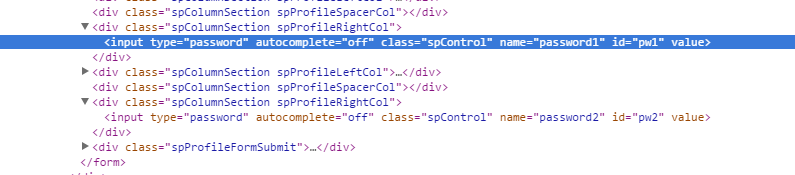
This first one is the browser (Chrome) “inspect element” of the account password change form loaded from the old (5.3.4) working, production version showing the HTML code related to the password entry form. 

sp-5_3_4_inspect_element.png

This next one is from the same form but on the 5.5.11 test version, with plugins active (Firefox) and using Genesis/Dynamic Website Builder Theme.

sp-5_5_11_inspect_element_plugins_active.png

This next one is from the same 5.5.11 test version with all plugins deactivated and using Twenty-Fifteen theme:

sp-5_5_11_inspect_element_plugins_not_active.png

I guess this shows that whatever’s going on, the form that gets shown is using “password1” and “password2” for the name attribute.  Ok, this leads me to believe that the form that’s being invoked on my test site is not the right form because this doesn’t tally with the source code of sp-form-account.php that I inspected.  Another telltale sign is that the password hint text below the form is not showing as there is that part in the source code.  It’s as if another version of the sp-form-account.php file is being executed, from where I can’t figure out.

Other than plugins (which have all been deactivated), what could be doing this?

My set-up is something like this (using imaginary domain name):

http://my-domain.com — my main wordpress site on my server’s public_html root (with WP Supercache)

http://my-domain.com/dev/2.2/ — /dev/2.2 folder under the main public_html root containing the test wordpress with a separate DB (no caching)

The reason I’m stating it is I’m wondering if there’s any conceivable way those two installs can affect each other.  I can’t imagine how.  Is there any way my dev/2.2 forum software could be pointing to other parts of my folder structure?  This is really frying my brain…

RV Roberto Villabona
Roberto Villabona
Member

In addition to this, I was wondering if you or anyone reading could recommend a debugging tool/plugin that could help me figure out what PHP files are getting loaded (and from where) while loading the page in question.  Thanks!

MP Mr Papa
Mr Papa
Member

try going to forum – toolbox – housekeeping and reset the profile forms…  if they are pointing somewhere else, that would fix reset them to default..

RV Roberto Villabona
Roberto Villabona
Member

Ok, that finally worked using Reset Profile Tabs!  

Understand you’re busy, but I would like to understand how that happened in the first place.  I am routinely transferring the whole production site to a development location and am suspecting that the procedure I use might be the root cause.

What I do is transfer a copy of the production site to a separate WP installation using the Duplicator plugin, which handles the replacement of references to the home URL so that the new copy is updated to reside in the new location. After duplication I upgrade WP to the latest version using the WP dashboard and upgrade all plugins, including SP and its plugins.

Is there something on SP Forum side that was probably not handled properly by this procedure?  Is it enough to just reset the profile tabs or is there anything else I should do to make sure the new copy of the site’s forum is working?

MP Mr Papa
Mr Papa
Member

paths to profile forms are stored in the database… any user can replace a form with their own…

so if you copied a forum from one domain to another domain (ie a test site), then your profile forms would be pointing to the original domain forms…  now to be clear, they are paths, not urls, so actually moving a domain would show an error, but in your case, since the main site and the test site are on same server, the paths would exist…

so anytime you move a simple press install, you will have to reset the profile tabs so they revert back…  not a lot of users replace the profile forms, but some do and the capability is there…

I think that is the only path like that…  of course, other hard coded urls, like on forum – components – login and registration would need to be updated…  additionally, you might want to ‘reset’ a few things on the housekeeping form for caches and what not…

