Support Forum

Perform Upgrade” keep running

PK Peder Karlsen
Peder Karlsen
Member

I did upgrade WordPress to 3.9 and did Upgrade Simple: Press From Version 5.4.1 to 5.4.2

(Build 11023 to Build 11296)


But when I do press “Preform Upgrade” it just stand there and run and run. In the WordPress update it did tell med to upgrade several time but that did stop after I did download and upload by ftp. 


Do you have any tips so I can get the forum back up and running and not just telling me, and the user to upgrade the forum?

7 Answers

New Answer

YS Yellow Swordfish
Yellow Swordfish
Member

When this happens it really does come down to either a JavaScript conflict/error stopping the AJAX processing – or – just sometimes it can be something hijacking the http request and sending extra parameters which then upsets the return value so SP doesn’t recognise the return codes. We have seen this with a security plugin for example requesting some sort of authentication with each http request.

The former is the more likely however. If you know how to use the script console that now comes with all major browsers you can check for errors when you try and start the upgrade process.

If not then personally I would recommend putting the site into maintenance mode – switching first to the WordPress default theme and trying the upgrade with that. Is still no luck then deactivate plugins that may be running javascripts on the admin side of things. Try it again after each one. All being as it should be then eventually it will run past the script error and complete. and you will know what plugin is causing the problem.

PK Peder Karlsen
Peder Karlsen
Member

After a bit of testing I do believe the problem was Google Analytics for WordPress
 or Plugin Organizer. Everything is now function fine.

i would really like to get Plugin Organizer back because it makes my site much faster when I do only use the plugins I do need on a page.

YS Yellow Swordfish
Yellow Swordfish
Member

I would not have expected Plugin Organiser to be a problem. As far as I was aware there was no javascript involved with that. We have, however,  had past problems with the Google Analytics plugin as that does add scripts to pages.

I would reactivate the organiser to be honest and I bet things work just fine. It is a most useful plugin and I believe we have quite af ew users who make use of it.

PK Peder Karlsen
Peder Karlsen
Member

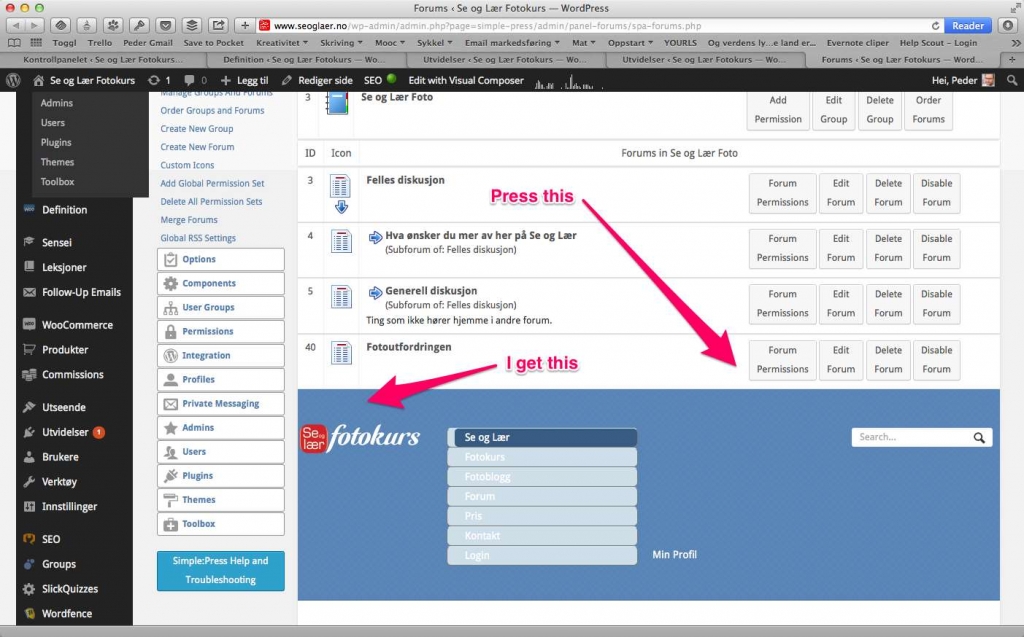
When I do activate Plugin Organizer I do get some part off the forum that don’t work. I do use the Default 1.2.6 Theme. When I do turn Plugin Organizer of everything is working fine. See ilustration

And we do also have some trouble posting when Plugin Organizer is active.

Any tips?

Peder

4_25_14_10_05_AM.jpg
YS Yellow Swordfish
Yellow Swordfish
Member

Wow!. What exactly IS that being shown. Could it be some sort of URL clash?

PK Peder Karlsen
Peder Karlsen
Member

I did find the problem! It was that I had used the Global Plugins feature, so when I did turn no Simple-Press there everything is function fine.

Have a nice weekend!

Peder